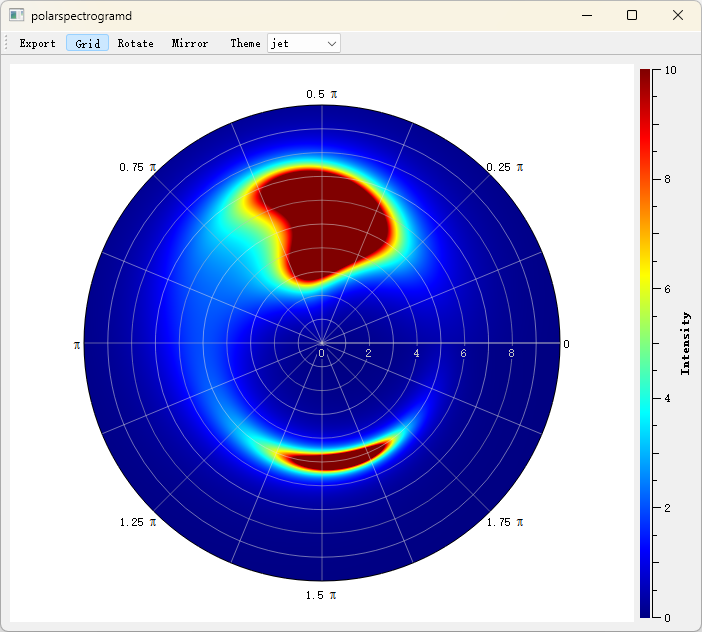
Polar Plot - QwtPolarPlot
QwtPolarPlot is a widget for drawing polar coordinate graphics. Unlike the traditional Cartesian coordinate system QwtPlot, it uses angle and radius as its two axes, making it suitable for displaying circular data such as radar charts, directional distributions, and astronomical data.
Main Features
- Angle (0-360°) and radius axes
- Curves drawn in polar coordinates
- Grid of concentric radius circles and angular rays
- Zooming and panning in polar coordinates
Basic Concepts
Polar Coordinate Structure
The sketch below shows the polar canvas: every data point is placed by an azimuth angle and a radius, concentric circles mark the radius scale, and rays from the pole mark the angle scale:
1 2 3 4 5 6 7 8 9 10 11 12 13 14 15 16 17 | |
Polar Item Types
| Class Name | Description |
|---|---|
QwtPolarPlot |
Main polar plot widget |
QwtPolarCurve |
Polar curve |
QwtPolarGrid |
Polar grid |
QwtPolarMarker |
Polar marker |
Usage
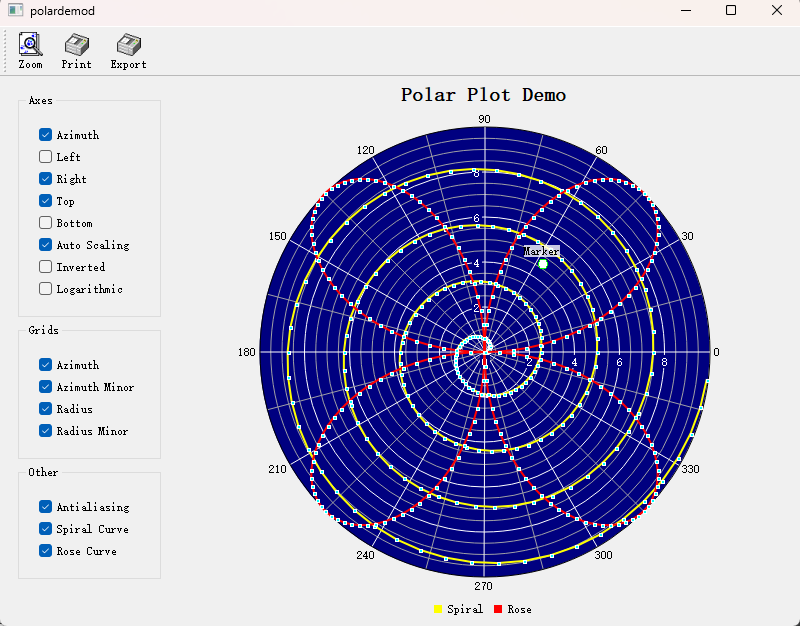
The polar plot example is located at: examples/2D/polardemo. Screenshot:
1. Creating a Polar Plot
A polar plot is built from three parts: the QwtPolarPlot widget itself (azimuth and radius scales set via setScale()), a QwtPolarGrid item for the background, and one or more QwtPolarCurve items. Curves consume QwtPointPolar samples wrapped in a QwtSeriesData<QwtPointPolar> object passed to setData(). For a plain QVector of samples, a minimal QwtArraySeriesData subclass is enough. The example below assembles them into a complete chart:
1 2 3 4 5 6 7 8 9 10 11 12 13 14 15 16 17 18 19 20 21 22 23 24 25 26 27 28 29 30 31 32 33 34 35 36 37 38 39 40 41 42 43 44 45 46 47 48 49 50 51 52 53 54 55 | |
2. Polar Grid Configuration
QwtPolarGrid draws both families of grid lines: showGrid() toggles the azimuth rays and radius circles by scale id (QwtPolar::Azimuth / QwtPolar::Radius), while showAxis() switches the tick labels on or off for each of the QwtPolar::AxisAzimuth, AxisLeft, AxisRight, AxisTop, and AxisBottom axes:
1 2 3 4 5 6 7 8 9 10 11 12 13 14 15 16 17 | |
3. Polar Curve Style
QwtPolarCurve::setStyle() chooses between Lines (points connected by straight segments, optionally smoothed by a curve fitter) and NoCurve (symbols only); values above UserCurve (100) are reserved for user-defined styles. Pen and QwtSymbol are set exactly as on Cartesian curves:
1 2 3 4 5 6 7 8 9 10 11 12 13 14 15 16 | |
4. Angle Range Settings
The azimuth axis takes the usual setScale() / setScaleMaxMajor() calls: limit the range to a sector (e.g. 0–180°), cap the number of major ticks, or swap the limits to reverse the angle direction:
1 2 3 4 5 6 7 8 | |
5. Radius Range Settings
The radius axis is adjusted the same way, with setScaleMaxMinor() additionally controlling the minor ticks between two majors; for data spanning several orders of magnitude, setScaleEngine() installs a logarithmic engine (QwtLogScaleEngine, the same core engine as for Cartesian axes) on the radius scale:
1 2 3 4 5 6 7 8 9 10 11 | |
6. Polar Markers
QwtPolarMarker annotates a single position given as a QwtPointPolar: setSymbol() draws an icon there, while setLabel() plus setLabelAlignment() attach a QwtText caption with the chosen alignment:
1 2 3 4 5 6 7 8 9 10 11 12 13 14 15 16 17 18 19 20 | |
Polar Axis Identifiers
| Identifier | Enum Value | Description |
|---|---|---|
| Angle axis | QwtPolar::Azimuth |
Angle coordinate (0-360°) |
| Radius axis | QwtPolar::Radius |
Radius coordinate |
Data Point Structure
All polar items consume QwtPointPolar samples, which simply pair an azimuth (in degrees) with a radius, accessible through azimuth() / radius(); the constructor taking a QPointF converts Cartesian coordinates automatically, and toPoint() converts back:
1 2 3 4 5 6 7 8 9 | |
Core Method Summary
QwtPolarPlot
| Method | Description |
|---|---|
setScale() |
Set axis range |
setScaleMaxMajor() |
Set number of major ticks |
setScaleMaxMinor() |
Set number of minor ticks |
setScaleEngine() |
Set scale engine |
replot() |
Refresh plot |
QwtPolarCurve
| Method | Description |
|---|---|
setData() |
Set data (takes ownership of a QwtSeriesData<QwtPointPolar> object) |
setStyle() |
Set curve style |
setPen() |
Set line style |
setSymbol() |
Set data point symbol |
Tip — Polar Plot Application Scenarios
- Radar displays
- Astronomical data (star charts)
- Directional distribution statistics
- Antenna radiation patterns
Example — Related Examples
- Polar demo:
examples/2D/polardemo- Polar spectrogram:
examples/2D/polarspectrogram
Screenshot of the polar spectrogram: