3D Plot Architecture: From QwtPlot3D to Plot + Item
Qwt's 3D module began as the standalone QwtPlot3D library from the Qt 3/4 era, was merged into Qwt 7.1, and was replaced in the 7.3 series by a Plot + Item architecture. The 3D Plot Introduction covers the API; the reasons for the current structure are below. The 3D Module Refactor Notes hold the commit sequence and developer conventions.
Info — Reading advice
If you only want to plot, start with the 3D Plot Introduction. Adding a new 3D graph type does not require touching the window class; section 5.2 explains why.
1. Two generations of the 3D module
The 3D capability in Qwt has two generations. The first was the standalone QwtPlot3D library from the Qt 3/4 era, merged into Qwt 7.1. The second is the structural refactor started in the Qwt 7.3 series, which kept the math and interaction and replaced the architecture and rendering.
flowchart LR
    A["Standalone QwtPlot3D<br/>(Qt 3/4 era)"] --> B["Merged in Qwt 7.1<br/>as the 3D submodule"]
    B --> C["7.1 ~ 7.3.2<br/>C++11 modernization / themes<br/>architecture unchanged"]
    C --> D["From 7.3.3<br/>Qwt3DPlotItem introduced<br/>rendering pipeline rewritten"]
    D --> E["7.3.5<br/>Qwt3DBar / Qwt3DLine added<br/>extension point validated"]
    E --> F["Today: Plot + Item<br/>VBO/VAO + GLSL 3.3 Core"]
The refactor was not a translation of old code into new syntax; it changed a set of structural decisions. The old module welded a plot window and a plot object into a single class. The new module splits them into two classes and allows exactly one dependency direction between them. The following sections first describe why the old structure could not work.
2. Defects of the legacy architecture
2.1 Every graph type was a window
The legacy module used a widget-centered class hierarchy: Qwt3D::Plot3D inherited QOpenGLWidget directly, and Qwt3D::SurfacePlot inherited Plot3D. A surface was the window itself, not something drawn inside one.
classDiagram
    class QOpenGLWidget {
        <<Qt>>
    }
    class Plot3D {
        <<old>>
        +owns data + styles + interaction + IO
        +setPlotStyle()
        +setDataColor()
        +assignMouse(9 params)
        +assignKeyboard(18 params)
    }
    class SurfacePlot {
        <<old>>
        +loadFromData()
        +createData()*
        +calculateHull()*
    }
    class GraphPlot {
        <<stub never implemented>>
    }
    class MultiPlot {
        <<stub never implemented>>
    }
    class VolumePlot {
        <<stub never implemented>>
    }
    QOpenGLWidget <|-- Plot3D
    Plot3D <|-- SurfacePlot
    Plot3D <|-- GraphPlot
    Plot3D <|-- MultiPlot
    Plot3D <|-- VolumePlot
The model had one fatal limitation: one window held exactly one dataset. Drawing a surface plus bars, or overlaying two curves on the same coordinate box, was impossible unless the data was forced into SurfacePlot's single storage. The GraphPlot / MultiPlot / VolumePlot classes were nominally extension points for multiple graph types, but in practice they were empty shells (a constructor plus one pure virtual) and were deleted as dead code during the refactor.
2.2 A "god widget"
Plot3D exposed 70+ public members mixing four unrelated responsibilities: view transformation (rotate/shift/scale), data and styles (setPlotStyle / setDataColor / setMeshColor / setIsolines / setPolygonOffset / setShading / addEnrichment), lighting and materials (setMaterialComponent / setLightComponent), plus interaction and export (assignMouse / assignKeyboard / savePixmap / saveVector).
Worse, its private data stored the plot data itself (Data* m_actualData) and the GPU cache (std::vector<GLuint> m_displayLists). Window and data were coupled at the storage level, so adding a graph type meant modifying the central widget. The 2D module had long separated QwtPlot (the canvas) from QwtPlotItem (the drawable object).
The data and style members that lived on the window were moved out wholesale. The interface difference is verifiable: these methods no longer exist on the window class and now live on their items:
Removed from the window (old Plot3D) |
Now owned by |
|---|---|
setPlotStyle / setShading / setIsolines / setMeshColor / setMeshLineWidth / setSmoothMesh / setPolygonOffset |
Qwt3DSurface (per-item render style) |
setDataColor / dataColor |
each item's color functor |
addEnrichment / degrade / userStyle |
Qwt3DSurface |
updateData / hasData / hull |
Qwt3DPlotItem::itemChanged() and Qwt3DPlot::hull() (union over all items) |
setCoordinateStyle |
direct Qwt3DCoordinateSystem API |
The window keeps only what a window should own: the GL context, view transformation, lighting, coordinate system, theme, export, plus the newly added item management (attach / detach / itemList) and shared-resource accessors (lineShader() / polygonShader() / textShader() / modelViewMatrix() / worldToScreen()).
2.3 Fixed-function OpenGL: a deprecated rendering path
The old render path used OpenGL 1.x features throughout:
- Immediate mode: per-vertex
glBegin/glEndsubmission (qwt3d_axis.cpp,qwt3d_coordsys.cpp,qwt3d_colorlegend.cpp, …); - Display lists:
glGenLists/glNewList/glCallListto cache geometry in the driver (m_displayListsinqwt3d_plot.cpp); - Matrix stack:
glRotatef/glTranslatef/glPushMatrixbouncing transforms between CPU and GPU; - Fixed-function lighting:
glLightfv/glMaterialfv/GL_COLOR_MATERIAL(qwt3d_lighting.cpp); - GLU quadrics:
gluQuadric*for cylinders/disks (qwt3d_enrichment_std.cpp),gluProjectfor projection (qwt3d_drawable.cpp); - Raster text:
glRasterPos3d+glDrawPixelspasting pixels onto the screen (qwt3d_label.cpp).
In modern OpenGL these APIs are either removed or deprecated: Core Profile (3.3+) has no glBegin, no display lists, no GLU and no fixed lighting. The module could not run under Core Profile, which meant it could not port to ANGLE / OpenGL ES (mobile, WebAssembly, and the stable ANGLE backend on Windows), while Qt 6's QOpenGLWidget keeps moving toward Core Profile. Immediate mode also submits vertices one at a time, a classic CPU→GPU bottleneck.
The replacement:
| Old | New | Where |
|---|---|---|
per-vertex glBegin/glEnd |
VBO + VAO + one glDrawElements |
per item (Qwt3DSurface::buildVBO()) |
| display lists | persistent VBO, rebuilt only when m_vboDirty, reused across frames |
qwt3d_surface.cpp |
| GL matrix stack | QMatrix4x4 computed on the CPU, passed as uniforms |
Qwt3DPlot::paintGL() |
glLightfv / glMaterialfv |
Blinn-Phong in the shader | src/plot3d/shaders/*.vert/.frag |
gluQuadric* |
CPU-generated geometry (e.g. the Tube swept cross-section) | qwt3d_line3d.cpp |
gluProject |
plain matrix math in Qwt3DRenderContext::worldToScreen() |
qwt3d_render_context.cpp |
glRasterPos3d + glDrawPixels |
QOpenGLTexture text textures |
qwt3d_label.cpp |
src/plot3d/shaders/ holds 10 GLSL 3.30 Core shaders (surface / polygon / line / point / text, one vertex + fragment pair each), covering every primitive type in the pipeline.
2.4 Inverted dependencies: low-level classes holding high-level pointers
The old design also inverted some dependencies. Color computation is a low-level utility and the window is high-level; the high level knowing the low level is normal, but the low level holding a pointer to the high level is a hazard. The old code contained three such reverse pointers:
- Color functors held the window:
Qwt3D::ColorMapColor(Plot3D* plot, ...)storedm_plot, and the constructor demanded a widget; - Data mappings held the plot widget:
Qwt3D::GridMapping::setPlotWidget(SurfacePlot*); - The drawable base held the widget for matrices and viewport.
The cost of reverse pointers is not hypothetical: the repository still carries the commit fix(qwtplot3d): recreate color functor to prevent dangling pointer, which fixed a crash rather than a style issue. Reverse pointers also blocked unit testing: exercising a color functor required constructing a QOpenGLWidget first.
The refactor corrected the direction and provided a general mechanism (sections 3.2 and 3.3): the layer above passes whatever the lower layer needs as a parameter, instead of the lower layer reaching for it through a back-pointer.
2.5 Naming inconsistency
All legacy types lived in namespace Qwt3D, including foundational types such as Triple, RGBA and ParallelEpiped, while the rest of the library uses global scope with a Qwt prefix (QwtPlot, QwtPlotCurve). Two naming schemes in one library, and a stray using namespace Qwt3D; polluted application code.
The refactor removed the namespace entirely and prefixed everything with Qwt3D (Qwt3DPlot, Qwt3DSurface, Qwt3DColorMapColor). This is a breaking change; the mapping table is in the 3D Module Refactor Notes.
2.6 Out of sync with the 2D architecture
The 2D mental model has been refined for more than a decade: QwtPlot is the canvas, QwtPlotItem is a drawable attached to it, attach() / detach() manage lifetime, itemChanged() requests a repaint, and style objects (QwtColorMap, QwtSymbol) are silent value objects whose owner triggers notification. The 3D module had none of this vocabulary, which meant:
- users had to switch between two unrelated API styles;
- pitfalls already solved in 2D (dirty flags, ownership, notification timing) had to be rediscovered in 3D;
- shared infrastructure of the
coremodule (colormap presets,QwtPoint3D,QwtSeriesData) could not be reused.
2.7 Summary of defects
| Defect | Direct consequence | Root cause |
|---|---|---|
| Graph type welded to window | one dataset per scene | widget-centered hierarchy |
| data + styles + interaction + IO in one class | adding a type requires editing the central class | responsibilities not separated by rate of change |
| fixed pipeline + display lists + GLU | unusable under Core Profile, slow, no ES/ANGLE | rendering bound to 1998 OpenGL |
| low-level → high-level pointers | dangling-pointer crashes, no unit tests | inverted dependencies |
namespace Qwt3D |
conflicts with library-wide naming | local legacy baggage |
detached from QwtPlot + QwtPlotItem |
doubled learning cost, non-transferable patterns | two generations of authors |
3. Refactoring principles
The refactor was not a one-shot rewrite; it progressed incrementally on the new3d branch under five fixed principles. The principles matter more than the code because they decide every trade-off that follows.
3.1 Principle 1: split by responsibility — a window only manages windows
The window class owns how you look at the scene; the item owns what is drawn. Qwt3DPlot handles the GL context, view transformation, lighting, coordinate system, theme and item list, which is scene-level state. Qwt3DPlotItem handles data, geometry, styles and GPU caches, which is object-level state.
The test is simple: if a property varies per dataset (mesh resolution, wireframe color, shading mode), it belongs to the item; if it applies to the whole picture (background color, light direction, camera angle, coordinate box range), it belongs to the window. This boundary makes "one window, many items" a natural outcome rather than a special case.
3.2 Principle 2: dependencies point downward only
The module is organized into six conceptual layers; a dependency may only target a lower (or same) layer, and any low → high pointer counts as a defect:
flowchart TD
    subgraph T5["Tier 5 — Window"]
        P["qwt3d_plot / lighting / mousekeyboard / movements"]
    end
    subgraph T4["Tier 4 — Items"]
        I["qwt3d_plotitem / surface / bar / line3d"]
    end
    subgraph T3["Tier 3 — Data source mappings"]
        M["qwt3d_gridmapping / function / parametricsurface"]
    end
    subgraph T2["Tier 2 — Drawables"]
        D["qwt3d_drawable / axis / label / colorlegend / coordsys<br/>qwt3d_render_context (the carrier that passes resources down)"]
    end
    subgraph T1["Tier 1 — Silent value objects"]
        C["qwt3d_color / colormap_color / enrichment / theme"]
    end
    subgraph T0["Tier 0 — Plain values and utilities"]
        V["qwt3d_types / scale / autoscaler / portability / helper"]
    end
    subgraph IO["Cross-cutting I/O"]
        X["qwt3d_io / io_reader / io_gl2ps"]
    end
    P --> I
    P --> D
    P --> C
    I --> C
    I --> V
    D --> V
    M --> V
    C --> V
    IO -.->|"function parameter only, never stored"| P
The single allowed "upward" pointer is Qwt3DPlotItem::plot(): an item genuinely needs the GL context and shaders its window provides, so this channel is deliberately preserved and written down in src/plot3d/AGENTS.md. Any other reverse reference is a bug.
Dependency direction decides what can be tested in isolation. Tier 0 types hold no pointer to any 3D class and can be numerically tested; Tier 1 value objects have no callbacks and can be constructed, copied and compared freely; Tier 2 drawables depend only on the context parameter they receive and can be verified without a window.
3.3 Principle 3: silent value objects, notifications owned by the layer above
The lower layer must not call the upper layer, so a state change does not travel upward. Setters on value objects (color functors, enrichments, themes) stay silent, and the owning item reports the change:
flowchart LR
    A["Caller mutates the functor<br/>setPreset / setInterval / setAlpha"] --> B["functor stays silent<br/>no callback to anyone"]
    A --> C["Caller then calls<br/>surface->invalidateColors()"]
    C --> D["m_vboDirty = true<br/>+ itemChanged()"]
    D --> E["Next frame: buildVBO()<br/>recomputes vertex colors"]
    D --> F["plot->itemChanged()<br/>recompute hull, refit axes, repaint"]
This mirrors the 2D contract exactly: after changing a QwtSymbol you call itemChanged(); after changing a QwtColorMap the QwtPlotSpectrogram decides how to refresh. Both halves of the library obey the same discipline, so users learn it once.
A related mechanism is push instead of query: the z-range needed for color normalization is not fetched by the functor through plot()->hull() (that would need a reverse pointer). Qwt3DSurface::pushColorRange() pushes the union hull's range into the functor through setActiveRange() before building the VBO.
Note — Why
invalidateColors()instead of automatic notificationAutomatic notification would force the value object to store a pointer to its owner — which is exactly the reverse-pointer problem all over again. An explicit call puts "who marks the dirty state" on the surface of the code; a reader can see the source of the invalidation immediately.
3.4 Principle 4: render on the Core Profile
The migration went beyond changing glBegin to VBO: it also redivided responsibility for GPU interaction:
- Window owns phase-level shared state:
paintGL()computes the modelView / projection matrices once, packages them into aQwt3DRenderContext, and exposes shared shader programs (all items of one window reuselineShader/polygonShader/textShader, instead of each compiling and linking its own); - Item owns its private geometry: VBO / VAO / EBO are created and destroyed inside the item, rebuilt when dirty, reused otherwise;
- Shaders are grouped by primitive type (polygon / line / point / text), live in
src/plot3d/shaders/, and are compiled into the binary via the Qt resource system.
GLSL 3.30 Core was chosen for portability: Core Profile is the greatest common divisor of desktop OpenGL, OpenGL ES 3.0 and ANGLE, so one shader path covers Windows / macOS / Linux and a future ES backend.
3.5 Principle 5: incremental refactor, every step buildable
A dozen commits in late July 2026, each solving exactly one structural problem while staying buildable:
flowchart LR
    A["Unify naming<br/>drop namespace Qwt3D<br/>add Qwt3D prefix"] --> B["Introduce the<br/>Qwt3DPlotItem base class"]
    B --> C["Rewrite the window<br/>Plot3D → Qwt3DPlot<br/>pure rendering window"]
    C --> D["Rewrite the surface<br/>SurfacePlot → Qwt3DSurface<br/>item + VBO/VAO"]
    D --> E["Function / parametric surface<br/>create() returns data"]
    E --> F["Coordinate system / axes / labels / legend<br/>ported to shaders"]
    F --> G["Theme and I/O<br/>adapted to the new architecture"]
    G --> H["Reverse-pointer cleanup<br/>RenderContext + value-object colors"]
    H --> I["Qwt3DBar / Qwt3DLine<br/>landed on the new extension point"]
Every step corresponds to a traceable commit, so the claims above can be checked. Nothing was thrown away; the refactor is a sequence of small correct decisions applied to the old code.
3.6 Trade-off: fix the architecture first, features later
The refactor deliberately deferred some features. Floor projection, normal display and enrichments (cross hairs, cones, arrows) keep their data interfaces, while their rendering is marked TODO. The old implementation depended entirely on glBegin/glEnd, which cannot run under Core Profile at all, and these are decorative primitives that should not block the migration of the main architecture. The entry points are in src/plot3d/qwt3d_surface.cpp: the doc comment of addEnrichment() and the end of draw() both carry an explicit TODO ("Enrichment rendering with VBO will be implemented in a future plan"). The functions keep accepting data and maintaining lists; they just do not produce pixels yet.
The reasoning: an architectural mistake makes every subsequent change more expensive, which was the legacy module's state for years, whereas a missing feature is local and can be filled in incrementally. History supported the judgment: once the architecture was straightened out, the bar and line items joined within a week without friction.
4. The refactored architecture
4.1 The full picture
The class diagram below lays the whole refactored architecture out on one canvas: Qwt3DPlot manages a z-ordered list of Qwt3DPlotItem objects (the concrete items are Qwt3DSurface, Qwt3DBar and Qwt3DLine), while Qwt3DFunction feeds data into surfaces, Qwt3DColor functors decide colors, and Qwt3DCoordinateSystem plus Qwt3DTheme take care of the coordinate box and the appearance:
classDiagram
    class Qwt3DPlot {
        +attach(item)
        +detach(item)
        +itemList()
        +hull() union
        +applyTheme(theme)
        +lineShader() / polygonShader() / textShader()
        +worldToScreen() / screenToWorld()
        -paintGL() iterates items by z
    }
    class Qwt3DPlotItem {
        <<abstract>>
        +attach(plot)
        +draw()*
        +hull()*
        +setZ(z)
        +itemChanged()
        +populateLegendColors()
    }
    class Qwt3DSurface {
        +loadFromData(grid/cell)
        +setPlotStyle(FILLED...)
        +setDataColor(functor)
        +setShading / setIsolines / setMeshColor
        +invalidateColors()
        -VBO / VAO / EBO / shader
    }
    class Qwt3DBar {
        +setSamples(1D/2D)
        +setBarStyle(Filled...)
        -per-bar cuboid geometry
    }
    class Qwt3DLine {
        +setSamples(QwtPoint3D)
        +setLineStyle(Lines/Tube/Dots)
        -Tube parallel-transport frame
    }
    class Qwt3DFunction {
        +operator()(x, y)*
        +create() returns Qwt3DFunctionData
    }
    class Qwt3DColor {
        <<value object>>
        +setActiveRange(zMin, zMax)
        +operator()(x, y, z)
    }
    class Qwt3DCoordinateSystem {
        +12 axes via AXIS enum
        +ticks / grid / labels
        +draw(ctx)
    }
    class Qwt3DTheme {
        +10 presets
        +apply(plot)
        +applyToItem(item)
    }
    Qwt3DPlot o-- Qwt3DPlotItem : manages (z order)
    Qwt3DPlotItem <|-- Qwt3DSurface
    Qwt3DPlotItem <|-- Qwt3DBar
    Qwt3DPlotItem <|-- Qwt3DLine
    Qwt3DSurface --> Qwt3DColor : owns
    Qwt3DFunction ..> Qwt3DSurface : produces data
    Qwt3DPlot --> Qwt3DCoordinateSystem
    Qwt3DPlot --> Qwt3DTheme
Responsibilities at a glance:
| Class | Role | Key responsibilities |
|---|---|---|
Qwt3DPlot |
rendering window (QOpenGLWidget) |
GL context, view/projection matrices, lighting, coordinate system, theme, item list, export |
Qwt3DPlotItem |
abstract item base | attach/draw/hull/z/itemChanged/legend colors |
Qwt3DSurface |
surface item | grid/cell data, five render styles, color functor, dirty-flag-driven VBO |
Qwt3DBar / Qwt3DLine |
bar / line items | self-contained geometry and styles |
Qwt3DFunction / Qwt3DParametricSurface |
data source mapping | sample z=f(x,y) or r(u,v) into data structs |
Qwt3DCoordinateSystem |
coordinate box | 12 axes (X1–Z4), ticks, grid, labels |
Qwt3DColor (incl. Qwt3DColorMapColor) |
color functor | silent value object, bridges core colormap presets |
Qwt3DTheme |
theme | unified description of widget-level and item-level properties |
4.2 How one frame is drawn
paintGL() shows what the window prepares and what the items prepare on each frame:
sequenceDiagram
    participant Qt as Qt (paint event)
    participant P as Qwt3DPlot
    participant C as Qwt3DRenderContext
    participant I as Qwt3DPlotItem (z order)
    participant CS as Qwt3DCoordinateSystem
    participant L as Legend / Title

    Qt->>P: paintGL()
    P->>P: clear (background + depth)
    P->>P: CPU builds modelView / projection (QMatrix4x4)
    P->>C: pack matrices + viewport + shared shaders
    loop each visible item (ascending z)
        P->>I: item->draw()
        I->>I: buildVBO() if dirty
        I->>I: bind own VAO + shader
        I->>I: glDrawElements(GL_TRIANGLES / GL_LINES)
    end
    P->>CS: draw(ctx) — coordinate box and ticks
    P->>P: switch to fixed modelView (no user rotation)
    P->>L: collect legend colors from items → draw(ctxFixed)
    L-->>Qt: legend and title stay screen-anchored
Two details of the draw path:
Qwt3DRenderContextis a value, not a pointer. It is constructed at each call site (matrices, viewport, shared shader pointers) and passed by const reference down the draw chain. This eliminated theQwt3DPlot*reverse pointer baked into the oldDrawable: everything a drawable needs arrives as a parameter, and the drawable does not know the window exists.- Legend and title use a fixed matrix. They are screen-anchored; if they rotated with the scene they would be wrong, so the window swaps in a baseline modelView that does not follow user interaction for the last drawing phase, keeping UI elements stable.
4.3 How data reaches the GPU
The flowchart below follows one data set on its whole journey to the GPU: from a user-defined Qwt3DFunction (or directly fed arrays) through loadFromData(), the itemChanged() notification and the hull recomputation, up to the deferred buildVBO() upload and the final glDrawElements submission in the next frame's draw():
flowchart TD
    F["User defines z = f(x,y)<br/>Qwt3DFunction::operator()"] --> G["create() samples the grid<br/>returns Qwt3DFunctionData (plain C++ data)"]
    A["or arrays fed directly<br/>double** / Triple** / cell nodes"] --> S
    G --> S["surface->loadFromData(data)"]
    S --> D["data stored inside the item<br/>m_vboDirty = true"]
    D --> E["itemChanged() → plot"]
    E --> H["plot recomputes hull (union of all items)<br/>→ coordinate box refits<br/>→ repaint requested"]
    D --> N["next frame: draw()<br/>buildVBO() uploads vertices/normals/indices once"]
    N --> Q["pushColorRange() pushes the z-range<br/>into the color functor"]
    Q --> R["glDrawElements submits"]
No step in this chain requires a lower layer to call back into a higher one: the data source returns data, the item requests a refresh, and the window aggregates hulls to decide the coordinate box. The hull handling matters here: Qwt3DPlot::hull() is the union of all item bounding boxes, and the coordinate system refits accordingly, so multi-item scenes need no manual range synchronization.
Warning — Attach first, load data second
The hull is recomputed only inside
itemChanged(), andQwt3DPlot::attach()itself does not recompute it. If you callloadFromData()beforeattach()and then never mutate another property, the item's notification has already fired while it was unattached (itemChanged()only notifies the plot whenplot()is non-null), so the window's hull stays degenerate, the coordinate box never forms, and the plot renders completely blank with no warning. The correct order isitem->attach(plot)first, thenloadFromData()and the various setters.
4.4 Colors and themes: plugging into the core ecosystem
The 3D module adapts the core module instead of duplicating its color system:
Qwt3DColorMapColorbridgesQwtColorMapand core's 22 scientific colormap presets (viridis,plasma,jet,coolwarm, …), so 2D spectrograms and 3D surfaces share one preset table;Qwt3DTheme's 10 presets package background, axes, title, grid and lighting presets (NoLighting/FlatLight/Studio/Outdoor/Soft) into a value type applied with a singleplot->applyTheme(...);- Applying a theme splits in two: widget-level properties (background, axis colors, lighting) go to
Qwt3DPlot, item-level properties (wireframe color, shading mode, plot style, data colormap) go to each attached item throughapplyToItem(). This follows from the Plot/Item split: a theme describes properties rather than rendering itself, and the two receivers apply them.
flowchart LR
    T["Qwt3DTheme<br/>(value type)"] -->|"apply(plot)"| P["Qwt3DPlot<br/>background / axis colors / title / lighting preset"]
    T -->|"applyToItem(item)"| I["Qwt3DSurface / Bar / Line<br/>wireframe color / shading / plotStyle / data colormap"]
    C["core: QwtColorMapPreset<br/>22 presets"] --> CC["Qwt3DColorMapColor<br/>(3D adapter)"]
    CC --> I
4.5 Relation to 2D and to core
The module dependency is a single edge: plot3d → core, with no dependency on plot (2D). The 3D module is a standalone library yet shares infrastructure with 2D through core: Qwt3DLine::setSamples() accepts QVector<QwtPoint3D> / QwtSeriesData<QwtPoint3D> (core types, and the data language of the 2D QwtPlotCurve). The two modules speak the same data contract.
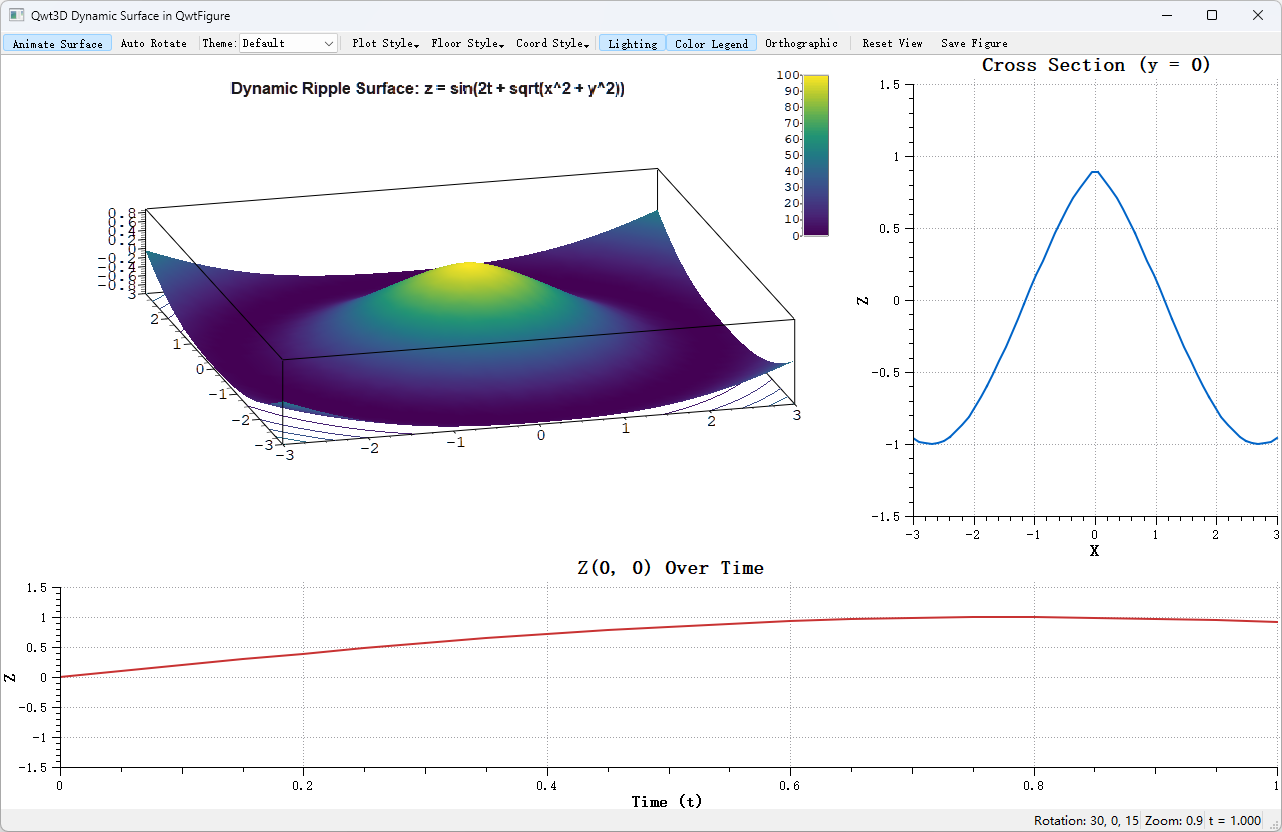
At the presentation level they can share a frame: examples/3D/figureSurface3D places a 3D surface window and 2D cross-section/time-series curves in one QwtFigure grid; moving the 3D scene resamples the 2D curves. Under the old architecture this required crossing two completely different event models; now each just attach()es to its own canvas.
5. Benefits and state of the art
5.1 Point-by-point comparison
| Legacy defect | After the refactor | Who benefits |
|---|---|---|
| one dataset per window | arbitrary items per window, z-order controls overlay | users comparing multiple layers |
| adding a type edits the central class | new items are self-contained, Qwt3DPlot untouched |
module maintainers |
| Core Profile unusable | VBO/VAO + GLSL 3.30, portable to ES/ANGLE | mobile / ANGLE / Wayland users |
| per-frame immediate submission | upload once, rebuild on dirty, reuse across frames | large meshes and animated scenes |
| reverse pointers → dangling pointers | layered dependencies + RenderContext passed down |
everyone (one fewer crash class) |
| value objects untestable | Tiers 0/1 testable without a window | teams with regression tests |
| split naming conventions | unified Qwt3D prefix |
newcomers |
| two mental models | symmetric with QwtPlot + QwtPlotItem |
users migrating from 2D |
5.2 The extension point is validated, not drawn on a slide
"Plot + Item is good architecture" cannot be asserted; it has to be measured by how much churn the second and third implementations caused. The repository answers this: Qwt3DBar (bars, per-bar cuboids with 6-face flat normals, 1D series or 2D grid) and Qwt3DLine (lines with Lines/Tube/Dots) were new files and new item subclasses, with Qwt3DPlot unchanged.
These items also demonstrate that the architectural constraints are actually honored:
- own VBO/VAO with lazy rebuild (
qwt3d_bar.cpp,qwt3d_line3d.cpp), never touching window GPU resources; - implement
hull()to participate in the coordinate box union; - implement
populateLegendColors()to plug into the unified legend; - follow the
invalidateColors()/itemChanged()notification contract.
One caveat, for accuracy: "zero changes" refers to the window class only. Qwt3DTheme::applyToItem() (qwt3d_theme.cpp) currently dispatches item-level properties by dynamic_cast per concrete item type, so a new item needs a branch there to receive the theme's wireframe color and data colormap. That is a small extension cost of type-based theme dispatch, nothing like modifying the window class.
The Tube style of Qwt3DLine sweeps a circular cross-section along the polyline with parallel-transport framing. Details that previously had to invade the window class are now private to the item. Full usage of both items is covered in 3D Bar Chart and 3D Line Plot.
5.3 Rendering state of the art
- Core Profile compatible: every primitive goes through a shader; not a single deprecated GL call remains;
- Shared shaders: reused at window level, so item creation/destruction triggers no compilation;
- dirty flags + persistent VBO: no copying while data is unchanged; animated scenes rebuild vertex buffers only on frames where data changed;
- CPU matrices: view transformation is plain
QMatrix4x4math, printable, serializable and unit-testable (worldToScreen()even computes without a GL context); - vector export retained:
gl2pscompiled unconditionally,saveVector()supports EPS / PS / PDF / SVG / PGF as a fallback channel outside the Core Profile pipeline; - serialization groundwork:
qwt3d_serialize.hprovidesQDataStreamoperators for value types such asTriple,RGBA,ParallelEpiped,Qwt3DFunctionData, soQwt3DIO::save()/load()can grow to whole-plot persistence.
The frame costs below come from timing paintGL() with glFinish on MSVC2019 + Qt 6.7.3, Release build, 1000×700 viewport. The values are absolute measurements on one machine; treat them as an order-of-magnitude guide rather than a cross-platform benchmark:
| Scenario | Time per frame |
|---|---|
| 30 × 512 grid surface | 3.3 ms |
| 300 × 512 grid surface | 6.0 ms |
| 1000 × 512 (≈510k vertices) | 7.6 ms |
| Tube style, 300 × 1024 | 12.3 ms |
For a typical workload of a few hundred traces × a few hundred samples at 30 fps, the "upload once, copy nothing per frame" VBO model leaves ample headroom; updating a single trace triggers a local vertex-buffer rebuild measured at close to 0 ms, so animation cost concentrates in the frames where data actually changes.
5.4 The compounding value of one ecosystem
2D and 3D now share the same color presets (core colormap presets), the same data types (QwtPoint3D / QwtSeriesData), the same notification contract (itemChanged() plus silent value objects), and the same CMake targets (qwt::core / qwt::plot / qwt::plot3d). Bugs fixed in 2D do not reappear in 3D, a colormap added in 2D is immediately usable in 3D, and the API habits users form in one half still hold in the other.
6. Known limitations and future work
The module still has the following limitations:
| Item | Status | Location |
|---|---|---|
| enrichment rendering (cross hairs / cones / arrows) | data interface present, rendering pending | addEnrichment() and the TODO at the end of draw() in qwt3d_surface.cpp |
floor projection (setFloorStyle) |
same — rendering pending | floor TODO in qwt3d_surface.cpp |
normal display (showNormals) |
same | same file |
| gl2ps vector export | relies on Compatibility Profile state; under Core Profile the transformation may be wrong (declared a known limitation in the source comment) | class comment in qwt3d_io_gl2ps.h |
| item bounding hull | axis-aligned box (ParallelEpiped), no post-rotation AABB |
Qwt3DPlotItem::hull() contract |
| automated tests for the 3D render path | none yet (tests/ currently covers only the 2D picker) |
tests/ |
Bug — If you depend on the items above
Check this table before upgrading. The legacy module could draw floor projections and enrichments (see archived screenshots in the repository); the new module has the data interfaces ready but the pixels have not caught up. This is a deliberate concession (see section 3.6), not an oversight.
7. Code and example index
7.1 Where to start reading
| To understand | Read |
|---|---|
| what the window does | paintGL() in src/plot3d/qwt3d_plot.cpp (about a hundred lines covering the whole frame) |
| the item contract | src/plot3d/qwt3d_plotitem.h (class comment includes a custom-item example) |
| a full real item implementation | buildVBO() and draw() in src/plot3d/qwt3d_surface.cpp |
| how context is passed down | src/plot3d/qwt3d_render_context.h |
| the dependency layering rules | src/plot3d/AGENTS.md (Tiers 0–5 plus the DO/DON'T list) |
| before/after of the refactor | docs/dev-guide/plot3d-refactor.md |
| shaders | src/plot3d/shaders/ (surface/polygon/line/point/text, one pair each) |
7.2 Examples
| Example | What to look at |
|---|---|
examples/3D/qwtplot3d |
comprehensive demo: theme switching, color legend, 5 data sources, animated surface, pixmap export |
examples/3D/bar3D |
Qwt3DBar: 1D series / 2D grid bars with a style dock |
examples/3D/line3D |
Qwt3DLine: Lines/Tube/Dots, point shapes, per-vertex coloring |
examples/3D/waterfall3D |
Qwt3DWaterfall: live 2D spectrum + 3D sliding-window waterfall, all styles/color modes, --screenshot/--selftest/--fps automation |
examples/3D/figureSurface3D |
a 3D surface window together with 2D cross-section/time-series curves in one QwtFigure |
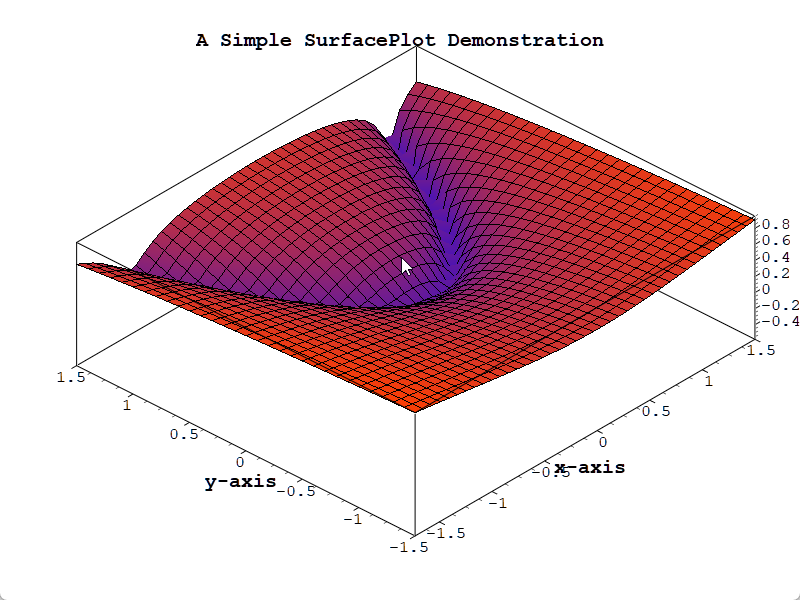
Rendering effects of the surface, color legend and coordinate box (screenshots archived in docs/assets/screenshots-3D/; run the examples above to check the current build):
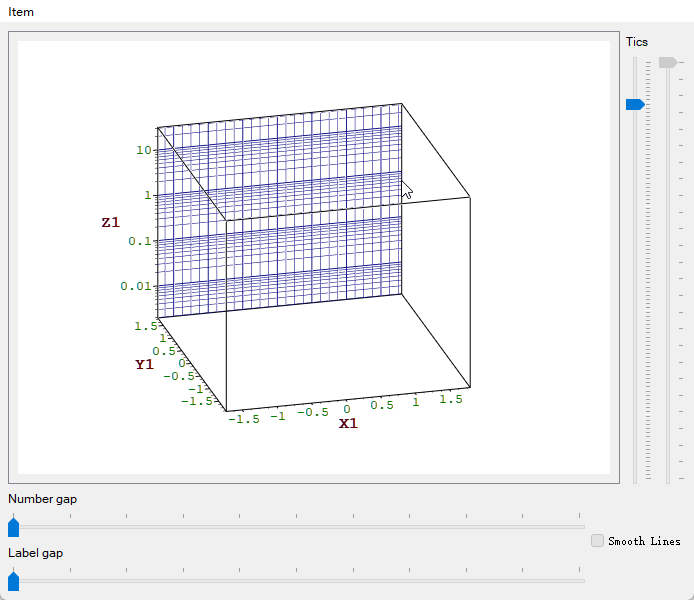
Axes, ticks and labels of the coordinate system (the 12-axis system is still rendered by Qwt3DCoordinateSystem):
A 3D surface window and 2D curves arranged in the same figure layout:
7.3 Further reading
- 3D Plot Introduction: API and usage
- 3D Bar Chart / 3D Line Plot: the two newer item types
- 3D Module Refactor Notes: commit sequence, migration table, developer conventions
src/plot3d/AGENTS.md: module-level layering rules (with DO/DON'T counterexamples)- repository root
AGENTS.md: repository-wide build and coding conventions