Legend Widget - QwtLegend
QwtLegend is the display widget for plot legends, used to show titles and icons of each plot item. Through the legend, users can identify the meaning of different curves or data series.
Main Features
- Automatic legend item generation: legend entries are generated from the plot items
- Interactive legend: clicking an entry can hide or show the corresponding plot item (opt-in via
setDefaultItemMode()) - Layout: supports multiple legend layout modes
- Style customization: icon and text styles of legend items can be customized
Basic Concepts
Legend Position
QwtPlot supports four legend positions:
| Position | Enum Value | Description |
|---|---|---|
| Left | LeftLegend |
Left of YLeft axis |
| Right | RightLegend |
Right of YRight axis |
| Bottom | BottomLegend |
Bottom of plot |
| Top | TopLegend |
Top of plot |
Legend Item Composition
Each legend item pairs a small icon with the plot item's title, and the icon is rendered from that item's line, symbol or brush style. The sketch below shows the composition of a typical legend:
1 2 3 4 5 6 | |
Usage
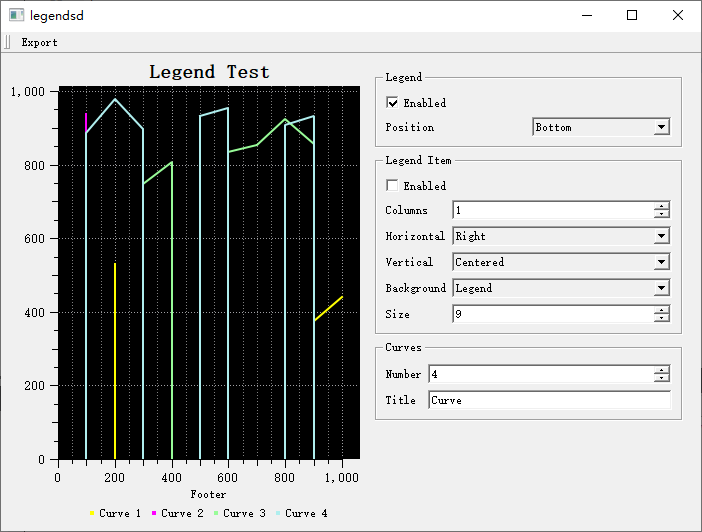
The legend demo is located at: examples/2D/legends. Screenshot:
1. Inserting a Legend
A legend is created as a QwtLegend widget and handed to the plot with QwtPlot::insertLegend(), whose second argument picks one of the four QwtPlot::LegendPosition values (LeftLegend, RightLegend, BottomLegend, TopLegend, defaulting to RightLegend). The example below inserts a legend on the right side:
1 2 3 4 5 6 7 8 9 10 11 12 13 | |
2. Legend Interaction
Legend items are read-only by default (QwtLegendData::ReadOnly). Interaction is enabled with QwtLegend::setDefaultItemMode(); a Checkable legend then emits the checked() signal, which is typically connected to toggle the visibility of the corresponding plot item via QwtPlot::infoToItem():
1 2 3 4 5 6 7 8 9 10 11 12 13 14 | |
3. Setting Legend Position and Ratio
The legend ratio controls how much of the plot's width or height the legend may occupy; it can be passed directly as the third argument of insertLegend(), or adjusted later through QwtPlotLayout::setLegendPosition() and setLegendRatio(). The example below reserves 20% for a right-side legend and then moves it to the bottom with a 15% ratio:
1 2 3 4 5 6 7 | |
4. Legend Style Configuration
Since QwtLegend is a regular Qt widget, its font can be set with setFont() and its background and border with a style sheet. The individual legend entries are QwtLegendLabel widgets (a QwtTextLabel subclass) living inside contentsWidget(); they can be found with legendWidget()/legendWidgets() for a single plot item, or styled in bulk. The example below shows these three levels of customization:
1 2 3 4 5 6 7 8 9 10 11 12 13 14 15 16 17 18 | |
5. Plot Item Legend Properties
Control the display style of plot items in the legend:
1 2 3 4 5 6 7 8 9 10 11 | |
6. Custom Legend Icons
Legend icons are produced by the virtual method QwtPlotItem::legendIcon(), so derived classes can override it to draw completely custom icons; their size is controlled by setLegendIconSize(). The snippet below enlarges the icon size and notes where to hook in the custom drawing:
1 2 3 4 5 | |
7. External Legend Widget
The legend can be placed outside the plot. There is no dedicated "connect external legend" call: the plot's legendDataChanged() signal is connected to the updateLegend() slot of the external QwtLegend, and QwtPlot::updateLegend() populates it with the current items:
1 2 3 4 5 6 7 8 9 10 11 12 13 14 | |
8. Embedded Legend Item
Use QwtPlotLegendItem to display legend inside the canvas. Its position is chosen with setAlignmentInCanvas() using standard Qt::Alignment flags:
1 2 3 4 5 6 7 8 9 10 11 12 13 14 15 16 17 18 19 20 21 22 | |
Core Method Summary
QwtPlot Legend Methods
| Method | Description |
|---|---|
insertLegend() |
Insert legend (position and ratio as arguments) |
legend() |
Return the current legend |
legendDataChanged() |
Signal to feed an external legend |
updateLegend() |
Emit legend data for all plot items |
itemToInfo() / infoToItem() |
Translate between plot item and legend item info |
QwtLegend Methods
| Method | Description |
|---|---|
setDefaultItemMode() |
Set interaction mode (QwtLegendData::ReadOnly/Clickable/Checkable) |
setMaxColumns() |
Set maximum number of columns |
legendWidget() / legendWidgets() |
Return the entry widget(s) of a plot item |
itemInfo() |
Return the item info of an entry widget |
contentsWidget() |
Return the widget holding all entries |
clicked() / checked() |
Interaction signals |
QwtPlotItem Legend Methods
| Method | Description |
|---|---|
setItemAttribute() |
Show/hide the item on the legend (QwtPlotItem::Legend) |
setLegendIconSize() |
Set icon size |
legendIcon() |
Return (and in derived classes override) the legend icon |
setTitle() |
Set title (legend text) |
Note
setLegendAttribute()(LegendShowLine/LegendShowSymbol/LegendShowBrush) is a method ofQwtPlotCurve, controlling how the curve renders its legend icon.Tip — Legend Usage Recommendations
- Few curves (<5): Right-side legend
- Many curves (5-10): Bottom legend
- Very many curves (>10): Consider using embedded legend or grouped display
Example — Related Examples
- Legend demo:
examples/2D/legends