Scale Engine - QwtScaleEngine
QwtScaleEngine is the calculation engine for axis ticks, responsible for automatically calculating reasonable tick positions and labels based on the data range. Different types of scale engines support different tick strategies.
Main Features
- Automatic calculation of major and minor ticks from the data range
- Linear, logarithmic and date scale engines
- Tick intervals chosen automatically (for example 10, 5, 2)
- Tick calculation with included or excluded boundaries
Basic Concepts
Scale Engine Types
| Engine Class | Description |
|---|---|
QwtLinearScaleEngine |
Linear scale engine (default) |
QwtLogScaleEngine |
Logarithmic scale engine |
QwtDateScaleEngine |
Date/time scale engine |
Scale Division Structure
QwtScaleDiv represents the scale division result:
1 2 3 4 5 | |
Usage
1. Linear Scale Engine (Default)
Axes use QwtLinearScaleEngine by default, so in most cases it is enough to enable automatic scaling with QwtPlot::setAxisAutoScale() and cap the tick density via setAxisMaxMajor() and setAxisMaxMinor(). The example below allows up to 10 major ticks, with up to 5 minor ticks between them, on the bottom axis:
1 2 3 4 5 6 7 8 9 10 11 12 | |
2. Logarithmic Scale Engine
Used for large-range data or exponential relationship data:
1 2 3 4 5 6 7 8 9 10 11 12 | |
3. Date Scale Engine
Used for time series data:
1 2 3 4 5 6 7 8 9 10 11 12 13 14 15 16 17 18 19 20 | |
4. Custom Scale Division
When the automatic tick layout does not fit, a QwtScaleDiv can be assembled by hand: set its interval with setInterval(), fill the tick lists for QwtScaleDiv::MajorTick / QwtScaleDiv::MinorTick via setTicks(), and apply it with QwtPlot::setAxisScaleDiv(). The example below builds a division with major ticks every 20 and minor ticks every 4:
1 2 3 4 5 6 7 8 9 10 11 12 13 14 15 16 17 18 19 20 21 | |
5. Scale Engine Properties
The tick layout is fine-tuned through QwtScaleEngine::Attribute flags set with setAttribute(): IncludeReference forces the reference value to appear as a tick, Symmetric forces a symmetric range, Floating lets the endpoints float instead of snapping to ticks, and Inverted inverts the direction; setMargins(lower, upper) adds extra space at both ends of the scale (measured in scale units - for QwtLogScaleEngine in decades). The example below fetches the engine of the bottom axis and adjusts these properties:
1 2 3 4 5 6 7 8 9 10 11 12 13 | |
6. Calculating Scale Division
An engine can also be used standalone: divideScale(x1, x2, maxMajorSteps, maxMinorSteps, stepSize = 0.0) takes the data range plus the maximum numbers of major and minor steps (and optionally a fixed step size) and returns a ready-made QwtScaleDiv, which can then be applied with QwtPlot::setAxisScaleDiv(). The example below computes the division with a local QwtLinearScaleEngine:
1 2 3 4 5 6 7 8 9 10 11 12 13 | |
Scale Engine Property Description
| Property | Description |
|---|---|
IncludeReference |
Force inclusion of reference value as a tick |
Symmetric |
Force symmetric range |
Floating |
Endpoints not forced to fall on ticks |
Inverted |
Invert tick direction |
Date Format Levels
QwtDateScaleDraw::setDateFormat() selects a format per QwtDate::IntervalType; the table below lists the levels with a typical custom format (the built-in defaults vary slightly between platforms):
| Level | Enum Value | Typical Format |
|---|---|---|
| Millisecond | QwtDate::Millisecond |
"hh ss:zzz" ss:zzz" |
| Second | QwtDate::Second |
"hhss" |
| Minute | QwtDate::Minute |
"hh:mm" |
| Hour | QwtDate::Hour |
"hh:mm" |
| Day | QwtDate::Day |
"dd MMM yyyy" |
| Week | QwtDate::Week |
"Www yyyy" |
| Month | QwtDate::Month |
"MMM yyyy" |
| Year | QwtDate::Year |
"yyyy" |
Core Method Summary
| Method | Description |
|---|---|
setAxisScaleEngine() |
Set scale engine |
setAxisAutoScale() |
Enable auto scaling |
setAxisMaxMajor() |
Set maximum major ticks |
setAxisMaxMinor() |
Set maximum minor ticks |
axisScaleEngine() |
Get scale engine |
axisScaleDiv() |
Get scale division |
Tip — Scale Optimization Recommendations
- Use linear engine for linear data (default)
- Use logarithmic engine for large-range data (spanning multiple orders of magnitude)
- Use date engine for time series data
- Manually set scale division for special requirements
Example — Related Examples
- Scale engine demo:
playground/scaleengine
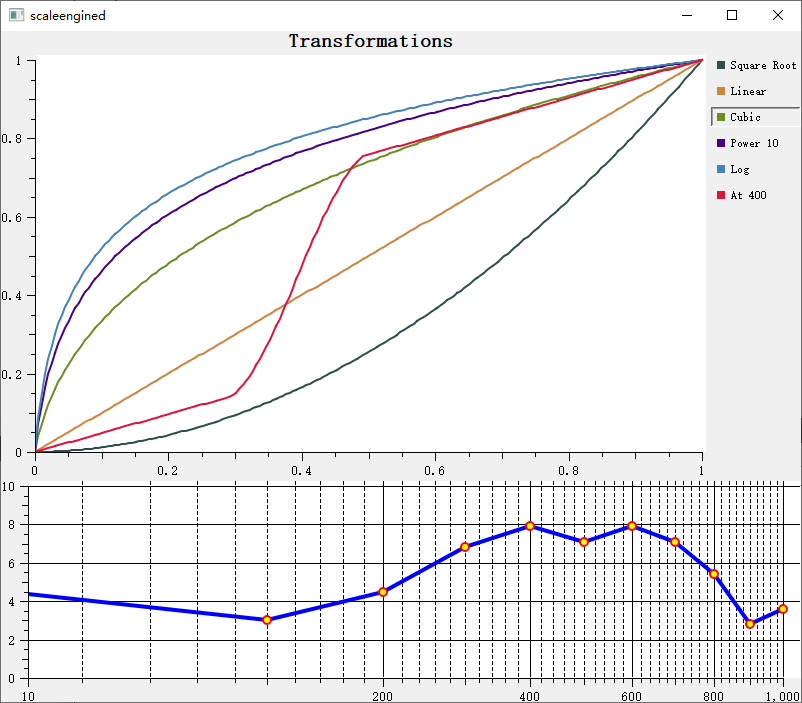
Screenshot of the scale engine demo: