Data Series - QwtSeriesData
QwtSeriesData is the abstract interface for plot item data. A custom QwtSeriesData subclass can supply samples from memory, a file, a database or any other source.
Main Features
- Data abstraction interface: defines a unified data access interface
- Multiple built-in implementations: memory storage and external array references
- Dynamic data support: real-time updates and large data sets
- Bounding calculation: computes the data bounding rectangle automatically
Basic Concepts
Data Interface Structure
The class diagram below outlines the QwtSeriesData<T> interface (size(), sample(i), boundingRect() and the optional setRectOfInterest()) together with the built-in derivations: the generic QwtArraySeriesData<T> stores samples in a QVector and adds setSamples() / samples(), QwtPointSeriesData is its specialization for QPointF samples, and QwtSyntheticPointData derives from QwtPointSeriesData to compute samples on the fly from a pure virtual y(double x) function without storing them:
classDiagram
    class QwtSeriesData~T~ {
        +size() int
        +sample(i) T
        +boundingRect() QRectF
        +setRectOfInterest(rect)
    }

    class QwtArraySeriesData~T~ {
        +setSamples()
        +samples()
    }

    class QwtPointSeriesData {
        +boundingRect() QRectF
    }

    class QwtSyntheticPointData {
        +y(x) double
        +x(index) double
        +setSize(size)
        +setInterval(interval)
    }

    QwtSeriesData <|-- QwtArraySeriesData
    QwtArraySeriesData <|-- QwtPointSeriesData
    QwtPointSeriesData <|-- QwtSyntheticPointData
Built-in Data Classes
| Class Name | Description |
|---|---|
QwtArraySeriesData<T> |
Stores arrays of arbitrary sample types in a QVector, provides setSamples() / samples() |
QwtPointSeriesData |
Stores QPointF data points (QwtArraySeriesData<QPointF>) |
QwtSyntheticPointData |
Generates function data on the fly from y(double x) (not stored) |
Further specializations of QwtArraySeriesData<T> exist for other sample types, e.g. QwtPoint3DSeriesData, QwtIntervalSeriesData, QwtSetSeriesData, QwtTradingChartData and QwtBoxChartData.
Usage
1. Using Built-in Data Classes
For most tasks no custom class is needed: the setSamples() overloads of QwtPlotCurve already cover the common cases, and when you prefer an explicit data object you can wrap the points in a QwtPointSeriesData and hand it over with setData(), as the two variants below show:
1 2 3 4 5 6 7 8 9 10 11 12 13 14 15 | |
2. Referencing External Data
When the samples already live in your own buffers, setRawSamples() lets the curve reference the raw double arrays instead of copying them, which is the fastest path for large data sets, at the cost of keeping those arrays alive yourself:
1 2 3 4 5 6 7 8 9 10 | |
Warning — setRawSamples Notes
- External arrays must remain valid until the curve is destroyed
- Do not modify array size, only modify contents
- Call replot to refresh display after data updates
3. Custom Data Class
Implementing a custom data source:
1 2 3 4 5 6 7 8 9 10 11 12 13 14 15 16 17 18 19 20 21 22 23 24 25 26 27 28 29 30 31 32 33 34 35 36 37 38 39 40 41 42 43 44 45 46 47 48 | |
4. Function-Generated Data
QwtSyntheticPointData generates function curves without storing any samples: subclass it, implement the pure virtual y(double x), and pass the number of equidistant samples plus the x interval to the base constructor; when the interval is left invalid, the points are computed for the visible plot area instead:
1 2 3 4 5 6 7 8 9 10 11 12 13 14 15 16 17 18 19 20 21 22 23 24 25 26 27 28 29 30 | |
5. Real-time Data Updates
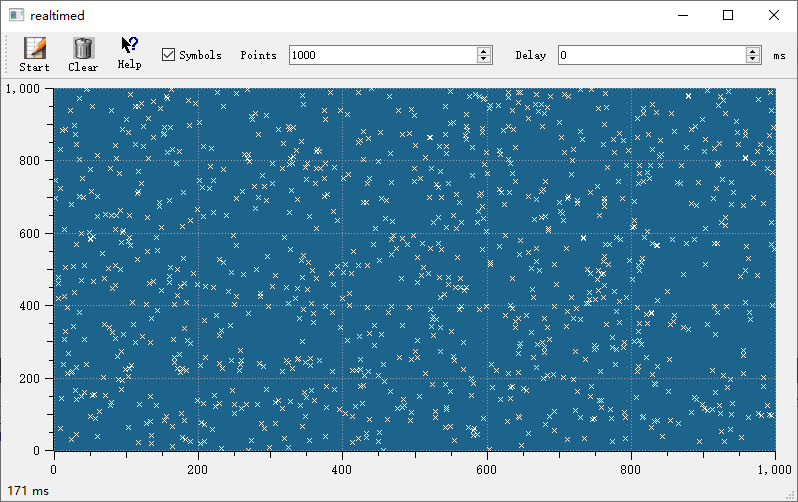
For streaming scenarios a small custom QwtSeriesData<QPointF> subclass is often the cleanest solution: the RealtimeSeriesData below maintains a rolling window of at most 1000 points, invalidates the inherited cachedBoundingRect cache whenever a point is appended so that boundingRect() recomputes it with the qwtBoundingRect() helper, and leaves the refresh to a plain plot->replot() call after each appendPoint():
1 2 3 4 5 6 7 8 9 10 11 12 13 14 15 16 17 18 19 20 21 22 23 24 25 26 27 28 29 30 31 32 33 34 35 36 37 38 39 40 41 | |
Core Method Summary
QwtSeriesData Interface
| Method | Description |
|---|---|
size() |
Return number of data points |
sample(i) |
Return the i-th data point |
boundingRect() |
Return data bounding rectangle |
setRectOfInterest() |
Set region of interest (optimize rendering) |
QwtPlotCurve Data Methods
| Method | Description |
|---|---|
setData() |
Set data object |
setSamples() |
Set data arrays |
setRawSamples() |
Reference external arrays |
data() |
Get data object |
Tip — Data Management Recommendations
- Static data: Use
setSamples()to copy data- Large data: Use
setRawSamples()to avoid copying- Dynamic data: Implement custom
QwtSeriesData- Function data: Use
QwtSyntheticPointDataExample — Related Examples
- Function-generated data:
examples/2D/sinusplot- Real-time data:
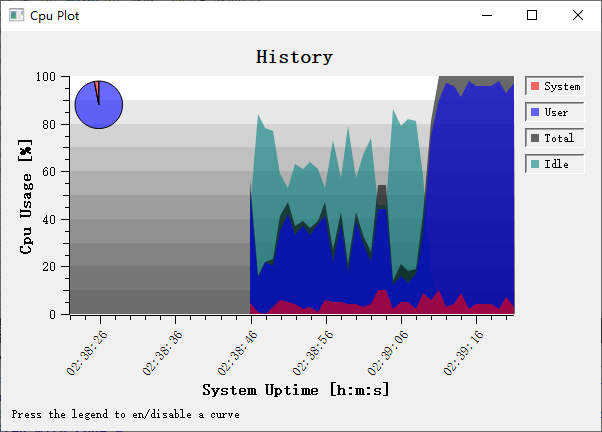
examples/2D/realtime- CPU monitor:
examples/2D/cpuplot
Screenshots of real-time data and CPU monitor: