Bar Chart - QwtPlotBarChart
QwtPlotBarChart is a plot item class for drawing bar charts. It supports grouped and stacked bar charts, can be displayed horizontally or vertically, and is used to compare categorical data.
Key Features
- Grouped/stacked modes: grouped comparison and stacked cumulative display of multiple data sets
- Direction switching: vertical and horizontal display orientations
- Style customization: bar fill, border, width, and other properties
- Baseline configuration: custom bar starting baseline position
- Legend modes: chart title or individual bar titles
Basic Concepts
Bar Chart Types
Qwt provides two bar chart classes:
| Class | Description |
|---|---|
QwtPlotBarChart |
Single-group bar chart, one bar per group |
QwtPlotMultiBarChart |
Multi-group bar chart, supports grouped and stacked modes |
Bar Chart Modes
| Mode | Description |
|---|---|
Grouped |
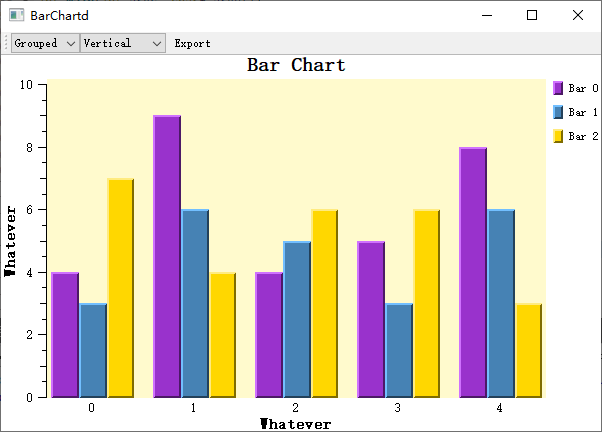
Grouped mode: Multiple data sets displayed side by side for comparison |
Stacked |
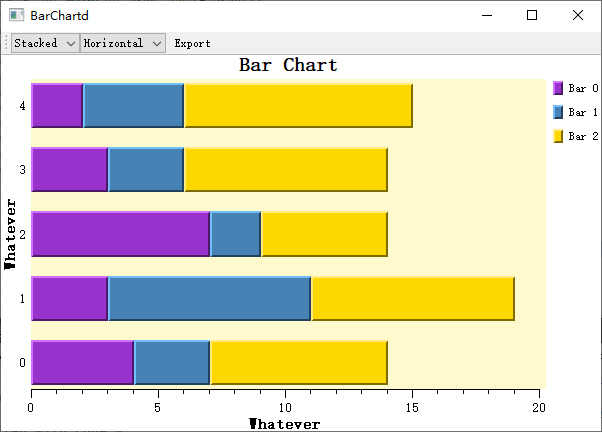
Stacked mode: Multiple data sets stacked to show totals |
Class Inheritance Structure
The class relationships of QwtPlotBarChart are as follows: it inherits QwtPlotAbstractBarChart for the capabilities shared by all bar charts (baseline, orientation, layout policy) and mixes in QwtSeriesStore<QwtPoint3D> for data storage:
classDiagram
    class QwtPlotAbstractBarChart {
        +setBaseline()
        +setOrientation()
        +setLayoutPolicy()
        +setLayoutHint()
    }

    class QwtPlotBarChart {
        +setSamples()
        +setSymbol()
        +setPen()
        +setBrush()
        +setLegendMode()
    }

    class QwtPlotMultiBarChart {
        +setSamples()
        +setBarTitles()
        +setSymbol()
        +setSamples()
    }

    QwtPlotAbstractBarChart <|-- QwtPlotBarChart
QwtPlotAbstractBarChart <|-- QwtPlotMultiBarChartUsage
The bar chart example is located at: examples/2D/barchart. Screenshot below:
1. Basic Bar Chart
Create the simplest single-group bar chart:
1 2 3 4 5 6 7 8 9 10 11 12 13 14 15 16 17 18 19 20 21 22 23 24 | |
2. Setting Data
QwtPlotBarChart provides multiple ways to set data:
1 2 3 4 5 6 7 8 9 10 11 12 | |
3. Bar Style Configuration
The look of a bar is customized with QwtColumnSymbol: the constructor's Style argument picks the shape (the built-in Box), setFrameStyle() picks the frame (NoFrame / Plain / Raised), and setPen() / setBrush() control the border line and the fill (which may be translucent). Attach the finished symbol to the chart with setSymbol():
1 2 3 4 5 6 7 8 9 10 11 12 13 14 15 16 17 18 | |
4. Display Orientation
setOrientation() switches between the two orientations: Qt::Vertical (default, X axis = categories, Y axis = values) and Qt::Horizontal (Y axis = categories, X axis = values, which helps when category labels are long):
1 2 3 4 5 | |
5. Bar Width Configuration
Bar width is governed by the layout policy (setLayoutPolicy()) combined with the layout hint (setLayoutHint()): AutoAdjustSamples divides the space by sample count with the hint as a minimum width, ScaleSamplesToAxes reads the hint as an interval in axis coordinates, ScaleSampleToCanvas as a fraction of the canvas width/height, and FixedSampleSize as a fixed pixel width:
1 2 3 4 5 6 7 8 9 | |
6. Baseline Settings
The baseline defines the starting position of bars:
1 2 3 4 5 6 7 8 | |
7. Multi-Group Bar Chart (QwtPlotMultiBarChart)
To compare several data sets side by side per category, use QwtPlotMultiBarChart: every sample carries a group of values, setBarTitles() names each set (used by the legend), and the data arrives through the setSamples() overloads:
1 2 3 4 5 6 7 8 9 10 11 12 13 14 15 16 17 18 19 20 21 22 23 24 | |
8. Custom Per-Group Bar Styles
setSymbols() takes one QwtColumnSymbol per set — the i-th symbol styles the i-th bar set, giving each set its own fill and border; without them the sets take their colors from the color cycle:
1 2 3 4 5 6 7 8 9 | |
Core Methods Summary
QwtPlotBarChart
| Method | Description |
|---|---|
setSamples() |
Set data |
setSymbol() |
Set bar symbol |
setPen() |
Set border pen |
setBrush() |
Set fill brush |
setBaseline() |
Set baseline position |
setOrientation() |
Set display orientation |
setLayoutPolicy() |
Set layout policy |
setLayoutHint() |
Set layout parameters |
setLegendMode() |
Set legend mode |
QwtPlotMultiBarChart
| Method | Description |
|---|---|
setBarTitles() |
Set titles for each group |
setSamples() |
Set multi-group data |
setSymbols() |
Set symbols for each group |
setChartMode() |
Set grouped/stacked mode |
Legend Modes
setLegendMode() controls how the bar chart appears in the legend: LegendChartTitle (default) contributes a single entry for the whole chart, while LegendBarTitles gives every bar (set) its own entry, typically combined with multi-bar charts:
1 2 3 4 5 | |
Example — Related Examples
- Bar chart demo:
examples/2D/barchart