Arrow Marker - QwtPlotArrowMarker
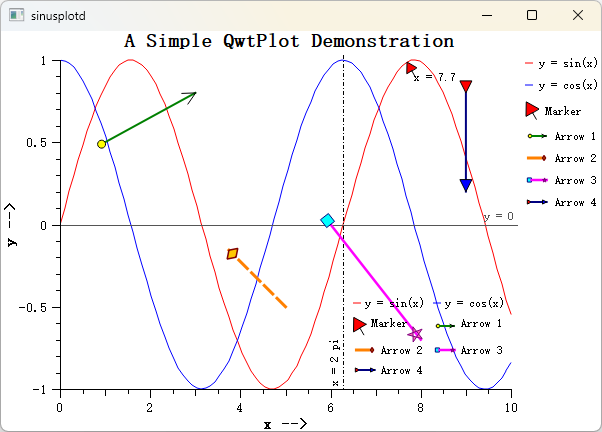
QwtPlotArrowMarker is a plot item for drawing arrow annotations on plots. It supports configurable start and end points, head and tail endpoint styles, and line styles. It is commonly used for annotating data regions, indicating directions, or adding explanatory notes.
Key Features
- Two positioning modes: explicit start/end coordinates, or start point + pixel length + angle
- Seven endpoint styles: NoEndpoint, ArrowHead, Circle, Square, Diamond, Triangle, CustomPath
- Independent head/tail configuration: each end can have its own style, size, pen, and brush
- Custom paths: create arbitrary endpoint shapes via
QPainterPath - Pixel-level control: in
StartLengthAnglemode, arrow size is preserved during zoom
Basic Concepts
Positioning Modes
| Mode | Enum Value | Description |
|---|---|---|
| Explicit coordinates | ExplicitPoints |
Specify start/end in plot coordinates; arrow scales with zoom |
| Start + length + angle | StartLengthAngle |
Specify start point, pixel length, and angle; size is fixed |
Endpoint Style Types
| Style | Enum Value | Description |
|---|---|---|
| None | NoEndpoint |
No endpoint drawn |
| Arrow head | ArrowHead |
V-shaped arrowhead |
| Circle | Circle |
Circular endpoint |
| Square | Square |
Square endpoint |
| Diamond | Diamond |
Diamond-shaped endpoint |
| Triangle | Triangle |
Filled triangle endpoint |
| Custom | CustomPath |
Arbitrary shape via QPainterPath |
Arrow Structure
The diagram below shows the anatomy of a QwtPlotArrowMarker: it spans from the start point (the tail) to the end point (the head), and each end can carry its own endpoint style.
1 2 3 4 5 | |
Usage
1. Basic Arrow (ExplicitPoints Mode)
Create an arrow with explicit start and end coordinates (the most common approach):
1 2 3 4 5 6 7 8 9 10 11 12 13 14 15 16 17 18 19 20 21 | |
2. Fixed-Length Arrow (StartLengthAngle Mode)
In this mode the arrow length is in pixels and does not change when zooming:
1 2 3 4 5 6 7 8 9 10 11 12 13 14 15 16 17 18 19 20 | |
3. Custom Endpoint Path
Create arbitrary endpoint shapes using QPainterPath, for example a star:
1 2 3 4 5 6 7 8 9 10 11 12 13 14 15 16 17 18 19 20 21 22 23 24 25 26 | |
4. Dual Triangle Endpoints
Both ends use triangle endpoints, useful for indicating direction:
1 2 3 4 5 6 7 8 9 10 11 12 13 14 15 | |
Legend Configuration
Arrow markers can appear in the plot legend. When enabled, the icon draws a horizontal sample line with head and tail endpoints:
1 | |
The default legend icon size is 24×12 pixels. Adjust it with setLegendIconSize():
1 | |
API Reference
| Method | Description |
|---|---|
setPoints(start, end) |
Set start and end points |
setStartPoint(point) |
Set start point |
setEndPoint(point) |
Set end point |
setPositionMode(mode) |
Set positioning mode |
setLength(length) |
Set pixel length (StartLengthAngle mode) |
setAngle(angle) |
Set angle in degrees (StartLengthAngle mode) |
setLinePen(pen) |
Set arrow line pen |
setHeadStyle(style) |
Set head endpoint style |
setHeadSize(size) |
Set head size in pixels |
setHeadBrush(brush) |
Set head fill brush |
setHeadPen(pen) |
Set head outline pen |
setHeadCustomPath(path) |
Set head custom QPainterPath |
setTailStyle(style) |
Set tail endpoint style |
setTailSize(size) |
Set tail size in pixels |
setTailBrush(brush) |
Set tail fill brush |
setTailPen(pen) |
Set tail outline pen |
setTailCustomPath(path) |
Set tail custom QPainterPath |
Tip — Usage Notes
- Enable anti-aliasing with
setRenderHint(QwtPlotItem::RenderAntialiased, true)for smoother lines.- In
StartLengthAnglemode, length is in pixels: the arrow does not resize when zooming.- In
ExplicitPointsmode, start/end use plot coordinates: the arrow scales with axis changes.Example — Related Examples
- Arrow annotation demo:
examples/2D/sinusplot
Screenshot of the arrow annotation: