Marker - QwtPlotMarker
QwtPlotMarker is a plot item for marking specific positions on a plot. It can display horizontal lines, vertical lines, crosshair lines, symbols, or text labels, and is commonly used to annotate key data points, threshold lines, or reference positions.
Key Features
- Multiple line styles: Horizontal line, vertical line, crosshair, or no line
- Symbol markers: Display custom symbols at specified positions
- Text labels: Add text annotations with controllable position and orientation
- Precise positioning: Located using coordinate values, automatically follows axis transformations
Basic Concepts
Line Style Types
QwtPlotMarker supports four line styles:
| Style | Enum Value | Description |
|---|---|---|
| No line | NoLine |
Show symbols and labels only |
| Horizontal line | HLine |
Horizontal line through the marker point |
| Vertical line | VLine |
Vertical line through the marker point |
| Crosshair | Cross |
Combination of horizontal and vertical lines |
Marker Composition
A single marker can combine several elements around one coordinate point: a horizontal line, a vertical line, a symbol drawn on the point itself, and a text label anchored nearby. The ASCII sketch below shows how these parts are composed around the (x, y) position:
1 2 3 4 5 6 7 | |
Usage
1. Creating a Basic Marker
The marker position is given in plot data coordinates via setValue() (or setXValue() / setYValue() for a single axis), and the item becomes visible once it is attach()ed to the plot. The example below places a marker at (5, 10):
1 2 3 4 5 6 7 8 9 10 11 12 13 14 15 16 17 18 | |
2. Horizontal Line Marker
Horizontal lines are commonly used to mark thresholds, baseline values, or Y-axis reference lines:
1 2 3 4 5 6 7 8 9 10 11 12 13 14 15 16 | |
3. Vertical Line Marker
Vertical lines are used to mark time points, event positions, or X-axis reference lines:
1 2 3 4 5 6 7 8 9 10 11 12 | |
4. Crosshair Marker
Crosshair lines display horizontal and vertical intersecting lines at a specific coordinate point:
1 2 3 4 5 6 7 8 9 10 11 12 | |
5. Symbol Marker
Display a symbol at a specific position (without lines):
1 2 3 4 5 6 7 8 9 10 11 12 13 14 15 16 17 18 19 20 | |
6. Text Label Configuration
Add text annotations to markers:
1 2 3 4 5 6 7 8 9 10 11 12 13 14 15 16 17 18 19 20 21 22 23 24 25 26 | |
7. Full Example - Annotating Data Peaks
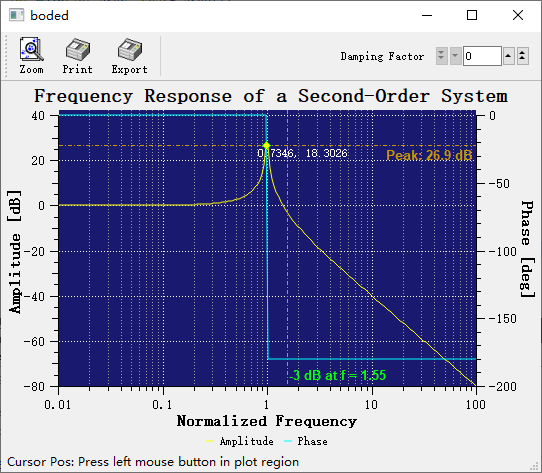
This example combines line style, symbol and label in one marker: it scans the curve samples for the maximum, then annotates the peak with a dashed QwtPlotMarker::VLine, a red triangular QwtSymbol and a QwtText label showing the peak value:
1 2 3 4 5 6 7 8 9 10 11 12 13 14 15 16 17 18 19 20 21 22 23 24 25 26 27 28 29 30 31 32 33 34 35 36 37 38 39 | |
Label Alignment Positions
Label alignment relative to the marker point is controlled by Qt::AlignmentFlag:
| Alignment | Position Description |
|---|---|
Qt::AlignLeft | Qt::AlignTop |
Upper left |
Qt::AlignRight | Qt::AlignTop |
Upper right |
Qt::AlignLeft | Qt::AlignBottom |
Lower left |
Qt::AlignRight | Qt::AlignBottom |
Lower right |
Qt::AlignHCenter | Qt::AlignTop |
Directly above |
Qt::AlignHCenter | Qt::AlignBottom |
Directly below |
Qt::AlignLeft | Qt::AlignVCenter |
Directly left |
Qt::AlignRight | Qt::AlignVCenter |
Directly right |
Core Methods Summary
| Method | Description |
|---|---|
setValue(x, y) |
Set marker position coordinates |
setXValue(x) |
Set X coordinate only |
setYValue(y) |
Set Y coordinate only |
value() |
Get marker position coordinates |
xValue() |
Get X coordinate |
yValue() |
Get Y coordinate |
setLineStyle() |
Set line style |
lineStyle() |
Get line style |
setLinePen() |
Set line pen |
linePen() |
Get line pen |
setSymbol() |
Set symbol |
symbol() |
Get symbol |
setLabel() |
Set text label |
label() |
Get text label |
setLabelAlignment() |
Set label alignment |
setLabelOrientation() |
Set label orientation |
setSpacing() |
Set label spacing |
Tip — Marker Layer Control
Markers should typically be drawn above other plot items. This can be controlled by setting the Z value:
1marker->setZ(100); // Higher Z value draws on topExample — Related Examples
- Curve peak annotation:
examples/2D/bode- Curve tracker:
playground/curvetracker
Screenshot of the curve peak annotation: