3D Plot Introduction
Qwt 7.1 integrated the original QwtPlot3D library for 3D data visualization. Since v7.3.3 the 3D module uses a Plot + Item architecture that mirrors the 2D module (QwtPlot + QwtPlotItem), with modern OpenGL rendering (VBO/VAO + GLSL 3.3 Core shaders).
Info — Why Plot + Item
For the defects of the legacy
QwtPlot3D, the refactoring rationale and its benefits, see 3D Plot Architecture (the architecture overview).
Main Features
-
Plot + Item architecture:
Qwt3DPlot(rendering window) +Qwt3DPlotItem(drawable items), symmetric with 2D'sQwtPlot+QwtPlotItem -
Multiple plot types: surface plots, grid plots, parametric surfaces, function plots, waterfall plots (sliding-window trace stacks), etc.
-
Modern OpenGL rendering: VBO/VAO + GLSL 3.3 Core shaders (no legacy fixed-function pipeline)
-
Interactive operations: mouse rotation, zooming and panning
-
Lighting and material parameters: the lighting switch, light rotation, light/material components and shininess all reach the shaders (since v7.5.1;
illuminate()/blowout()switch the single light and the defaults equal the previously hardcoded values, see the technical report) -
Theme system: visual style switching with 10 preset themes and 22 scientific colormaps
-
Multi-item composition: attach multiple items to a single
Qwt3DPlotfor combined rendering
Architecture Overview
The 3D module follows a Plot + Item pattern, symmetric with the 2D module:
-
Qwt3DPlotis a rendering window (QOpenGLWidgetsubclass) that manages the GL context, view transforms, lighting, coordinate system, and mouse/keyboard interaction. It holds no plotting data itself. -
Qwt3DPlotItemis the abstract base class for all 3D drawable items. Items manage their own data, geometry, and styles. They attach to aQwt3DPlotviaattach()/detach(). -
A single
Qwt3DPlotcan hold any number of items, rendered together in one GL context.
classDiagram

    class Qwt3DPlot {

        +attach(Qwt3DPlotItem*)

        +detach(Qwt3DPlotItem*)

        +itemList()

        +setRotation()

        +setScale()

        +enableMouse()

        +showColorLegend()

        +applyTheme()

    }


    class Qwt3DPlotItem {

        <<abstract>>

        +attach(Qwt3DPlot*)

        +detach()

        +draw()*

        +hull()*

        +setZ()

        +itemChanged()

    }


    class Qwt3DSurface {

        +loadFromData()

        +setResolution()

        +setPlotStyle()

        +setDataColor()

        +addEnrichment()

    }


    class Qwt3DFunction {

        +operator()(x,y)*

        +create()

        +setDomain()

        +setMesh()

    }


    Qwt3DPlotItem <|-- Qwt3DSurface

    Qwt3DFunction --> Qwt3DSurface : generates data for

    Qwt3DPlot o-- Qwt3DPlotItem : manages
Note — No Namespace
All 3D classes use the
Qwt3Dprefix directly in the global scope (e.g.,Qwt3DPlot,Qwt3DSurface). There is nonamespace Qwt3D; this is a breaking change from v7.3.2 and earlier.
Core Classes
| Class | Description |
|---|---|
Qwt3DPlot |
3D rendering window (QOpenGLWidget), manages GL context, view, lighting, coordinate system, and item list |
Qwt3DPlotItem |
Abstract base class for all 3D plot items (attach/detach/draw/hull) |
Qwt3DSurface |
3D surface plot item, displays continuous surfaces (handles both grid and cell data) |
Qwt3DBar |
3D bar chart item (1D series or 2D grid histogram); per-bar cuboids with flat normals |
Qwt3DLine |
3D line/curve item; Tube (swept cylinder, lit) / Lines / Dots styles |
Qwt3DWaterfall |
3D waterfall item with a built-in sliding window; stacked traces (spectra) along the depth axis |
Qwt3DFunction |
Data generator that creates surfaces from z = f(x, y) mathematical functions |
Qwt3DParametricSurface |
Data generator for parametric surfaces r(u, v) |
Qwt3DCoordinateSystem |
3D coordinate system with 12 axes, box/frame styles |
Qwt3DColorLegend |
3D color bar / legend |
Qwt3DTheme |
3D theme system, encapsulates background, mesh, colormap, axes, lighting, and all visual attributes |
Usage
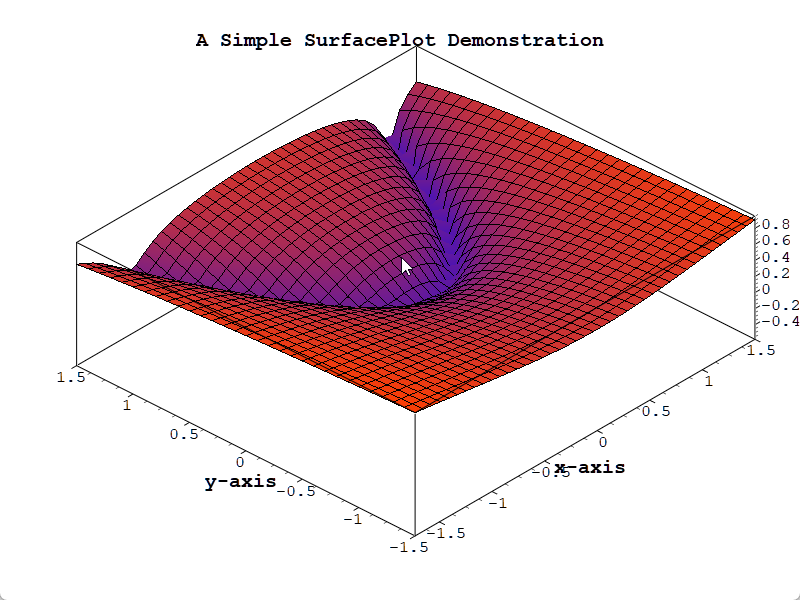
The 3D plot example is located at: examples/3D/simpleplot3D. Screenshot:
Basic Usage Example
1 2 3 4 5 6 7 8 9 10 11 12 13 14 15 16 17 18 19 20 21 22 23 24 25 26 27 28 29 30 31 32 33 34 35 36 37 38 39 40 41 42 43 44 45 46 47 48 49 50 51 52 53 54 55 56 57 58 59 60 61 62 63 | |
Data Loading
1 2 3 4 5 6 7 8 9 10 11 12 13 14 15 16 17 18 19 20 21 22 23 24 25 26 27 28 29 30 31 32 33 34 35 36 37 | |
Interactive Operations
1 2 3 4 5 6 7 8 9 10 11 12 13 14 15 16 17 18 19 20 21 22 23 24 25 26 27 28 29 30 31 32 33 34 35 36 37 38 39 | |
Color Mapping
1 2 3 4 5 6 7 8 9 10 11 12 13 | |
Multi-Item Composition
Several items can share the same 3D space:
1 2 3 4 5 6 7 8 9 10 11 12 13 14 15 16 17 18 19 20 21 22 23 | |
Other 3D Item Types (v7.3.5+)
The 3D module provides more Qwt3DPlotItem types; each has a dedicated page:
-
3D Bar Chart (
Qwt3DBar): 1D series or 2D grid (3D histogram), per-bar cuboids with flat normals,Filled/FilledMesh/Wireframe. -
3D Line Plot (
Qwt3DLine):Tube(lit swept cylinder) /Lines/Dots, per-vertex colormap. -
3D Waterfall (
Qwt3DWaterfall): sliding-window waterfall of 1D traces (spectra),Ribbon/RibbonMesh/Wireframe/Tubestyles, depth/amplitude/solid coloring.
Live Waterfall (Stacked Traces)
A waterfall draws a stream of one-dimensional traces (spectra, chromatograms, ...) as stacked curves along the depth axis. One Qwt3DWaterfall item owns the live machinery (sliding window, depth numbering, ribbon geometry and coloring), so a live waterfall only needs one push per tick:
1 2 3 4 5 6 7 8 9 10 11 12 13 14 15 16 17 18 19 20 21 | |
Where to look:
-
3D Waterfall - styles, color modes, sliding-window semantics, depth-axis text labels, pitfalls and performance notes
-
examples/3D/waterfall3D- the complete live demo: 2D spectrum + peak hold on top, 3D sliding-window waterfall below, toolbar for window size / style / colormap / color mode / opacity, plus--screenshot,--selftestand--fpsautomation arguments
Theme System (v7.3.1+)
The Qwt3DTheme class switches the visual style of a 3D plot. It encapsulates the visual attributes: background color, mesh color, data colormap, axis colors, title styling, lighting presets and shading modes.
Built-in Preset Themes
| Preset Name | Description |
|---|---|
Default |
White background + jet colormap + no lighting |
Dark |
Dark gray background + viridis + soft lighting |
Scientific |
White background + jet + studio lighting |
Warm |
Warm-toned background + hot colormap |
Cool |
Cool-toned background + cool colormap |
Matplotlib |
matplotlib style (viridis + soft lighting) |
EarthTones |
Earth tones + autumn colormap |
Ocean |
Ocean tones + winter colormap |
HighContrast |
Black background with white lines for high contrast |
Presentation |
Large fonts + thick lines, suitable for presentations |
Usage Examples
1 2 3 4 5 6 7 8 9 10 11 12 13 14 15 16 17 18 19 20 21 22 23 24 25 26 27 | |
Colormap Presets
Qwt3DTheme provides 22 scientific visualization colormaps via the core module's QwtColorMapPreset:
-
Perceptually uniform:
viridis,plasma,inferno,magma,cividis -
Classic:
jet,hot,cool,spring,summer,autumn,winter -
Grayscale:
gray,bone,copper -
Rainbow:
rainbow,hsv,turbo -
Diverging:
coolwarm,rdylbu,rdylgn,spectral
1 2 3 4 5 6 7 8 9 | |
Lighting Presets
| Preset | Description |
|---|---|
NoLighting |
No lighting, solid color rendering |
FlatLight |
Uniform ambient light |
Studio |
Classic three-point lighting |
Outdoor |
Strong directional light + ambient |
Soft |
Soft diffuse lighting |
Build Configuration
To use 3D features, enable the QWT_CONFIG_QWTPLOT_3D CMake option:
1 2 3 4 5 6 7 8 9 10 11 12 13 | |
Warning — OpenGL Dependency
The 3D plot module requires OpenGL 3.3+ Core Profile and uses GLSL 3.30 shaders. The graphics driver must support OpenGL 3.3 or higher. The module also bundles
gl2psfor vector export (EPS/PDF) as a Compatibility Profile fallback.
Core Method Summary
Qwt3DPlot Methods
| Method | Description |
|---|---|
attach(item) / detach(item) |
Attach/detach a plot item |
itemList() |
Get list of attached items |
setRotation(x, y, z) |
Set rotation angles (degrees) |
setScale(x, y, z) |
Set scale ratio |
setZoom(z) |
Set zoom level |
enableMouse(bool) |
Enable/disable mouse interaction |
setMouseSpeed(rot, scale, shift) |
Set the mouse drag speeds (rotation turns per widget dimension / scaling gain / shifting units) |
mouseSpeed(rot, scale, shift) |
Read the mouse drag speeds |
setRollMouse(state) |
Set an extra roll gesture around the Y axis (middle button by default) |
rollMouse() |
Returns the roll gesture |
showColorLegend(bool) |
Show/hide color legend |
applyTheme(preset) / applyTheme(name) |
Apply a theme |
setBackgroundColor(RGBA) |
Set background color |
Qwt3DSurface Methods
| Method | Description |
|---|---|
loadFromData(...) |
Load data array into the surface (3 overloads: grid double, grid Triple, cell) |
setResolution(int) |
Set data resolution (1 = all data, higher = downsample) |
setPlotStyle(PLOTSTYLE) |
Set rendering style (WIREFRAME, HIDDENLINE, FILLED, FILLEDMESH, POINTS) |
setDataColor(Qwt3DColor*) |
Set data color functor (takes ownership) |
setMeshColor(RGBA) / setMeshLineWidth(double) |
Configure mesh appearance |
setFloorStyle(FLOORSTYLE) |
Set floor projection style |
setShading(SHADINGSTYLE) |
Set shading mode (FLAT, GOURAUD) |
addEnrichment(Qwt3DEnrichment&) |
Add vertex/edge/face enrichment |
setNormalLength(double) / showNormals(bool) |
Configure surface normals |
Qwt3DFunction Methods
| Method | Description |
|---|---|
operator()(x, y) |
Pure virtual — user implements z = f(x, y) |
assign(Qwt3DSurface&) |
Assign target surface item |
setDomain(minX, maxX, minY, maxY) |
Set X/Y data range |
setMesh(columns, rows) |
Set grid resolution |
create() / create(surface&) |
Generate and load surface data |
Tip
Data size should not be too large (recommended under 100x100 grid)
For complex surfaces, reduce resolution to improve performance
Use lighting to make surfaces easier to read
Use
setZ()to control draw order when multiple items overlapExample — Related Examples
Basic 3D plot:
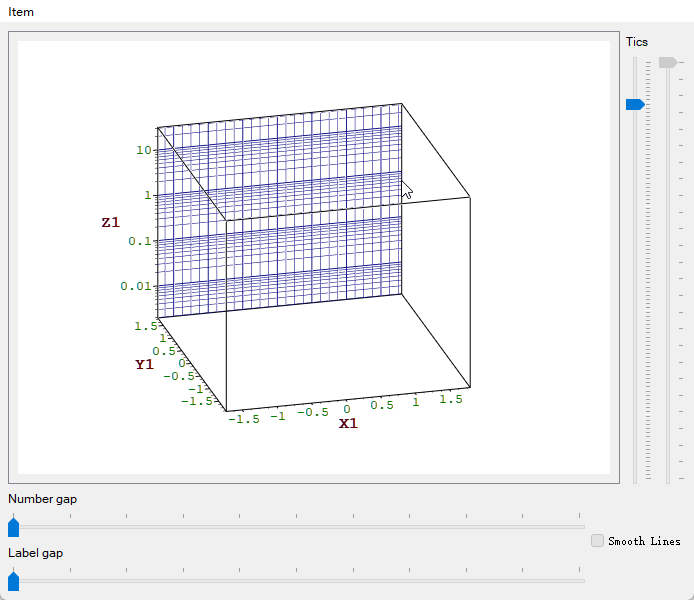
examples/3D/simpleplot3D3D axis configuration:
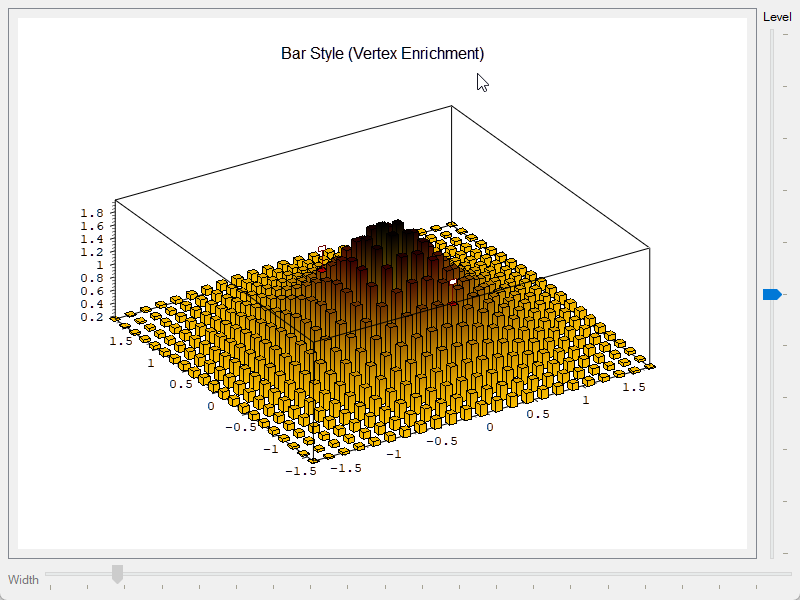
examples/3D/axes3D enrichments:
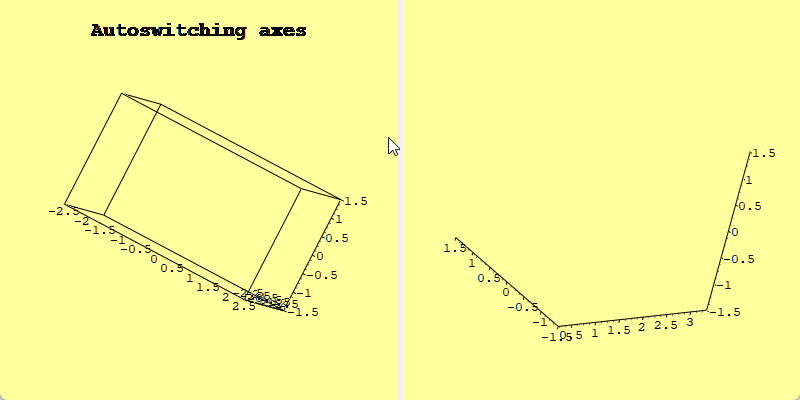
examples/3D/enrichments3D auto switch:
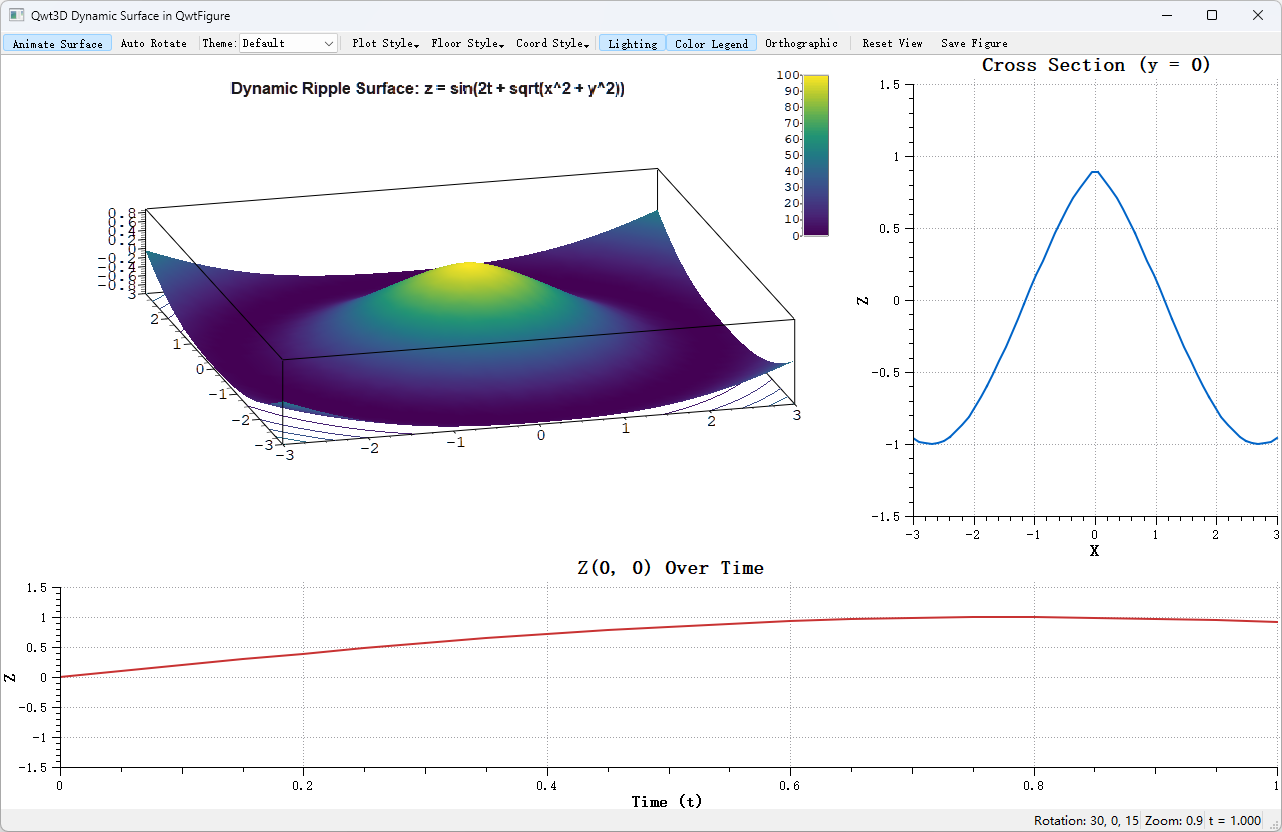
examples/3D/autoswitchDynamic 3D surface (QwtFigure integration):
examples/3D/figureSurface3D3D bar chart:
examples/3D/bar3D3D line plot:
examples/3D/line3D3D waterfall (live sliding window):
examples/3D/waterfall3D
Screenshots of 3D axis configuration, 3D enrichments, 3D auto switch, and dynamic 3D surface: