Vector Field Plot - QwtPlotVectorField
QwtPlotVectorField is used to draw vector fields, displaying vector data with direction and magnitude information on a 2D plane. Commonly used in fluid mechanics, electromagnetic field analysis, meteorological data, and other fields.
Key Features
- Arrows represent vector direction and magnitude
- Magnitude mapped to arrow length or color
- Display density adjustment to avoid overcrowding
- Customizable arrow shape and style
Basic Concepts
Vector Field Representation
Vector field data consists of position and vector components:
1 2 3 4 5 6 7 8 9 | |
Data Structure
Uses QwtVectorFieldSample to represent a single vector:
1 2 3 4 5 6 7 8 9 10 11 12 13 | |
Usage
The vector field example is located at: playground/vectorfield. Screenshot below:
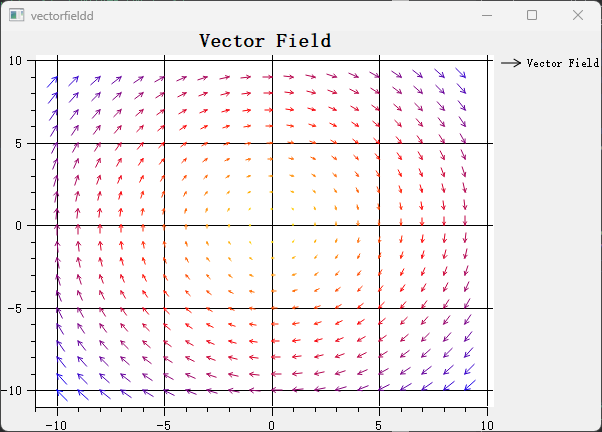
1. Basic Vector Field Plot
The field item is a plain QwtPlotVectorField fed through setSamples() with QwtVectorFieldSample values, each combining a position (x, y) with vector components (vx, vy). The example below generates a 10 x 10 trigonometric vector grid and attaches it to a plot:
1 2 3 4 5 6 7 8 9 10 11 12 13 14 15 16 17 18 19 20 21 22 23 | |
2. Arrow Style Configuration
The arrow shape is provided by a QwtVectorFieldSymbol implementation, either QwtVectorFieldArrow (filled, with adjustable head and tail width) or QwtVectorFieldThinArrow (line-based), assigned via setSymbol(), while the stroke comes from the field item's own setPen(). setMagnitudeScaleFactor() then controls how strongly the vector magnitude affects the arrow length. The snippet below wires these settings together:
1 2 3 4 5 6 7 8 9 10 11 12 13 14 15 16 17 18 | |
3. Vector Magnitude Mapping
Magnitude-to-length mapping is governed by setMagnitudeScaleFactor(), a linear factor applied to each vector's magnitude (active while the MagnitudeAsLength mode is enabled, which is the default), optionally clamped with setMinArrowLength() / setMaxArrowLength(). The snippet below shows linear mapping, clamping, and a fixed-length configuration:
1 2 3 4 5 6 7 8 9 10 11 12 | |
4. Display Density Control
Density is reduced by averaging neighbouring samples into grid cells: setRasterSize() defines the cell size, and the FilterVectors paint attribute (enabled via setPaintAttribute()) activates the filtering. The snippet below configures this decimation:
1 2 3 4 5 | |
5. Color Mapping
Color-by-magnitude requires a QwtColorMap, for example a QwtLinearColorMap between two colors, assigned with setColorMap(), plus the MagnitudeAsColor flag enabled through setMagnitudeMode(); setMagnitudeRange() defines the value interval spanned by the map. The example below sets up a blue-to-red mapping:
1 2 3 4 5 6 7 8 9 10 11 12 | |
Core Methods Summary
| Method | Description |
|---|---|
setSamples() |
Set vector data (QVector<QwtVectorFieldSample> or QwtVectorFieldData*) |
setSymbol() |
Set the arrow symbol (QwtVectorFieldArrow / QwtVectorFieldThinArrow) |
setPen() / setBrush() |
Set the arrow outline pen / fill brush |
setMagnitudeScaleFactor() |
Set the magnitude-to-length scale factor |
setMinArrowLength() / setMaxArrowLength() |
Clamp the arrow length (pixels) |
setRasterSize() + setPaintAttribute(FilterVectors) |
Reduce display density by averaging vectors per grid cell |
setColorMap() |
Set the color map used for MagnitudeAsColor |
setMagnitudeMode() |
Enable MagnitudeAsColor / MagnitudeAsLength mapping |
setMagnitudeRange() |
Set the magnitude interval mapped by the color map |
setIndicatorOrigin() |
Set the arrow anchor (OriginHead / OriginTail / OriginCenter) |
Tip — Application Scenarios
- Fluid mechanics: Flow velocity field visualization
- Electromagnetics: Electric/magnetic field distribution
- Meteorology: Wind direction field display
- Mathematical analysis: Vector function visualization
Example — Related Examples
- Vector field demo:
playground/vectorfield