3D Waterfall - Qwt3DWaterfall
Qwt3DWaterfall is a 3D plot item that renders a sequence of one-dimensional traces (spectra, chromatograms, ...) as stacked curves along the depth axis. It owns the live-data machinery: push one trace per sample interval with pushTrace() and the item maintains the sliding window, the depth numbering, the ribbon geometry and the color mapping.
For an overview of the 3D module see 3D Plot Introduction. Qwt3DWaterfall is a Qwt3DPlotItem and follows the same attach/draw/hull contract as Qwt3DSurface and Qwt3DLine.
The axes follow the module convention that the value axis is z (as in Qwt3DSurface): x = bin value, y = trace position in the window (depth), z = amplitude (up). Label them accordingly (X1 "Bin", Y1 "Frames ago", Z1 "Amplitude"); the depth axis is the one to put a Qwt3DTextScale on.
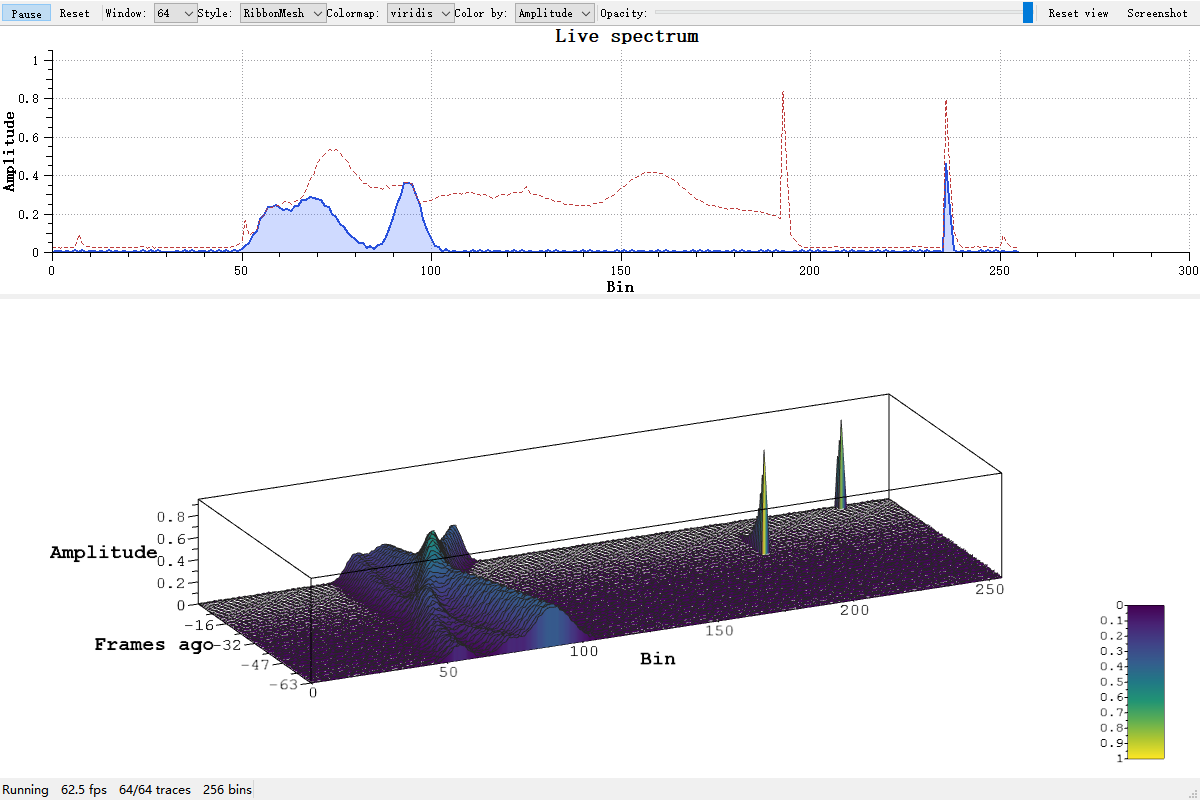
The same live scene in the outline-only Wireframe style - the cheapest way to render a dense window, and a good way to inspect the trace stack without the fill:
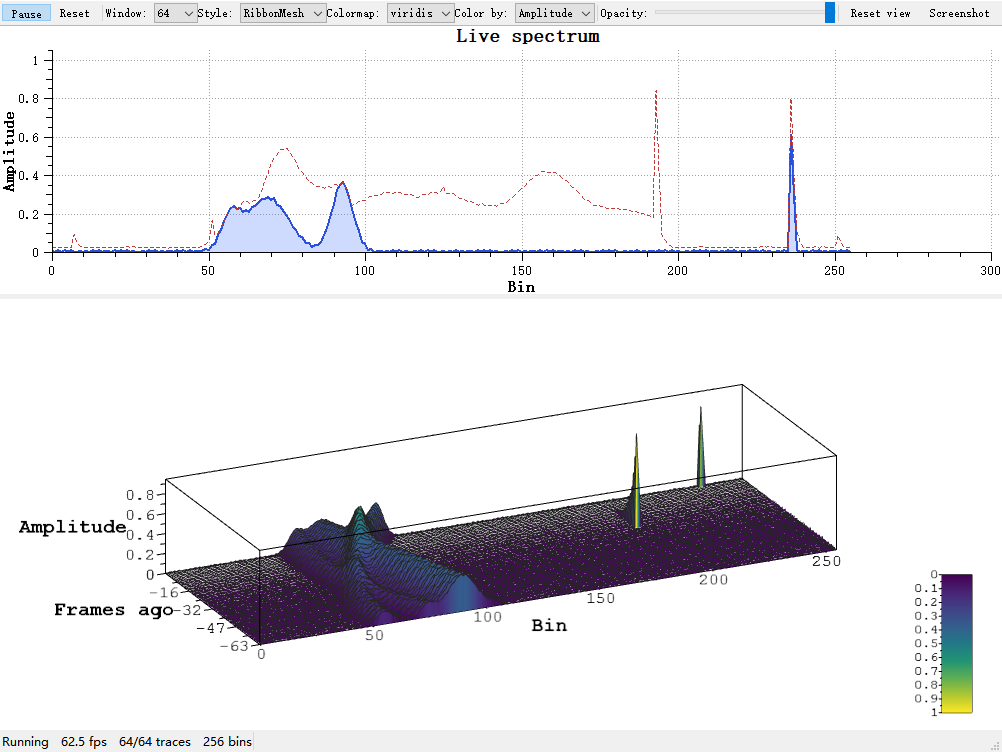
Key Features
- Built-in sliding window:
pushTrace()appends the newest trace and drops the oldest; no user-side window or depth bookkeeping - Stable depth axis: the depth coordinate of a trace is its slot index, so the hull y-range grows monotonically to
[0, traceCapacity()-1]and then stays pinned: no per-frame depth autoscale jitter - Four geometry styles:
Ribbon(filled curtain),RibbonMesh(curtain + outline),Wireframe(outline only),Tube(lit solid strokes) - Three color modes: by depth position, by amplitude (sample value), or solid
- Text scale for the depth axis: label the depth axis with "frames ago" / timestamps via
Qwt3DTextScale - One item = one legend: a waterfall contributes a single colormap gradient to the color legend, instead of N per-curve entries
- Theme integration: picked up by
Qwt3DTheme::applyToItem()
Basic Concepts
Geometry Styles
| Style | Description |
|---|---|
Qwt3DWaterfall::Ribbon |
Filled curtain from the baseline up to the trace (default). The classic waterfall look. |
Qwt3DWaterfall::RibbonMesh |
Ribbon plus a line outline drawn on top. The outline is always drawn after the fill, regardless of the item's z value. |
Qwt3DWaterfall::Wireframe |
Line outline only, no fill. Cheapest style. |
Qwt3DWaterfall::Tube |
Each trace is swept into a lit solid tube with a view-circular cross section (same construction as Qwt3DLine::Tube). Dense traces are decimated to <=129 ring stations; the most expensive style. |
Color Modes
| Mode | Description |
|---|---|
Qwt3DWaterfall::ByDepth |
Colormap over the trace position in the window (default). Each curtain gets a flat color from the colormap. |
Qwt3DWaterfall::ByAmplitude |
Colormap over the sample value — the usual "spectrum intensity" look. Retargets a Qwt3DColorMapColor functor to the z coordinate (setSourceAxis(ColorFromZ)) automatically. |
Qwt3DWaterfall::Solid |
Single color from setColor(). |
Sliding Window Semantics
The window is a fixed set of traceCapacity() slots ordered oldest to newest:
pushTrace()writes the new trace into the newest slot; when the window is full the oldest slot is dropped first (cheap slot moves, no deep copies).- The first
pushTrace()fixessamplesPerTrace(). Later frames are fitted into that bin count (longer ones truncated, shorter ones zero-padded), so the window width — and the hull x-range — never jitters. - Because the depth y of a trace is its slot index, the hull y-range only ever grows from
[0,0]to[0, traceCapacity()-1]and then stays stable. This is what makes a live waterfall "just work" without axis-autoscale flicker. setDepthOrder(NewestBehind)mirrors the direction (newest trace atz == 0) without changing the hull extent.setTraceCapacity()shrink keeps the newest traces; grow keeps everything and lets the window fill up again.clear()empties the window but keeps capacity, style and colors.
Usage
The live 3D waterfall example is located at: examples/3D/waterfall3D (a 2D live spectrum on top of a 3D sliding-window waterfall, both fed the same frame).
1. Static Waterfall (zero custom code)
A one-shot waterfall needs no custom class at all: create a Qwt3DWaterfall, attach it to a Qwt3DPlot before feeding data, size the window with setTraceCapacity(), pick the geometry via setPlotStyle() (Ribbon / RibbonMesh / Wireframe / Tube) and the coloring via setColorMode(), then fill the window with one pushTrace() per trace, as the example below shows:
1 2 3 4 5 6 7 8 9 10 11 12 13 14 15 16 17 18 19 20 21 22 | |
Note — Anisotropic data and view scaling
A typical spectrum waterfall spans bins
0..M-1, amplitude0..1and depth0..capacity-1— strongly anisotropic. UseAUTOFILL, which normalizes every axis to the largest data range before the projection is derived, and then shape the normalized cube withplot->setScale()(the example uses(1.0, 0.35, 0.6): full bin width, compressed depth, 60% amplitude height). UnderDATARATIOthe raw proportions leave the curtains a 1-unit sliver inside a 255-unit scene, and per-axissetScale()cannot rescue it because the projection radius is derived from the unscaled hull.
2. Live Waterfall (30 Hz)
Live mode reuses the same object: configure capacity, color mode and a fixed setColorRange() once at startup, and afterwards each timer tick only needs a single pushTrace() call, which slides the window and triggers itemChanged() → update() automatically:
1 2 3 4 5 6 7 8 | |
setColorRange() is essential for a live waterfall: the automatic ByAmplitude range follows the current data minimum/maximum and would make the colors crawl frame by frame. A fixed range keeps e.g. "yellow = 0 dB, purple = noise floor" stable.
The example additionally shapes the normalized view (AUTOFILL plus setScale(1.0, 0.35, 0.6), compressing the depth axis) and pre-fills the window before showing, so the waterfall starts full instead of crawling up from a single trace.
3. Depth Axis Text ("frames ago")
Qwt3DTextScale is a linear scale whose major tic labels come from a user supplied string list:
1 2 3 4 5 6 7 8 9 10 11 12 13 14 15 16 17 | |
Warning — Pitfall: every axis needs its own scale object
Qwt3DAxis::setScale()stores the scale in a clone pointer that clones and consumes the passed object. Sharing oneQwt3DTextScale*between several axes leaves a dangling pointer and crashes. Create one instance per axis.
4. Coloring and the Color Functor
The three ColorMode values map to different color sources: ByAmplitude runs a Qwt3DColorMapColor functor — installed with setDataColor() and selectable by preset name such as "plasma" — over the sample z values, ByDepth colors each trace by its slot position in the window (the default), and Solid uses the single RGBA given to setColor():
1 2 3 4 5 6 7 8 9 10 | |
setColorMode(ByAmplitude) retargets a Qwt3DColorMapColor functor to the z coordinate (the amplitude axis) via setSourceAxis(ColorFromZ); ByDepth retargets it to y (the depth axis). The functor default is ColorFromZ, so existing surface/bar/line rendering is unchanged. With a functor of a different type the owner decides how to interpret the (x, y, z) argument.
Colors are baked into the VBO at build time; after mutating the functor in place, call invalidateColors() (or any setter) to rebuild.
5. Baseline, Opacity, Outline
Three further setters fine-tune the curtain look: setBaseline() pins the value the ribbons start from (by default the amplitude minimum), setOpacity() blends the curtains, and setOutlineColor() / setOutlineWidth() style the outline drawn by the RibbonMesh and Wireframe styles:
1 2 3 4 | |
Semi-transparent ribbons are drawn oldest-slot-first. Interpenetration artifacts can appear when the view is nearly parallel to the curtains; prefer a viewing angle that looks at the window from the front or above (the example's default setRotation(55, 0, 25)).
Two Pitfalls Verified by Real Rendering
-
Attach before feeding data. Before v7.5.0,
Qwt3DPlot::attach()did not recalculate the scene. An item whose data was loaded beforeattach()— with no setter (and therefore noitemChanged()) in between — left the plot hull at(0,0,0)-(0,0,0)and the widget rendered blank without any warning.attach()/detach()now recalculate the hull union and the coordinate system, and detaching shrinks the hull again. -
Derived scales must override
clone().Qwt3DAxis::setScale()hands the scale to a clone pointer whose assignment callsclone(). A user-derived scale that does not overrideclone()is sliced to its base class insidesetScale(), and the customticLabel()silently stops working (verified pixel-identical rendering before the fix).Qwt3DTextScaleoverridesclone(); if you write your own scale class, you must too.
Performance Notes
| Workload | Typical frame cost (MSVC 2019, Release, 1000x700) |
|---|---|
| 64 traces x 256 bins, RibbonMesh (the example default) | ~4 ms paintGL |
| 128 traces x 512 bins, Ribbon | well within a 16 ms frame budget |
- Every
pushTrace()rebuilds the whole-window VBO (all slots shift). The upload budget iscapacity x bins x 28 bytesper frame; at the target workload (<= 128 x 512) this is ~14 MB/s at 30 fps. - For very large windows (
capacity > 128andbins > 1024) an optimization channel is documented in the source: one draw call per slot with the row z provided by a private shader uniform, so only the newest row is re-uploaded. Measure before you need it. - Use
Wireframewhen you only need the shape; useTubeonly when you need thick, lit strokes, as it is by far the most expensive style (one swept surface per trace). The tube radius is capped below half a slot so neighboring traces never fuse; at very large windows preferRibbon/RibbonMesh.
See Also
- 3D Plot Introduction — module architecture,
Qwt3DPlot+ item contract - 3D Line Plot — the single-curve sibling (
Qwt3DLine), including the shared tube construction examples/3D/waterfall3D— live spectrum demo with all styles, color modes and window sizes