Stock K-Line Chart (Candlestick Chart) - QwtPlotTradingCurve
QwtPlotTradingCurve is a specialized plot item class for drawing stock/financial K-line charts (candlestick charts). It supports displaying trading data such as open, close, high, and low prices, and is commonly used for financial data visualization and technical analysis.
Key Features
- Candlestick, American bar and other K-line styles
- Up/down colors derived automatically from open and close prices
- Display range calculated from the data
- Customizable up/down bar styles
Basic Concepts
K-Line Composition
Each K-line contains four price data points:
1 2 3 4 5 6 7 8 9 10 11 | |
K-Line Styles
| Style | Enum Value | Description |
|---|---|---|
| Candlestick | CandleStick |
Displays complete body with upper and lower shadows |
| American bar | Bar |
Shows lines only, no body drawn |
Data Structure
Uses QwtOHLCSample (declared in qwt_samples.h, also reachable via #include <QwtOHLCSample>) to represent each K-line's data. Note that the constructor takes the prices in the order time, open, high, low, close:
1 2 3 4 5 6 7 8 9 10 11 12 13 14 | |
Usage
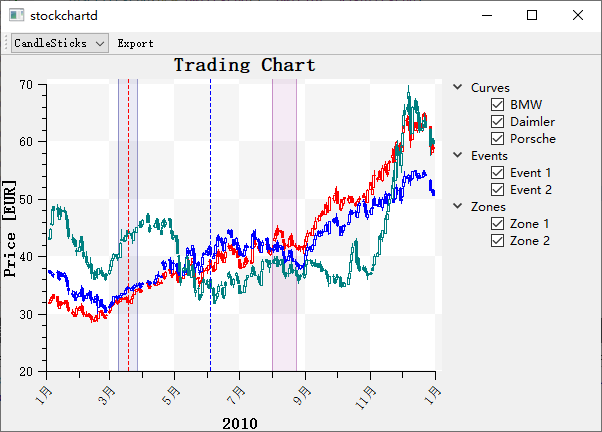
The stock K-line chart example is located at: examples/2D/stockchart. Screenshot below:
1. Basic K-Line Chart
A trading curve is configured through setSymbolStyle() (Bar / CandleStick, default CandleStick): setSymbolBrush() assigns the body fill per price Direction (Increasing / Decreasing), and setSymbolExtent() sets the body width in scale units. Data is fed to setSamples() as QwtOHLCSample values (time, open, high, low, close). The example below renders four daily candles on a plot:
1 2 3 4 5 6 7 8 9 10 11 12 13 14 15 16 17 18 19 20 21 22 23 24 25 26 27 28 29 30 31 32 33 34 35 | |
2. K-Line Style Configuration
Candlestick Style
In CandleStick mode the box between open and close is filled according to the price direction: setSymbolBrush() takes a Direction (Increasing when the close is above the open, Decreasing otherwise) plus a brush. The outline pen is set globally via setSymbolPen(), which has no per-direction overload, and a flat sample (open == close) is painted with the Decreasing brush because there is no separate neutral state. The snippet below assigns distinct fills for up and down days:
1 2 3 4 5 6 7 8 | |
American Bar Style
Bar style draws only the vertical line spanning low to high, with small horizontal ticks marking the open (left) and close (right) prices; no filled body is drawn. Switch to it with setSymbolStyle(QwtPlotTradingCurve::Bar):
1 2 3 4 | |
3. Body Width Settings
Body width is governed by three methods: setSymbolExtent() defines the width in scale (coordinate) units, while setMinSymbolWidth() and setMaxSymbolWidth() clamp the rendered width in pixels. The snippet below combines all three:
1 2 3 4 5 6 7 8 | |
4. Data Settings
setSamples() is overloaded to accept either a QVector<QwtOHLCSample>, where each sample stores time, open, high, low and close, or a QwtSeriesData<QwtOHLCSample>* for custom data sources. Both forms are shown below:
1 2 3 4 5 6 7 8 9 10 11 | |
5. Combining with Volume Chart
Volume is typically overlaid as a QwtPlotBarChart attached to the same plot: its setSamples() accepts a QVector<double> of per-bar values and setBrush() styles the columns. The example below adds a gray volume series beneath the candles:
1 2 3 4 5 6 7 8 | |
6. Adding Moving Averages
Moving averages are ordinary QwtPlotCurve items layered on top of the candles, each with its own pen and sample array. The example below overlays 5-day and 10-day moving averages:
1 2 3 4 5 6 7 8 9 10 11 12 13 | |
Core Methods Summary
| Method | Description |
|---|---|
setSamples() |
Set K-line data (QVector<QwtOHLCSample> or QwtSeriesData<QwtOHLCSample>*) |
setSymbolStyle() |
Set K-line symbol style (Bar / CandleStick) |
setSymbolBrush() |
Set the fill brush for one direction (Increasing / Decreasing) |
setSymbolPen() |
Set the symbol outline pen (one global pen, shared by both directions) |
setSymbolExtent() |
Set body width in scale units |
setMinSymbolWidth() |
Set minimum width (pixels) |
setMaxSymbolWidth() |
Set maximum width (pixels) |
Up/Down State Determination
| State | Enum Value | Condition |
|---|---|---|
| Up | Increasing |
close > open |
| Down | Decreasing |
close <= open (a flat close == open uses the Decreasing brush) |
Tip — Color Conventions
- Chinese market: Red for up, green for down
- International market: Green for up, red for down
- Colors can be adjusted as needed
Example — Related Examples
- Stock chart demo:
examples/2D/stockchart