Axis Widget - QwtScaleWidget
QwtScaleWidget is the display widget for axes, responsible for drawing tick marks, tick labels, and axis titles. It is a fundamental component of the QwtPlot axis system and also supports standalone use.
Main Features
- Major ticks, minor ticks and tick labels
- Axis title text
- Axis titles painted horizontally below or above the scale widget (
TitleOutside) - Mouse drag panning and scroll wheel zooming (new in Qwt7)
- Color bars for spectrograms
- Customizable tick length, label font and other style details
Basic Concepts
Axis Position
Qwt uses the QwtAxis::Position enum to identify axis positions:
| Position | Enum Value | Description |
|---|---|---|
| Bottom X-axis | QwtAxis::XBottom |
Bottom horizontal axis |
| Top X-axis | QwtAxis::XTop |
Top horizontal axis |
| Left Y-axis | QwtAxis::YLeft |
Left vertical axis |
| Right Y-axis | QwtAxis::YRight |
Right vertical axis |
Axis Structure
An axis is composed of the backbone with its tick marks, the tick labels beside them, and the axis title; ticks come in two lengths - long major ticks and short minor ticks. The sketch below shows the structure of a horizontal axis:
1 2 3 4 5 6 7 | |
Usage
1. Setting Axes via QwtPlot
Most axis settings go through QwtPlot directly: setAxisTitle() assigns the title, setAxisScale() fixes the value range, and setAxisVisible() shows or hides an axis, each addressed by a QwtAxis::Position. The example below configures the bottom X and left Y axes:
1 2 3 4 5 6 7 8 9 10 11 12 13 14 15 16 17 | |
2. Getting Axis Widget
For finer control, fetch the underlying widget of an axis with QwtPlot::axisWidget(); it is a QwtScaleWidget, so setFont() styles the tick labels, setTitle() accepts a styled QwtText, and setScaleColor()/setTextColor() set the colors of the backbone/ticks and of the tick labels. The example below customizes the bottom axis widget:
1 2 3 4 5 6 7 8 9 10 11 12 13 14 15 | |
3. Built-in Interaction Features (New in Qwt7)
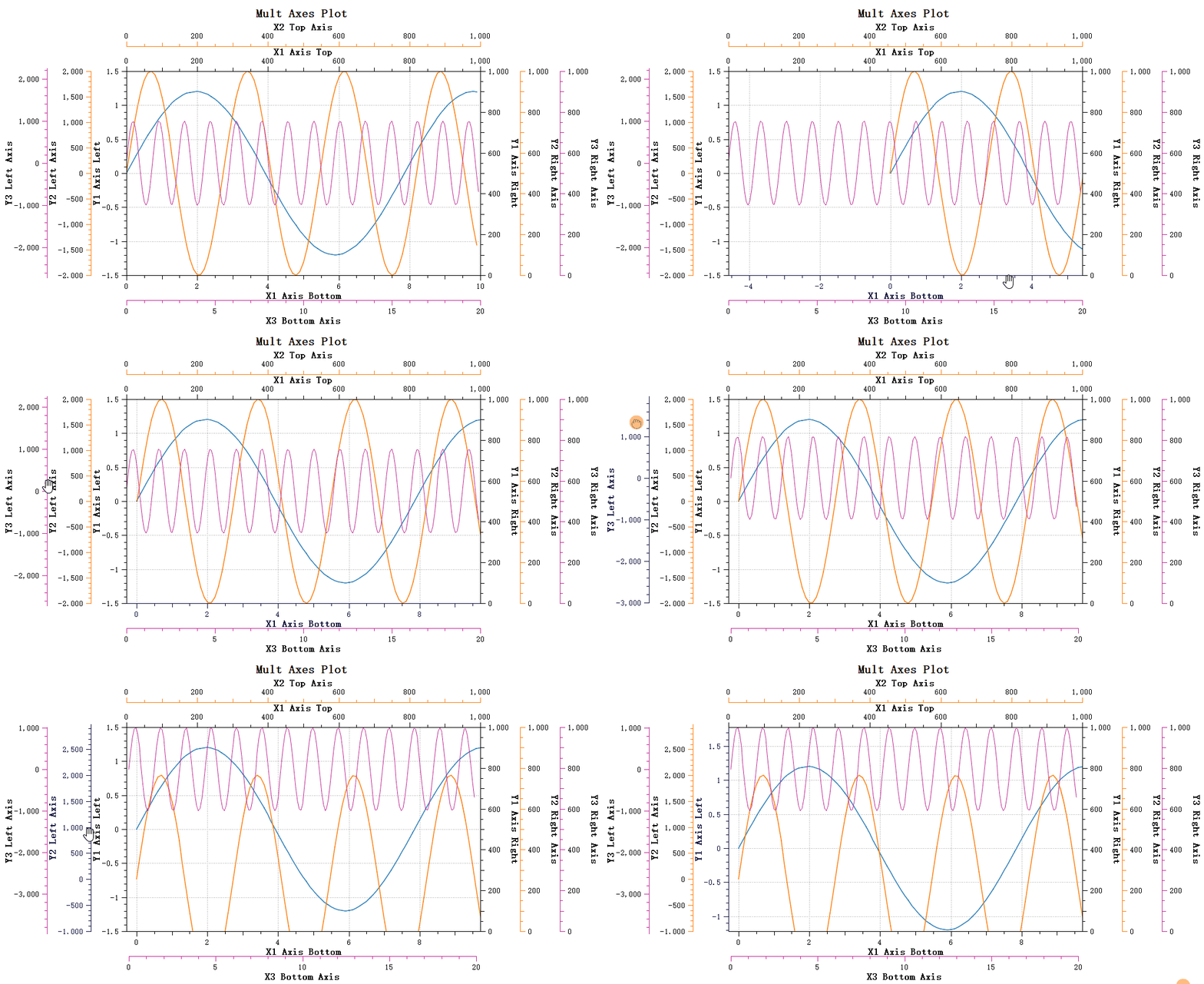
Qwt 7.0 adds built-in axis interaction: after an axis is activated by clicking it, dragging pans and the mouse wheel zooms the corresponding axis scale. The features are enabled as flags with setBuildinActions() (ActionNone, ActionClickPan, ActionWheelZoom, ActionAll):
1 2 3 4 5 6 7 8 9 10 11 12 13 14 | |
Panning effect:
Zooming effect:
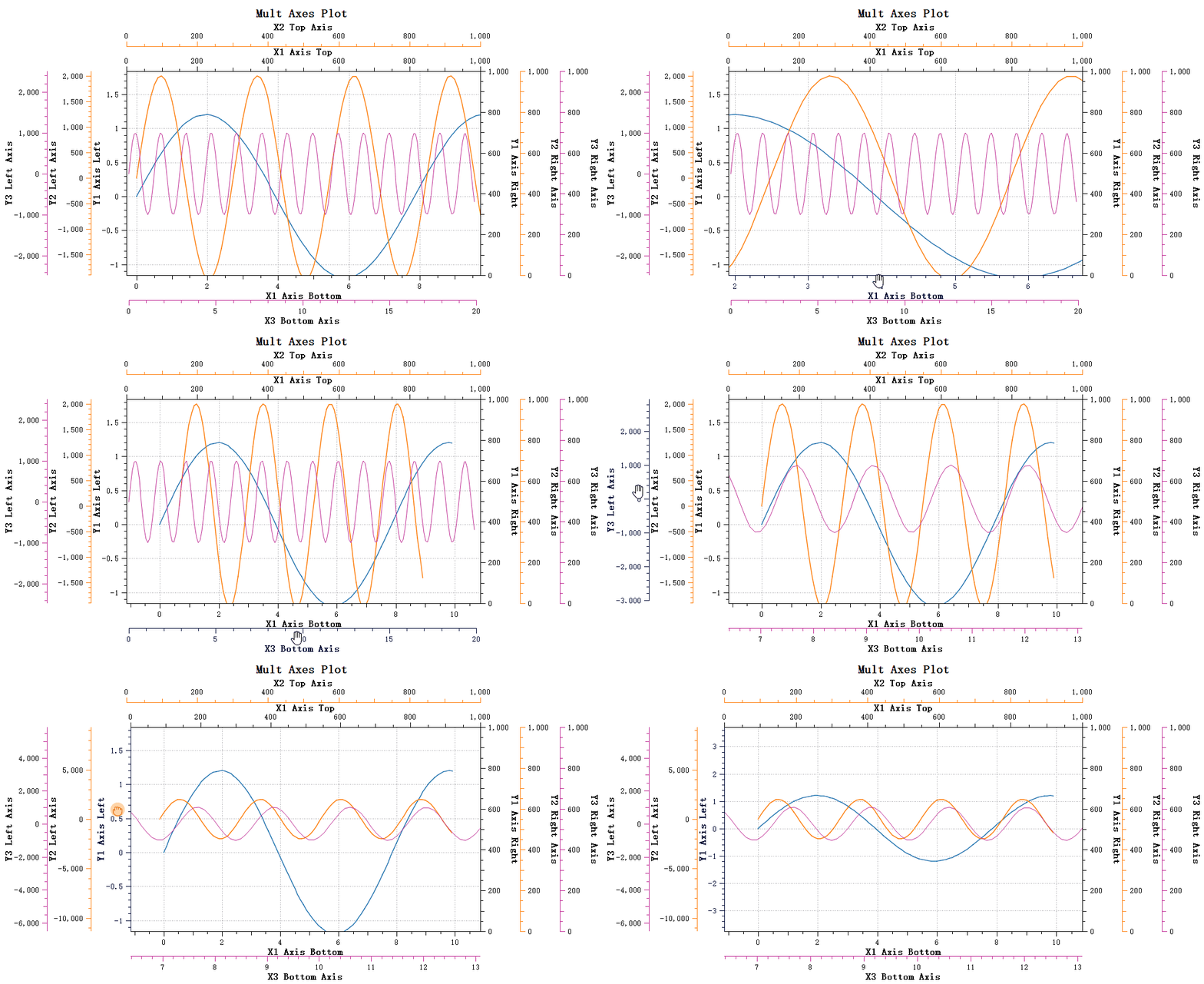
For detailed axis interaction documentation, refer to: Axis Interaction Actions
4. Color Bar Display
Used for scenarios requiring color mapping such as spectrograms. There is no separate color bar position setter - the side where the bar is drawn follows the alignment of the scale draw:
1 2 3 4 5 6 7 8 9 | |
5. Tick Drawing Style
The tick mark appearance is not configured on QwtScaleWidget itself: the direction (outside/inside the canvas) is a QwtPlot setting per axis, while tick lengths and the tick-to-label spacing belong to the QwtScaleDraw object returned by scaleWidget->scaleDraw(). The snippet below shows these settings:
1 2 3 4 5 6 7 8 9 10 11 12 | |
6. Tick Label Formatting
Customize tick label format by setting QwtScaleDraw:
1 2 3 4 5 6 7 8 9 10 11 12 13 14 15 | |
7. Setting Tick Division
Tick divisions can either be computed automatically by the scale engine via QwtPlot::setAxisAutoScale(), or built by hand: fill a QwtScaleDiv with an interval and an explicit list of QwtScaleDiv::MajorTick positions, then hand it to the axis with QwtPlot::setAxisScaleDiv(). The example below shows both modes:
1 2 3 4 5 6 7 8 9 10 11 12 13 14 | |
8. Outside Axis Titles (TitleOutside)
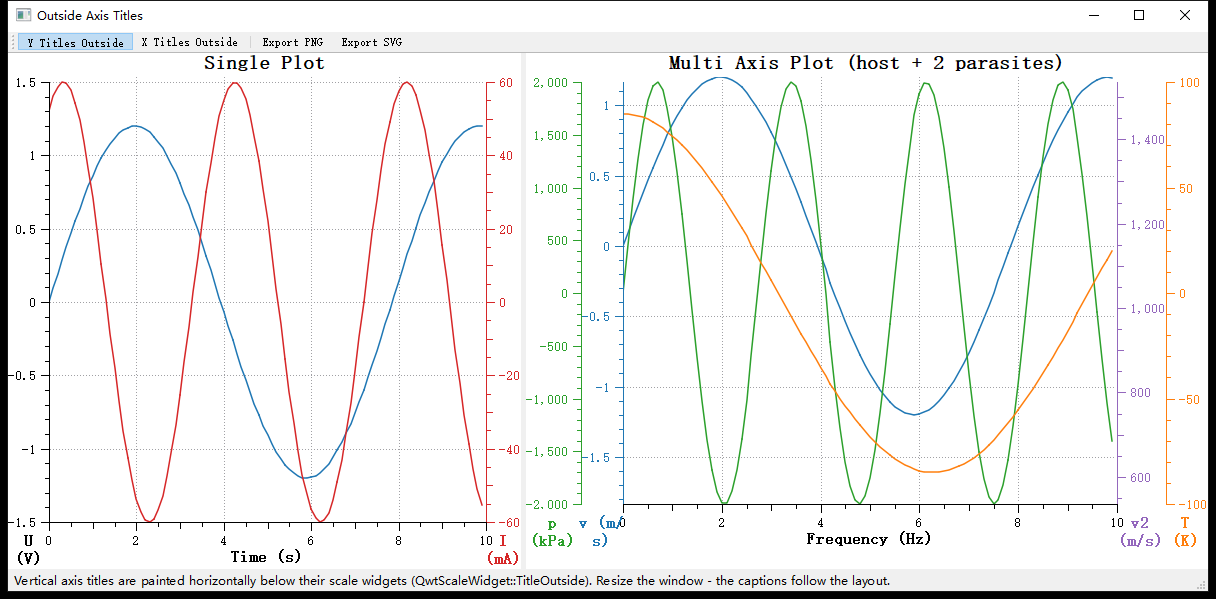
By default the axis title is painted inside the scale widget (rotated for vertical axes). With QwtScaleWidget::TitleOutside the title is painted as horizontal text into a caption strip outside the scale widget instead: directly below it for YLeft/YRight/XBottom and above it for XTop. The plot layout reserves the strip automatically and keeps it attached to the scale widget through every relayout (window resize, axis visibility or scale changes, ...).
1 2 3 4 5 6 7 8 9 10 11 12 13 14 15 16 | |
Effect (from the example examples/2D/outsideTitle; left: single plot, right: multi axis plot with parasite layers, every layer title below its own axis column):
Behavior notes
- In
TitleOutsidemode the title no longer contributes to the axis dimension; the layout reserves a caption strip in the adjacent band instead.QwtPlotLayout::scaleCaptionRect()exposes the geometry of that strip. - Multi axis plots (see Parasite Axes): all layers share the bottom band. The host layout aggregates the caption demands of every layer and splits the band between the captions at the mid points of the neighboring axis columns, so captions stay below their own column and never overlap.
- The horizontal alignment of the caption text follows
setTitleAlignment();setTitlePosition()(position along the backbone) only applies toTitleInside. - Caption text wraps when it is wider than its region, so prefer short titles for narrow multi axis columns.
QwtPlotRendererincludes the captions in PNG/SVG/PDF exports (renderScaleCaption()).
Core Method Summary
QwtPlot Axis Methods
| Method | Description |
|---|---|
setAxisTitle() |
Set axis title |
setAxisTitlePlacement() |
Set title placement (inside the widget or outside as caption) |
setAxisScale() |
Set axis range |
setAxisAutoScale() |
Enable auto scaling |
setAxisVisible() |
Set axis visibility |
setAxisTickDirection() |
Set tick direction (TickOutside/TickInside) |
axisWidget() |
Get axis widget |
setAxisMaxMajor() |
Set maximum number of major ticks |
setAxisMaxMinor() |
Set maximum number of minor ticks |
QwtScaleWidget Methods
| Method | Description |
|---|---|
setTitle() |
Set axis title |
setTitlePlacement() |
Set title placement (TitleInside/TitleOutside) |
setFont() |
Set label font |
setScaleColor() / setTextColor() |
Set backbone/tick and label colors |
setBuildinActions() |
Enable built-in interaction (ActionClickPan/ActionWheelZoom/ActionAll) |
setColorBarEnabled() |
Enable color bar |
setColorMap() |
Set color map |
scaleDraw() |
Access the scale draw (tick lengths via setTickLength()) |
setScaleDraw() |
Set scale draw object |
Tip — Axis Configuration Recommendations
- For numeric axes, automatic scaling meets most needs
- For time axes, use
QwtDateScaleEngine- For logarithmic axes, use
QwtLogScaleEngineExample — Related Examples
- Axis interaction: Multiple examples in
examples/2D- Outside axis titles:
examples/2D/outsideTitle- Color bar:
examples/2D/spectrogram- Tick demo:
playground/scaleengine