Pixel Snapping in the Curve Pipeline: QwtPointMapper::RoundPoints and the Dense-Curve Staircase¶
Abstract — Two samplings of the same smooth curve should draw the same picture. In QWT they did not: with antialiasing enabled, a spectral line stored with 200,000 samples showed a visible staircase in a 14-unit zoom, while the same line shape stored with 18,600 samples was smooth. The effect traces back to the Qwt 6.2 base.
QwtPainter::roundingAlignment()defaults totrue;QwtPainter::isAligning()only asks whether the paint engine floors coordinates to integers, never whether the painter antialiases; andQwtPlotCurve::drawLines()therefore switched onQwtPointMapper::RoundPointsfor an antialiased widget canvas. Snapping is formalized below and shown to erase the sub-pixel geometry the rasterizer needs for coverage. QWT 7 fixes the problem in two layers: the 7.x series adds reduction algorithms that keep sub-pixel coordinates (pixel column, true LTTB, MinMax buckets, adaptive), and the policy introduced after v7.5.1 aligns to pixels only when the painter does not antialias, withWeedOutIntermediatePointsdecoupled fromRoundPoints. Re-running the demo with the library default now reproduces the alignment-off blend ratio exactly (0.5470 at the dense peak shoulder, against 0.284 with snapping); the sparse peak measures 0.568 in both builds, andFilterPointsAggressivestill collapses 199,751 vertices to 7,384. The cost of snapping is measured per reduction path on one million samples, and its geometric and visual signatures are quantified.Abstract — Key results
RoundPointscomputesround(p * DPR) / DPRper coordinate. At device pixel ratio (DPR) 1 this quantizes to whole pixels; at DPR 2 the step is half a logical unit, which is still one whole device pixel.- On one million samples with no reduction the flag costs +35 % mapper time (14.2 ms to 19.2 ms) and produces no fewer vertices; it is not a performance optimization by itself.
- After LTTB, MinMax or Adaptive reduction the cost is within measurement noise (−1 % to +2 %), because only the few thousand selected vertices are rounded.
- Snapping turns 99.9 % of the mapped polyline into exactly horizontal or vertical segments on a smooth dense signal; without snapping the figure is 0 %. The staircase is a property of the geometry handed to
QPainter, not of the rasterizer.- In rendered images the antialiasing blend ratio of the dense peak shoulder falls from 0.547 (snapping off) to 0.284 (snapping on). The sparse peak stays at 0.568 in both configurations: it never had enough samples per column to trigger the effect.
- QWT 7 policy, implemented after v7.5.1: align only when the painter does not antialias. Antialiased raster, PDF and SVG output keep sub-pixel coordinates.
1. Introduction¶
1.1 The observation¶
The demonstration program examples/2D/downsample_demo renders two synthetic spectra built from the same line shape: one stored with about 200,000 samples over the full range, one with about 18,600. In the zoomed view used below (wavelength 858 to 872) the dense dataset contributes about 3,500 samples and the sparse one about 330. Both are drawn with QwtPlotCurve::RenderAntialiased enabled, both without point reduction, into a 1400 x 700 canvas.
The dense spectrum shows a staircase: every few pixel rows the drawn edge jumps sideways by one pixel, and the diagonal flanks look like a staircase drawn with a one-pixel pen. The sparse spectrum, sampled ten times more coarsely, is smooth. The counter-intuitive part is the direction: more data produces a worse picture.
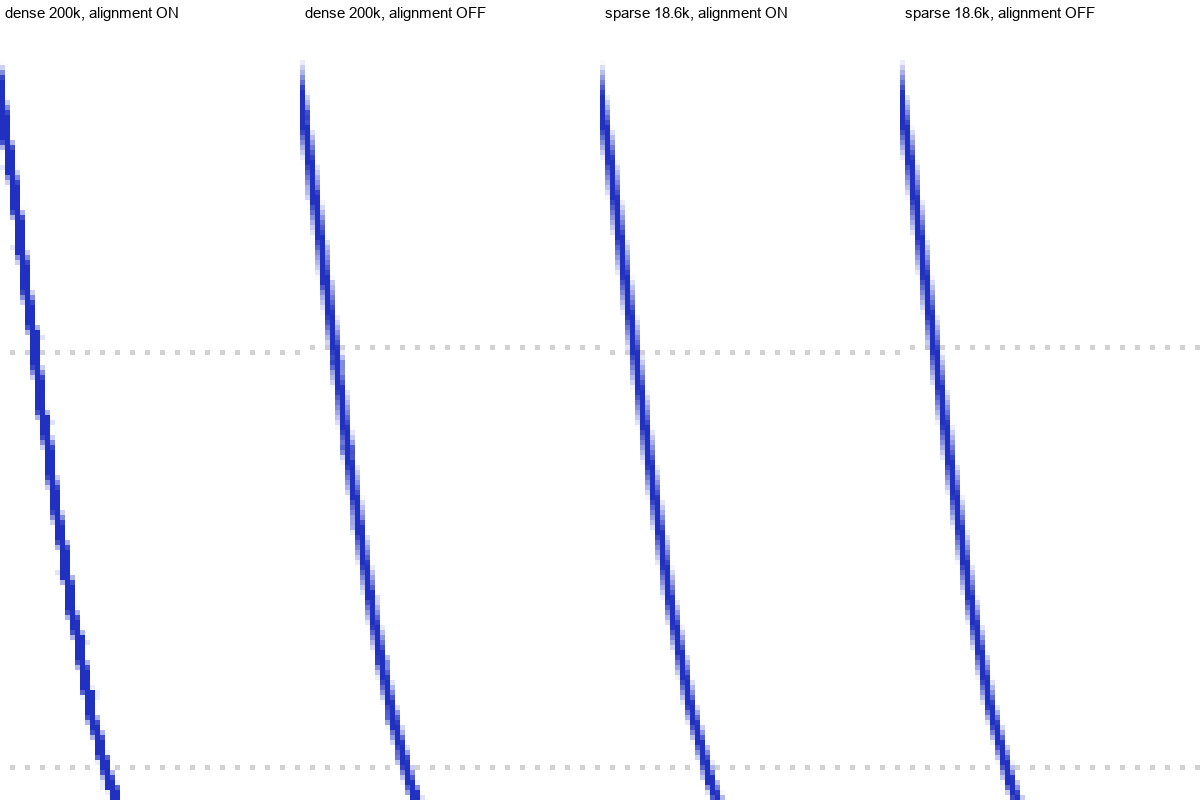
Figure 1 — The rising flank of the tallest peak, 5x nearest-neighbour magnification. Left to right: dense samples with pixel alignment on, dense with alignment off, sparse with alignment on, sparse with alignment off. Antialiasing is enabled in all four renders; the axis grid is visible behind the curve.
The immediate suspicion, that antialiasing is off, is wrong. Figure 1 shows blend pixels along every edge in all four panels. What changes between the panels is the geometry the rasterizer receives.
1.2 Why QWT 6 renders it this way¶
The code path behind the staircase comes from Qwt 6.2, the upstream release this branch started from. Three decisions combine.
The first is the default of the global switch (src/plot/qwt_painter.cpp):
1 | |
The second is the condition inside QwtPainter::isAligning(). It returns false for PDF, SVG and unknown paint engines, and for painters with a rotating or scaling transform. Integer-flooring raster engines pass, and the function never inspects QPainter::Antialiasing:
1 2 3 | |
The third is the wiring in QwtPlotCurve::drawLines(): when the combined switch is on, the curve enables RoundPoints, and with FilterPointsAggressive also WeedOutIntermediatePoints:
1 2 3 4 5 6 7 | |
For the rendering stack Qwt 6 targeted, this was a sensible default. On an integer-flooring engine without antialiasing, snapped coordinates keep one-pixel pens, grid lines and markers sharp, and they give WeedOutPoints its definition: samples that land in the same device pixel collapse into one vertex, which is what made dense curves affordable to draw. Qwt 6 had exactly two reduction attributes, FilterPoints and FilterPointsAggressive, and both are defined on snapped coordinates. No algorithm in the library preserved fractional coordinates, so the snapping step could not damage anything upstream. Antialiasing was treated as a render hint that changes coverage, not as a change to coordinate semantics.
On an antialiased canvas the same decision has the opposite effect. The rasterizer receives a polyline whose vertices sit on the pixel lattice, and on a shallow flank the best it can draw is a sequence of horizontal runs and vertical jumps (§2.2). There was no per-painter escape hatch either. Turning the global switch off smoothed the curve, but it also removed hairline crispness from non-antialiased output and made the aggressive weeding path unreachable.
That wiring survived into QWT 7 up to v7.5.1. Sections 2 to 6 measure what it costs in geometry and time; Section 7 describes how QWT 7 changes it.
1.3 Scope and method¶
Five questions frame the analysis:
- What exactly does
RoundPointsdo, and where is it enabled? - Why does it hurt a dense antialiased curve and not a sparse one?
- What does it cost, per reduction path, in the mapper?
- Why did QWT 6 behave this way, and what does QWT 7 change?
- Which flag combinations should applications use?
The mapper and render measurements use the library at v7.5.0 with Qt 6.7.3, a Release build with MSVC 2019 (/O2 /MD /std:c++17), on an Intel Core i7-8700 at 3.20 GHz under Windows 10 x64. Absolute times vary with hardware; the relative ordering and the ratios are stable. All figures and tables are regenerated by docs/assets/algorithms/roundpoints_experiment.py from two raw inputs: roundpoints_results.csv (mapper timings and polyline geometry, produced by roundpoints_bench.cpp) and roundpoints_render_metrics.csv (image metrics, produced by roundpoints_render_metrics.py). The rendered batches come from examples/2D/downsample_demo --batch, once with the pre-fix library default and once with --noround. The alignment policy that fixes the behaviour postdates v7.5.1; the numbers in Sections 4 to 6 describe the pre-fix library, and Section 7.4 re-runs the same batch on the fixed build.
1.4 Relation to the downsampling report¶
The companion report Downsampling Curves for the Screen treats the problem "too many points for the pixel columns" and derives the bucket algorithms that reduce N samples to roughly 4W vertices. The opposite end of the same pipeline is treated here: what happens to the vertices after reduction, when they are converted from data coordinates to paint coordinates. The two interact, since a reduction algorithm can only preserve what the mapper does not subsequently destroy, but they are separate stages with separate switches, and conflating them causes confusion.
2. The snapping operation¶
2.1 Definition¶
QwtPointMapper maps data coordinates to paint coordinates through the axis scale maps, then optionally applies a rounding functor. The functor is defined in src/plot/qwt_point_mapper.cpp:
1 2 3 4 5 6 7 8 9 | |
With ratio set to the device pixel ratio of the target paint device, the operation per coordinate is
where \(\operatorname{round}\) is round-half-away-from-zero as implemented by qwtRoundValueF(). The output type stays QPolygonF: the coordinates remain floating point, they are merely constrained to the lattice \(\frac{1}{\rho}\mathbb{Z}\).
Proposition 1 (device pixel lattice). For any \(\rho > 0\), \(x_{\text{snapped}} \cdot \rho \in \mathbb{Z}\). That is, a snapped coordinate lands exactly on a device pixel boundary regardless of DPR.
Proof. By construction \(x_{\text{snapped}} = k/\rho\) with \(k = \operatorname{round}(x_{\text{paint}}\rho) \in \mathbb{Z}\), hence \(x_{\text{snapped}}\rho = k\). \(\square\)
At \(\rho = 1\) the lattice is the integer grid, the familiar case. At \(\rho = 2\) the lattice is the half-integer grid in logical units, which is the integer grid in device pixels, so a vertex can sit between two logical units but never between two device pixels. Figure 2 illustrates the two cases.
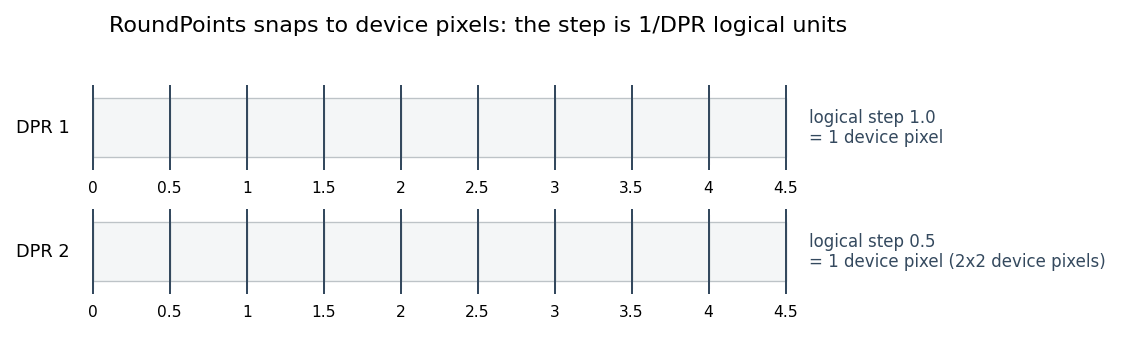
Figure 2 — RoundPoints snaps to device pixels. At DPR 1 the logical step equals one device pixel; at DPR 2 the logical step halves, so a snapped vertex may sit at a half-integer logical coordinate but still on a device pixel boundary.
2.2 Effect on a polyline¶
Consider a smooth curve sampled far more densely than the pixel grid. Its mapped vertices form a sequence whose consecutive differences are much smaller than one pixel. Snapping each vertex independently has two consequences:
- Vertex collapse. Several consecutive samples map into the same lattice cell and become the same point. The polyline loses vertices; this is the mechanism
WeedOutPointsrelies on. - Direction quantization. Consecutive surviving vertices differ by integer multiples of \(1/\rho\). On a shallow flank, where the true curve rises by a fraction of a pixel per column, the snapped polyline must alternate between horizontal runs (constant \(y\)) and vertical jumps (constant \(x\)). The result is a staircase.
Figure 3 shows the second consequence in isolation, on a synthetic line that rises 0.2 pixel rows per column.
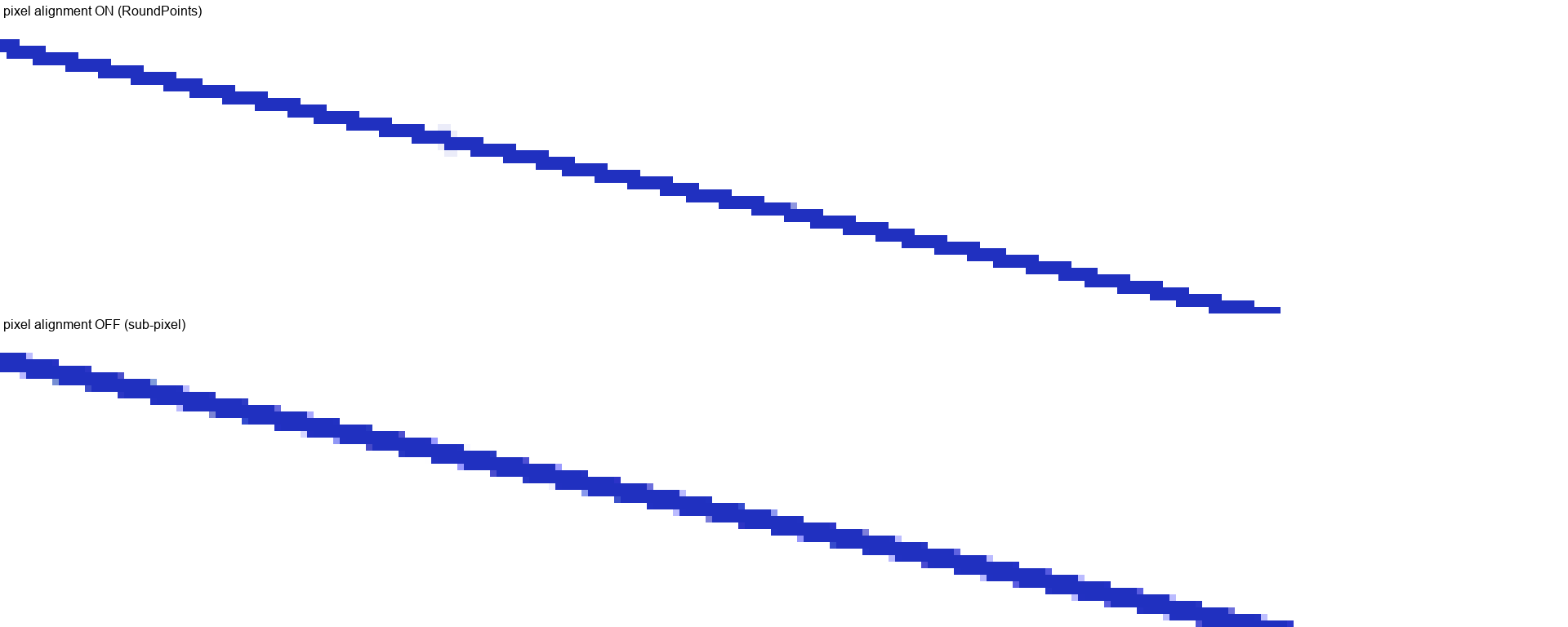
Figure 3 — A straight line rising 0.2 pixel rows per column, rendered at 8x magnification. Top: with RoundPoints, the integer grid forces a one-pixel step every five columns. Bottom: without RoundPoints, the line keeps its sub-pixel slope and the antialiasing rasterizer spreads each edge over two rows.
The staircase is not a rendering artifact in the sense of a bug in the rasterizer. It is the correct rasterization of a polyline that genuinely consists of horizontal and vertical segments. The information lost is the sub-pixel offset of each vertex, and no downstream stage can recover it: antialiasing computes coverage from the geometry it is given.
Proposition 2 (irrecoverability). Let \(L\) be a polyline with vertices \(v_i \in \mathbb{R}^2\) and let \(L'\) be the same polyline with every vertex snapped to the lattice \(\frac{1}{\rho}\mathbb{Z}^2\). Any rasterizer that is a function of the polyline geometry alone produces \(\mathcal{R}(L')\), and \(\mathcal{R}(L') = \mathcal{R}(L)\) only if \(L\) and \(L'\) coincide on the covered pixel columns.
Proof. The rasterizer has no access to \(L\) once it receives \(L'\); it is a pure function of its input. Distinct inputs may of course rasterize identically when the difference is below the coverage resolution, but a difference of up to \(1/(2\rho)\) per vertex accumulates along a shallow flank and exceeds it. \(\square\)
The practical form of Proposition 2: once RoundPoints is on, enabling antialiasing cannot restore the smooth flank. That was the combination QWT 6 shipped, and QWT 7 carried it through v7.5.1.
2.3 Where snapping is enabled¶
QwtPlotCurve::drawLines() (src/plot/qwt_plot_curve.cpp) reads two independent switches:
1 2 | |
QwtPainter::roundingAlignment(painter) is the conjunction of the global user switch (QwtPainter::setRoundingAlignment(), default true) and QwtPainter::isAligning(painter). The latter returns false for PDF, SVG, unknown paint engines, and for painters with a rotating or scaling transformation. It does not inspect QPainter::Antialiasing, so a plain widget canvas with antialiasing enabled takes the aligning branch shown in §1.2.
The aggressive weeding flag is set inside that branch as well. The detail matters in §7.3: for the pre-fix library, FilterPointsAggressive did nothing at all unless RoundPoints was on, because the mapper also guards its quad path behind the same flag (toPolygonF(), src/plot/qwt_point_mapper.cpp).
The same global switch is read by drawDots(), drawSteps(), drawSticks(), drawSymbols() and several other plot items (qwt_plot_intervalcurve.cpp, qwt_plot_boxchart.cpp, qwt_plot_marker.cpp, qwt_plot_shapeitem.cpp, qwt_plot_grid.cpp), so turning it off is an application-wide decision, not a per-curve one.
3. Why density decides¶
The staircase amplitude is bounded by half a device pixel per vertex, but its visibility depends on how many vertices share a pixel column and on the slope of the curve at that point.
3.1 Samples per column¶
Let \(n\) be the number of visible samples, \(W\) the canvas width in device pixels. The mean occupancy is \(\lambda = n / W\). Three regimes follow:
- \(\lambda \ll 1\): most columns hold no sample. The polyline is a long chord from one sample to the next; there is no vertex inside the column to snap, so the drawn line is a straight interpolation with correct sub-pixel endpoints. No staircase.
- \(\lambda \approx 1\): one vertex per column. Snapping moves it within its cell, but the polyline still descends one column per vertex, so the segments remain diagonal. The staircase is mild.
- \(\lambda \gg 1\): many vertices per column. The snapped polyline can only move vertically inside the column and horizontally between columns; the column becomes a vertical stroke plus a one-pixel horizontal tread. Visible staircase.
The demo's dense spectrum has \(\lambda \approx 3500/1300 \approx 2.7\) samples per column in the zoomed window; the sparse one has \(\lambda \approx 330/1300 \approx 0.25\). The difference in the renders is the difference between the onset of the third regime and the first regime. The mapper benchmark of Section 4 uses a deliberately extreme density (\(\lambda \approx 833\)) so that the transform cost is measurable; the geometric mechanism is the same at \(\lambda = 2.7\), as the rendered blend-ratio experiment in Section 6 shows.
3.2 Slope¶
A staircase needs a direction to quantize. On a near-vertical flank the snapped segments are mostly vertical anyway, and the treads are one pixel wide; on a near-horizontal flank the treads stretch over many columns and become conspicuous. This is why the effect is easiest to photograph on the shoulder of a peak, where the curve is shallow, and hard to see at the apex.
The synthetic render of Figure 3 uses a deliberately shallow slope of 0.2 rows per column, which yields five-column treads. The real spectrum of Figure 1 has local slopes between 1 and 5 rows per column on the upper flank, which yields one- to two-column treads, still visible at normal magnification as the figure shows.
3.3 What the antialiasing rasterizer does with each case¶
Qt's raster engine computes per-pixel coverage from the distance between the pixel center and the polygon edge. A sub-pixel vertex offset changes that distance by a fraction of a pixel and therefore changes the blend weight of the two adjacent rows. A snapped vertex puts the edge exactly on a pixel boundary, so the coverage of one row is 1 and of the other 0, with no blend pixel at all. The blend ratio is therefore a direct, monotone indicator of how much sub-pixel geometry survives, which is what the experiments measure.
4. Cost in the mapper¶
4.1 Benchmark protocol¶
roundpoints_bench.cpp drives QwtPointMapper::toPolygonF() directly on a one-million-sample signal, a 1200 x 800 canvas and a linear x map spanning the full data range. Seven flag configurations cover every reduction path. For each, the mapper runs with and without RoundPoints, at DPR 1 and DPR 2. Each configuration is calibrated to at least 20 ms per timed run, then measured with three warm-up and nine timed calls; the median is reported. The mapper only is timed (QPainter::drawPolyline() is excluded), so the numbers isolate the transform and reduction work.
The signal is two long-period sines, dense enough to exercise every reduction path (\(\lambda \approx 833\) samples per column) while remaining smooth at canvas scale.
4.2 Results¶
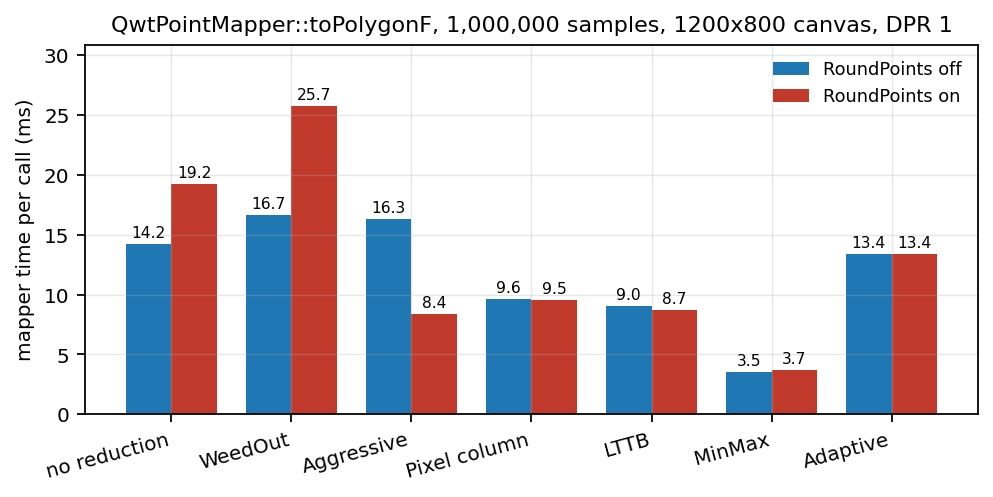
Figure 4 — QwtPointMapper::toPolygonF() time per call on one million samples, 1200 x 800 canvas, DPR 1, with and without RoundPoints.
| Path | off (ms) | on (ms) | change | vertices off → on |
|---|---|---|---|---|
| no reduction | 14.21 | 19.22 | +35 % | 1,000,000 → 1,000,000 |
WeedOutPoints |
16.65 | 25.71 | +54 % | 1,000,000 → 3,898 |
WeedOutIntermediatePoints |
16.29 | 8.42 | −48 % | 1,000,000 → 1,986 |
PixelColumnReduce |
9.61 | 9.51 | −1 % | 2,402 → 2,402 |
LTTBReduce |
9.01 | 8.74 | −3 % | 4,804 → 3,166 |
MinMaxReduce |
3.50 | 3.68 | +5 % | 4,804 → 4,465 |
AdaptiveColumnReduce |
13.37 | 13.41 | +0.3 % | 4,181 → 3,749 |
Medians of nine timed runs; the minimum-based ratios are slightly larger (+41 % for no reduction, +65 % for WeedOutPoints) because the flag's extra work is easier to see on the fastest runs.
The first row is the pure cost of the flag: one extra multiply, round and divide per coordinate, over one million vertices, with no reduction in output size. It is a 35–41 % penalty on the mapper for a dense unreduced curve; the earlier measurement that motivated this report, taken with a different timing protocol, saw +51 %.
The WeedOutPoints row is the flag doing its intended job: 1,000,000 vertices collapse to 3,898 because samples sharing a device pixel are duplicates once snapped. The mapper itself is slower (it still touches every input), but the downstream drawing cost drops by two orders of magnitude in vertex count. This is the trade the flag was designed for.
The WeedOutIntermediatePoints row must be read carefully: in the pre-fix library, without RoundPoints the aggressive path is not entered at all (toPolygonF() guards it inside the RoundPoints branch), so the two columns compare two different algorithms, not one algorithm with and without rounding. Section 7.3 removes that coupling.
The four modern reduction paths (pixel column, LTTB, MinMax, Adaptive) show changes between −3 % and +5 %, i.e. within or barely above run-to-run noise. They select a few thousand vertices and round only those; the scan over the million input samples dominates.
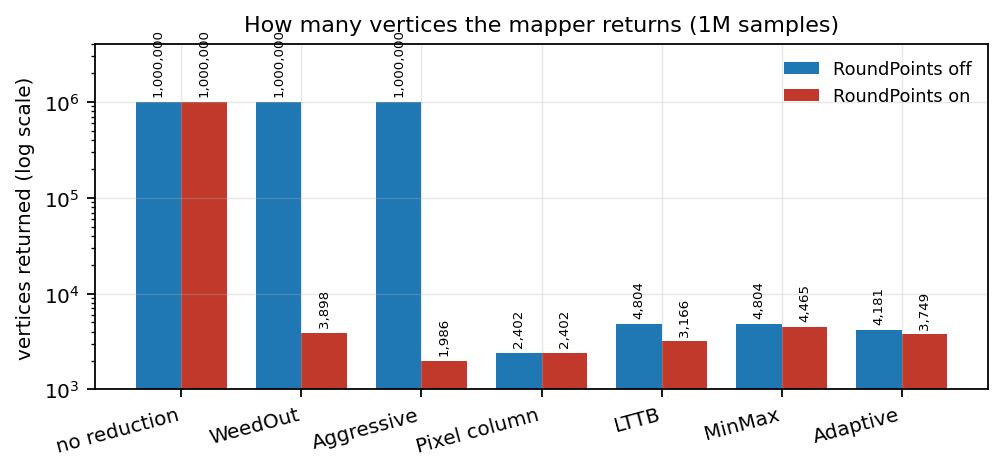
Figure 5 — Vertices returned by the mapper. Note the logarithmic axis: without rounding, the unreduced and deduplicated paths return one vertex per sample.
4.3 The DPR dimension¶
At DPR 2 the lattice is finer in logical units but identical in device pixels, so the number of surviving vertices after snapping is larger (for WeedOutPoints, 7,783 instead of 3,898) and the time penalty is unchanged. No new effect appears; the flag simply operates on a finer grid. The DPR-aware behaviour was itself a fix (commit 9ce35af, "make QwtPointMapper pixel units honor the device pixel ratio"), before which pixel-column algorithms used logical units and behaved differently on HiDPI screens.
4.4 Scaling with sample count¶
| Samples | off (ms) | on (ms) | ratio |
|---|---|---|---|
| 100,000 | 1.31 | 1.90 | 1.45 |
| 250,000 | 3.31 | 4.74 | 1.43 |
| 500,000 | 6.56 | 9.93 | 1.51 |
| 1,000,000 | 13.62 | 19.59 | 1.44 |
| 2,000,000 | 27.46 | 39.52 | 1.44 |
The ratio is flat, confirming a per-vertex constant cost rather than a cache or allocation effect. Both curves are linear in \(n\), as expected for a single pass.
5. Geometric signature¶
The mapper output can be inspected without rendering: count how many segments of the returned polyline are exactly horizontal (dy == 0.0) or exactly vertical (dx == 0.0). Without snapping, a smooth curve mapped to paint coordinates has no exactly axis-aligned segment, because floating-point values essentially never coincide. With snapping, the coordinates are integers (at DPR 1) and the segments are axis-aligned by construction.
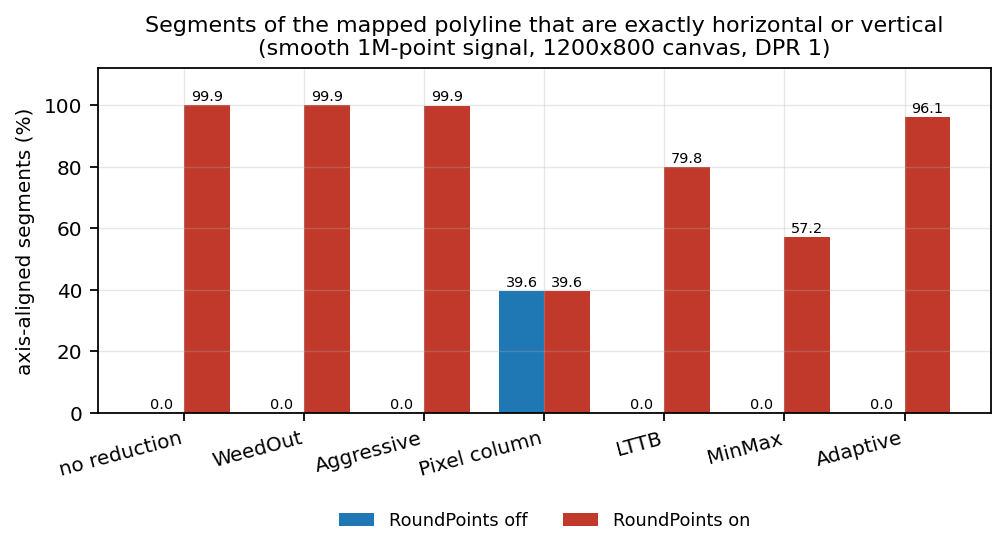
Figure 6 — Fraction of mapped segments that are exactly horizontal or vertical, one million samples, smooth signal.
| Path | off | on |
|---|---|---|
| no reduction | 0.0 % | 99.9 % |
WeedOutPoints |
0.0 % | 99.9 % |
WeedOutIntermediatePoints |
0.0 % | 99.9 % |
PixelColumnReduce |
39.6 % | 39.6 % |
LTTBReduce |
0.0 % | 79.8 % |
MinMaxReduce |
0.0 % | 57.2 % |
AdaptiveColumnReduce |
0.0 % | 96.1 % |
Two readings matter. First, the unreduced and deduplicated paths become essentially entirely axis-aligned; the polyline is no longer a curve in any geometric sense, but a sequence of horizontal and vertical steps. Second, PixelColumnReduce is unaffected by the flag: it emits a min/max envelope per column and its own output already contains the horizontal connections, which is why the pixel-column algorithm shows a staircase of its own even with rounding off.
The reduction algorithms sit in between because they keep a small number of real samples: LTTB picks one sample per bucket, MinMax two, Adaptive a tolerance-selected subset. When those few vertices are snapped, most of their connecting segments become axis-aligned, but the vertices themselves are still distributed along the curve, so the result is a coarser staircase rather than a full one.
6. Visual experiment¶
6.1 Setup¶
examples/2D/downsample_demo --batch <dir> renders a matrix of dataset x reduction x view combinations to PNG. Two batches were produced with the same binary: one with the pre-fix library default (roundingAlignment on) and one with --noround. The analysis crop is the rising shoulder of the tallest peak in the win14 view, a 120 x 360 pixel region where the flank is shallow and the staircase is most visible.
For every crop the script counts curve pixels (blue-dominant pixels), classifies them as pure pen or blend, and reports the blend ratio. It also records the topmost curve pixel row (the peak apex), which must not move.
6.2 Results¶
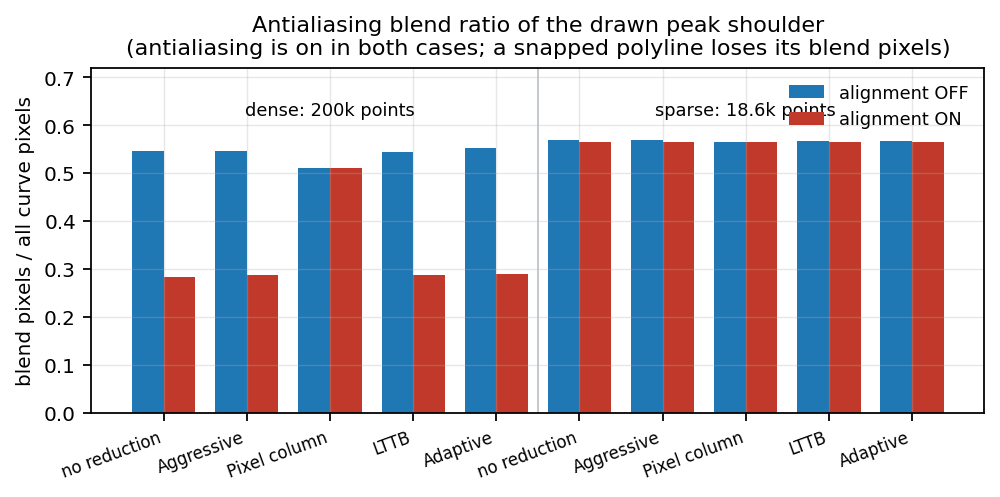
Figure 7 — Antialiasing blend ratio of the peak shoulder, dense versus sparse samples, alignment on versus off. Antialiasing is enabled in every bar.
| Dataset | Reduction | alignment off | alignment on | apex row |
|---|---|---|---|---|
| dense (200k) | no reduction | 0.547 | 0.284 | 0 |
| dense (200k) | FilterPointsAggressive |
0.547 | 0.287 | 0 |
| dense (200k) | FilterPointsPixel |
0.511 | 0.511 | 0 |
| dense (200k) | FilterPointsLTTB |
0.544 | 0.288 | 0 |
| dense (200k) | FilterPointsAdaptive |
0.552 | 0.289 | 0 |
| sparse (18.6k) | no reduction | 0.568 | 0.564 | 0 |
| sparse (18.6k) | FilterPointsLTTB |
0.568 | 0.564 | 0 |
| sparse (18.6k) | FilterPointsAdaptive |
0.568 | 0.565 | 0 |
The comparisons show:
- Dense data loses half its blend pixels when snapping is on. The ratio 0.28 versus 0.55 is the quantitative form of the visual difference in Figure 1. The absolute values depend on the crop and the pen width; the factor of two is the signal.
- Sparse data is unaffected. The ratio is 0.56 in both configurations, because the samples are far enough apart that snapping moves each vertex by less than the antialiasing resolution and never creates a multi-vertex column.
FilterPointsPixelis unaffected by the global switch, as the geometric analysis predicted: the algorithm computes its own pixel-domain envelope and ignoresRoundPoints. Its ratio, 0.51, is lower than the sub-pixel paths because its output already contains horizontal connections.
The apex row is identical in every configuration, confirming that snapping changes the shape of the flank but not the position of the peak.
6.3 Failure modes and limits¶
- The blend-ratio metric depends on the pen width, the crop and the rendering backend. It is used here for relative comparison between two renders of the same configuration, not as an absolute quality score.
- The
win14crop was chosen because the staircase is visible there; other windows and the full-range view show smaller differences. The mechanism is still present in all of them, but its strength depends on samples per column and local slope. - The synthetic line of Figure 3 is a best case for illustrating the mechanism (slope 0.2). Real spectra have steeper flanks and correspondingly narrower treads.
- The measurements cover raster rendering at DPR 1 and DPR 2 only. PDF and SVG output is not affected because
QwtPainter::isAligning()already excludes those engines; that path is argued from the source, not measured here.
7. The QWT 7 fix¶
QWT 7 addresses the problem from both ends. The 7.x series gives the mapper reduction algorithms that keep sub-pixel coordinates, so dense data can be reduced without being quantized. The alignment policy added after v7.5.1 then stops the last stage from snapping those coordinates away.
7.1 The selection rule¶
The evidence supports a simple rule, stated as a decision table for the two switches that matter.
| Situation | RoundPoints |
Rationale |
|---|---|---|
| Antialiased raster (widget canvas), any reduction | off | sub-pixel geometry is the input the rasterizer needs |
| Non-antialiased raster, thin lines, pixel-exact look | on | vertices land on real pixels; edges stay crisp |
WeedOutPoints used as a pixel deduplicator |
on | the algorithm's purpose is to merge samples per device pixel |
WeedOutIntermediatePoints (aggressive) |
on | the quad path rounds to device pixels internally |
PixelColumnReduce |
irrelevant | the algorithm does not read the flag |
| PDF / SVG / rotated or scaled painter | off | already excluded by QwtPainter::isAligning() |
| After LTTB / MinMax / Adaptive, for performance | off | no measurable gain, visible loss on dense data |
At the library level this becomes:
1 2 3 | |
Non-antialiased raster painting keeps its previous behaviour, PDF/SVG and transformed painters stay on the sub-pixel path, and the flag disappears for the case where it does harm.
7.2 Reduction algorithms added in QWT 7¶
The reduction side of the pipeline grew over the 7.x series:
| Release | Attribute | Mapper path | What it keeps |
|---|---|---|---|
| v7.3.1 | FilterPointsPixel |
PixelColumnReduce |
min/max envelope per device pixel column |
| v7.3.1 | FilterPointsLTTB |
bucket reduction (became MinMaxReduce) |
min/max samples per bucket |
| v7.5.0 | FilterPointsLTTB |
LTTBReduce |
one area-selected sample per bucket (true LTTB) |
| v7.5.0 | FilterPointsMinMaxLTTB |
MinMaxReduce |
the former bucket implementation |
| v7.5.1 | FilterPointsAdaptive |
AdaptiveColumnReduce |
density-gated cluster points at their real y |
All of these paths honor RoundPoints: with the flag off they return the selected samples at their fractional coordinates, so the rasterizer can compute coverage from the real slope. PixelColumnReduce is the exception by design, because its output is an envelope rather than samples. v7.5.1 also moved the pixel budgets of all reduction paths from logical to device pixels (setDevicePixelRatio(), commit 9ce35af), which keeps the same number of device pixels under an arbitrary DPR.
The output size is what makes dense data affordable: the 1.2 million sample dataset of the demo renders in 4 to 8 ms with any of the modern reductions, against 44 ms without reduction. The reduction happens before the mapper emits geometry, and none of these algorithms rounds the surviving vertices.
7.3 The antialiasing-aware alignment policy¶
The final change (commit 7294c68, after v7.5.1) applies the rule of §7.1 to the curve paths:
drawLines()anddrawDots()enableRoundPointsonly when the painter does not antialias. Non-antialiased raster output keeps the old snapping behaviour, androundingAlignment(painter)still excludes PDF, SVG and transformed painters.legendIcon()snaps its horizontal line to the pixel grid only when the icon is recorded without antialiasing, which keeps the 1-pixel line crisp in a non-antialiased legend.WeedOutIntermediatePointsno longer depends onRoundPoints. The quad weeding path intoPolygonF()rounds to device pixels internally and now runs before theRoundPointsbranch, soFilterPointsAggressivestays reachable on an antialiased canvas. The integertoPolygon()path already treated the flags independently.
What did not change: non-antialiased raster painting still snaps, PDF/SVG and transformed painters were already excluded, and items outside the curve pipeline (grid, markers, box charts) still read the global switch. The latter is a separate scope; the fix targets the paths where the curve's own geometry was being quantized.
7.4 Measured effect¶
The same batch pipeline on the fixed build, with the library default (no --noround), now produces the alignment-off result:
| Quantity | pre-fix default | fixed default | --noround |
|---|---|---|---|
dense shoulder blend ratio (many, no reduction) |
0.284 | 0.5470 | 0.5470 |
sparse shoulder blend ratio (few, no reduction) |
0.564 | 0.5682 | 0.5682 |
FilterPointsAggressive vertices, dense win14 |
7,384 | 7,384 | 7,384 |
The curve pixels of the fixed default batch and the --noround batch are identical, and the aggressive vertex count is unchanged: the decoupling keeps the quad path reachable now that RoundPoints is off for an antialiased painter. The only differing pixels are grid lines, which still respond to the global switch. The two smooth panels of Figure 1 now come from the default configuration: no application-level switch, no per-curve setting.
The mapper cost table of §4 still applies to the non-antialiased path, where snapping remains enabled. On the antialiased path the snapping pass disappears, and the vertex count is no longer reduced by accidental deduplication, so the reduction attributes become the tool that controls cost. That is the arrangement the companion downsampling report assumes.
8. Reproduction¶
All results below are regenerated from the repository:
1 2 3 4 5 6 7 8 9 10 11 12 13 14 15 16 17 18 19 20 21 | |
The two .bat helpers resolve the repository root from their own location and use QT_DIR (Qt installation) and QWT_BUILD_DIR (build tree) environment variables, defaulting to a local Qt 6.7.3 path and <repo>/build; adjust those two settings for another machine. roundpoints_bench.cpp and roundpoints_render_check.cpp also carry the equivalent cl command lines in their header comments.
The render measurements in Sections 4 to 6 were taken with the pre-fix library. A current build never snaps an antialiased painter, so out_round and out_noround now contain the same curve pixels; reproducing the pre-fix images requires a build at v7.5.1 or earlier. The committed CSV files and the figures generated from them remain reproducible without re-rendering. The batch now renders three datasets (many, few, and the 1.2 million sample million); the metrics script analyzes many and few.
9. Conclusion¶
QWT 6 inherited a snapping policy from Qwt 6.2 that was built for integer-flooring, non-antialiased raster output: a global switch that defaulted to on, an engine check that ignored antialiasing, and a reduction toolbox defined entirely on snapped coordinates. On an antialiased canvas that combination quantized dense polylines before the rasterizer saw them, and the result was the staircase of Figure 1.
QWT 7 fixes both halves of the problem. The 7.x series adds reduction algorithms that select samples without rounding them, and the policy after v7.5.1 enables pixel snapping only when the painter does not antialias. The dense peak shoulder now renders with the same blend ratio as the alignment-off build (0.5470 against 0.284), sparse data is unchanged, and the aggressive weeding path still reduces 199,751 vertices to 7,384 under antialiasing. The per-vertex cost of snapping, roughly 45 % of mapper time on an unreduced million-point curve, now applies only where it buys something: crisp hairlines on non-antialiased output.
10. References¶
- QWT 7.5.0 sources:
src/plot/qwt_point_mapper.cpp(QwtRoundF,qwtAdaptiveColumnReduce,qwtLttbReduce,qwtMinMaxBucketReduce,qwtPixelColumnReduce,toPolygonF()dispatch),src/plot/qwt_plot_curve.cpp(drawLines()),src/plot/qwt_painter.cpp(isAligning(),roundingAlignment()). - QWT 7.5.1 release notes:
CHANGES.md, entries forFilterPointsAdaptive, the device-pixel fix (commit9ce35af) and the downsample demo. - Antialiasing-aware alignment fix (after v7.5.1): commit
7294c68,QwtPlotCurve::drawLines()/drawDots()/legendIcon()andQwtPointMapper::toPolygonF(). - Companion report: Downsampling Curves for the Screen: LTTB Theory and the QWT7 MinMax Bucket.
- Companion report: Curve Rendering: Gaussian, Savitzky-Golay and Feature Preservation.
- Demonstration program:
examples/2D/downsample_demo(interactive GUI with render-time readout, plus--batch,--noround,--nosplit,--dotsmodes). - Raw data and scripts:
docs/assets/algorithms/roundpoints_bench.cpp,roundpoints_render_check.cpp,roundpoints_render_metrics.py,roundpoints_experiment.py,roundpoints_results.csv,roundpoints_render_metrics.csv. - Steinarsson, S. Downsampling Time Series for Visual Representation. MSc thesis, University of Iceland, 2013.
- Qt documentation:
QPainter::Antialiasing,QPaintEngine::Type.