QwtPyPlot — Matplotlib-Style Plotting Interface
QwtPyPlot is a high-level wrapper class in Qwt 7 that provides a pyplot-like plotting interface for C++ users familiar with matplotlib. It delegates internally to QwtFigure, QwtPlot, QwtPlotFactory, QwtPlotStyling, and other existing classes without modifying any underlying implementation.
Overview
The class diagram below shows how QwtPyPlot relates to the infrastructure it wraps and delegates to, namely QwtFigure, QwtPlot, QwtPlotFactory, and QwtPlotStyling, plus QwtFormatString, which parses matplotlib-style format strings:
classDiagram
    class QwtPyPlot {
        +QwtPyPlot(QwtFigure*)
        +QwtPyPlot(QwtPlot*)
        +gcf() QwtFigure*
        +gca() QwtPlot*
        +sca(QwtPlot*)
        +subplot(rows, cols, index)
        +plot(x, y, fmt)
        +scatter(x, y, size, color)
        +bar(values, color)
        +hist(data, bins, color)
        +imshow(data, cmap)
        +contour(data, levels)
        +fillBetween(x, y1, y2)
        +setTitle(title)
        +setXLim(min, max)
        +grid(show)
        +legend()
        +savefig(filename, dpi)
        +show()
    }

    class QwtFormatString {
        +parse(fmt) QwtFormatString
        +color
        +marker
        +lineStyle
        +noLine
    }

    QwtPyPlot ..> QwtFigure : wraps
    QwtPyPlot ..> QwtPlot : operates on
    QwtPyPlot ..> QwtPlotFactory : delegates
    QwtPyPlot ..> QwtPlotStyling : delegates
    QwtPyPlot ..> QwtFormatString : parses
| Class |
Responsibility |
Header |
QwtPyPlot |
Matplotlib pyplot-style plotting interface |
<QwtPyPlot> |
QwtFormatString |
Matplotlib format string parser |
<QwtPyPlot> |
Core Concepts
QwtPyPlot maintains a "current axes" pointer (similar to matplotlib's gca()), so all plotting methods operate on the current axes:
| matplotlib Concept |
QwtPyPlot / Qwt Equivalent |
matplotlib.figure.Figure |
QwtFigure |
matplotlib.axes.Axes |
QwtPlot |
pyplot module |
QwtPyPlot class |
plt.gcf() / plt.gca() |
QwtPyPlot::gcf() / gca() |
plt.subplot() |
QwtPyPlot::subplot(rows, cols, index) |
fig.savefig() |
QwtPyPlot::savefig(filename, dpi) |
Two Usage Modes
Constructing QwtPyPlot from a QwtFigure* enables multi-subplot mode: subplot(rows, cols, index) creates a cell in the figure grid and makes it the current axes. The example below builds a 2×1 layout with a line plot and a bar chart, then saves the whole figure at 300 DPI:
 1
 2
 3
 4
 5
 6
 7
 8
 9
10
11
12
13
14
15
16
17
18
19
20 | #include <QwtFigure>
#include <QwtPyPlot>
QwtFigure* fig = new QwtFigure;
QwtPyPlot plt(fig);
// Create subplot 1 in a 2×1 grid
plt.subplot(2, 1, 1);
plt.plot(x, y, "r-o", "Temperature");
plt.setTitle("Sensor Data");
plt.grid(true);
plt.legend();
// Create subplot 2
plt.subplot(2, 1, 2);
plt.bar({10, 20, 30, 40}, "b", "Sales");
plt.setYLabel("Value");
plt.savefig("output.png", 300);
fig->show();
|
Mode 2: QwtPlot Single-Plot Mode
Constructing from a QwtPlot* instead gives single-plot mode: every call operates directly on that plot, with no figure or subplot management. This is the lightest way to decorate an existing QwtPlot widget:
| #include <QwtPlot>
#include <QwtPyPlot>
QwtPlot* plot = new QwtPlot;
QwtPyPlot plt(plot);
plt.plot(x, y, "b--");
plt.scatter(x2, y2, 50, "r");
plt.setTitle("Quick Plot");
plot->show();
|
QwtFormatString parses matplotlib-style format strings, supporting combinations of color, marker, and line style:
| Format: [color][line_style][marker]
Examples: "r-o" → red solid line + circle marker
"b--" → blue dashed line
"g^:" → green dotted line + upward triangle
"ko" → black circles (no line)
|
Color Characters
| Char |
Color |
Char |
Color |
b |
Blue |
m |
Magenta |
g |
Green |
y |
Yellow |
r |
Red |
k |
Black |
c |
Cyan |
w |
White |
Marker Characters
| Char |
Marker |
Char |
Marker |
o |
Circle |
x |
Cross (×) |
s |
Square |
+ |
Plus (+) |
^ |
Triangle up |
* |
Star |
v |
Triangle down |
. |
Dot |
D |
Diamond |
|
|
Line Styles
| Symbol |
Style |
- |
Solid |
-- |
Dashed |
-. |
Dash-dot |
: |
Dotted |
Tip — Matplotlib Behavior
When only a marker is specified without a line style (e.g. "ro"), the line is automatically hidden, showing only marker points. This matches matplotlib behavior.
Plotting Methods
Basic Plots
plot() — Line Plot
plot() returns a QwtPlotCurve* and offers three overloads: y-only data (x becomes 0, 1, 2, … automatically), a pair of x/y vectors, or a QVector<QPointF>. Each accepts an optional format string and legend label:
| // y-only (x auto-generated as 0, 1, 2, ...)
plt.plot({1, 4, 2, 5}, "r-o");
// x-y data
plt.plot(x, y, "b--", "Label");
// QPointF data
QVector<QPointF> data = {{0,1}, {1,3}, {2,2}};
plt.plot(data, "g^:");
|
scatter() — Scatter Plot
scatter() draws marker-only points without connecting lines and returns a QwtPlotCurve*. Besides the coordinates it takes a marker size, a color, and an optional label, so several groups stay distinguishable in the legend:
| // Parameters: x, y, marker size, color, label
plt.scatter(x1, y1, 30, "r", "Group A");
plt.scatter(x2, y2, 50, "b", "Group B");
|
bar() — Bar Chart
bar() creates a QwtPlotBarChart*. The simple overload takes only values and uses the sample index as x position; the second overload accepts explicit x positions plus a bar width:
| // y-only values (x = index)
plt.bar({10, 20, 30, 40}, "c");
// x-y data with width
plt.bar(x, values, 0.8, "b", "Sales");
|
hist() — Histogram
hist() bins raw samples automatically into a QwtPlotHistogram*. The bin count defaults to 10; color and legend label are optional:
| // Automatic binning (default 10 bins)
plt.hist(data, 20, "m", "Distribution");
|
imshow() — Heatmap
imshow() maps a 2D QVector<QVector<double>> matrix to colors through a QwtPlotSpectrogram*. The colormap defaults to "viridis"; leaving vmin/vmax at 0 derives the value range from the data itself:
| // 2D matrix data with various colormaps
QVector<QVector<double>> matrix = ...;
plt.imshow(matrix, "viridis");
|
Supported colormaps: "viridis", "hot", "cool", "jet", "gray"
contour() — Contour Lines
contour() also returns a QwtPlotSpectrogram*, but draws isolines of the matrix instead of a colored surface. An empty levels list auto-generates 10 contour lines; otherwise the given levels are used and colored according to cmap:
| // Auto-generate 10 contour levels
plt.contour(data);
// Custom contour levels
plt.contour(data, {0.2, 0.4, 0.6, 0.8}, "hot");
|
fillBetween() — Filled Area
fillBetween() shades the region between two curves y1(x) and y2(x) using a QwtPlotIntervalCurve*. The fill color is given by name, and alpha (default 0.3) controls its transparency:
| // Parameters: x, y1, y2, color, alpha
plt.fillBetween(x, yLower, yUpper, "blue", 0.3);
|
errorbar() — Error Bars
errorbar() turns each (x, y, yerr) triple into a QwtIntervalSample spanning y - yerr to y + yerr and draws it as a tube-style QwtPlotIntervalCurve*, styled with the usual format string:
| plt.errorbar(x, y, yerr, "r-", "Measurement");
|
quiver() — Vector Field
quiver() creates a QwtPlotVectorField* that draws an arrow with components (u, v) at every position (x, y), typically used for gradients or flow fields:
| plt.quiver(x, y, u, v, "k");
|
candlestick() — OHLC Chart
candlestick() renders financial data as a QwtPlotTradingCurve*; each QwtOHLCSample bundles a time value with open, high, low, and close prices:
| QVector<QwtOHLCSample> ohlcData = ...;
plt.candlestick(ohlcData, "Stock");
|
Decorative Elements
| Method |
Description |
Example |
grid(show, minor) |
Grid lines |
plt.grid(true, true) |
axhline(y, fmt) |
Horizontal reference line |
plt.axhline(0, "k--") |
axvline(x, fmt) |
Vertical reference line |
plt.axvline(5, "r:") |
axhspan(y1, y2, color, alpha) |
Horizontal zone highlight |
plt.axhspan(2, 4, "yellow", 0.2) |
axvspan(x1, x2, color, alpha) |
Vertical zone highlight |
plt.axvspan(3, 7, "blue", 0.1) |
legend(loc) |
Legend |
plt.legend() |
annotate(text, xy, xytext) |
Arrow annotation |
plt.annotate("Peak", peak, label) |
Axis Configuration
Titles and Labels
setTitle(), setXLabel(), and setYLabel() set the plot title and the bottom/left axis titles respectively; all of them apply to the current axes (gca()):
| plt.setTitle("My Plot");
plt.setXLabel("Time (s)");
plt.setYLabel("Amplitude");
|
Axis Limits and Scale
setXLim() / setYLim() pin the visible range of an axis, while setXScale() / setYScale() switch the axis between "linear" and "log" scaling:
| // Set axis limits
plt.setXLim(0, 100);
plt.setYLim(-5, 5);
// Logarithmic scale
plt.setXScale("log");
plt.setYScale("log");
// Back to linear
plt.setXScale("linear");
|
Ticks
setXTicks() / setYTicks() replace the automatically generated major tick positions with a custom list, optionally supplying text labels for them; invertXAxis() / invertYAxis() flip the axis direction:
| // Custom tick positions
plt.setXTicks({0, 2.5, 5, 7.5, 10});
plt.setYTicks({-1, 0, 1});
// Invert axis direction
plt.invertXAxis();
plt.invertYAxis();
|
Subplot Layout
subplot(rows, cols, index) splits the figure into a grid, activates the cell with the given 1-based, row-major index, and returns the underlying QwtPlot*. Switching to a grid with fewer columns (2×1 after 2×2 below) makes that subplot span the full row width:
| QwtFigure* fig = new QwtFigure;
QwtPyPlot plt(fig);
// subplot(rows, cols, index) — 1-based index
plt.subplot(2, 2, 1); // Row 1, Column 1
plt.subplot(2, 2, 2); // Row 1, Column 2
plt.subplot(2, 1, 2); // Row 2, spans 2 columns
|
Twin Axes (Dual Y/X)
twinx() creates a parasite plot that shares the host's bottom x-axis but owns a separate y-axis on the right (twiny() does the same for a top x-axis). The new plot automatically becomes the current axes, and sca() switches between them explicitly:
| plt.subplot(1, 1, 1);
plt.plot(x, temp, "r-", "Temperature");
plt.setYLabel("°C");
// Create twin Y-axis on right
QwtPlot* ax2 = plt.twinx();
plt.sca(ax2); // Switch to new axes
plt.plot(x, humidity, "b--", "Humidity");
plt.setYLabel("%");
|
Tight Layout
tightLayout() recomputes the subplot geometry so titles and axis labels do not overlap, aligning the y-axes of all subplots in the figure:
| plt.tightLayout(); // Align Y-axes across all subplots
|
Appearance
Two setters control the overall look: setFaceColor() paints the figure background, while setAxesColor() paints the canvas behind the plots. Both accept color names or hex strings:
| // Set figure background color
plt.setFaceColor("lightgray");
// Set canvas background color
plt.setAxesColor("white");
|
Output and Interaction
Save to File
savefig() renders the figure into an image file (format inferred from the filename) and returns true on success. The optional dpi controls the export resolution; leaving it out falls back to the screen DPI:
| plt.savefig("output.png"); // Default DPI
plt.savefig("output.png", 300); // 300 DPI
|
Show Window
show() makes the underlying widget visible: the QwtFigure in multi-subplot mode, or the current QwtPlot in single-plot mode.
Interaction Controls
enablePan() attaches a QwtPlotPanner for drag-panning to the current axes' canvas, and enableZoom() attaches a QwtPlotCanvasZoomer for rubber-band zooming. Both default to true and can be turned off again by passing false:
| plt.enablePan(true); // Enable drag panning
plt.enableZoom(true); // Enable rubber-band zoom
|
Complete Example
The following example demonstrates a multi-subplot application with line plots, scatter plots, and histograms:
 1
 2
 3
 4
 5
 6
 7
 8
 9
10
11
12
13
14
15
16
17
18
19
20
21
22
23
24
25
26
27
28
29
30
31
32
33
34
35
36
37
38
39
40
41
42
43
44
45 | #include <QApplication>
#include <QwtFigure>
#include <QwtPyPlot>
#include <cmath>
int main(int argc, char* argv[])
{
QApplication app(argc, argv);
QwtFigure* fig = new QwtFigure;
QwtPyPlot plt(fig);
// Generate data
QVector<double> x, sinY, cosY;
for (int i = 0; i <= 100; i++) {
double t = i * 0.1;
x.append(t);
sinY.append(std::sin(t));
cosY.append(std::cos(t));
}
// Subplot 1: Line plot
plt.subplot(2, 1, 1);
plt.plot(x, sinY, "r-", "sin(x)");
plt.plot(x, cosY, "b--", "cos(x)");
plt.setTitle("Trigonometric Functions");
plt.grid(true);
plt.legend();
// Subplot 2: Histogram
plt.subplot(2, 1, 2);
QVector<double> randomData;
for (int i = 0; i < 500; i++) {
randomData.append(std::sin(i * 0.1) * 10 + (i % 7));
}
plt.hist(randomData, 20, "c");
plt.setTitle("Distribution");
plt.tightLayout();
plt.savefig("demo.png", 300);
fig->resize(800, 600);
fig->show();
return app.exec();
}
|
API Reference
Construction and State
| Method |
Description |
QwtPyPlot(QwtFigure*) |
Construct: multi-subplot mode |
QwtPyPlot(QwtPlot*) |
Construct: single-plot mode |
gcf() |
Get current Figure |
gca() |
Get current axes |
sca(QwtPlot*) |
Set current axes |
Plotting Methods
| Method |
Return Type |
Description |
plot(y, fmt, label) |
QwtPlotCurve* |
Y-only line plot |
plot(x, y, fmt, label) |
QwtPlotCurve* |
X-Y line plot |
plot(data, fmt, label) |
QwtPlotCurve* |
QPointF line plot |
scatter(x, y, size, color, label) |
QwtPlotCurve* |
Scatter plot |
bar(values, color, label) |
QwtPlotBarChart* |
Bar chart |
bar(x, values, width, color, label) |
QwtPlotBarChart* |
X-Y bar chart |
hist(data, bins, color, label) |
QwtPlotHistogram* |
Histogram |
boxplot(data, label) |
QwtPlotBoxChart* |
Box plot |
fillBetween(x, y1, y2, color, alpha) |
QwtPlotIntervalCurve* |
Filled area |
errorbar(x, y, yerr, fmt, label) |
QwtPlotIntervalCurve* |
Error bars |
imshow(data, cmap, vmin, vmax) |
QwtPlotSpectrogram* |
Heatmap |
contour(data, levels, cmap) |
QwtPlotSpectrogram* |
Contour lines |
quiver(x, y, u, v, color) |
QwtPlotVectorField* |
Vector field |
candlestick(data, label) |
QwtPlotTradingCurve* |
OHLC chart |
Axis Configuration
| Method |
Description |
setTitle(title) |
Set plot title |
setXLabel(label) |
Set X-axis label |
setYLabel(label) |
Set Y-axis label |
setXLim(min, max) |
Set X-axis limits |
setYLim(min, max) |
Set Y-axis limits |
setXScale(scale) |
Set X-axis scale ("linear" / "log") |
setYScale(scale) |
Set Y-axis scale |
setXTicks(ticks, labels) |
Set X-axis ticks |
setYTicks(ticks, labels) |
Set Y-axis ticks |
invertXAxis() |
Invert X-axis |
invertYAxis() |
Invert Y-axis |
| Method |
Description |
subplot(rows, cols, index) |
Create subplot (1-based index) |
addAxes(rect) |
Add axes at normalized position |
twinx(host) |
Create twin Y-axis |
twiny(host) |
Create twin X-axis |
tightLayout() |
Apply tight layout |
Output and Interaction
| Method |
Description |
savefig(filename, dpi) |
Save figure to file |
show() |
Show widget window |
enablePan(enable) |
Enable/disable panning |
enableZoom(enable) |
Enable/disable zooming |
Example — Related Examples
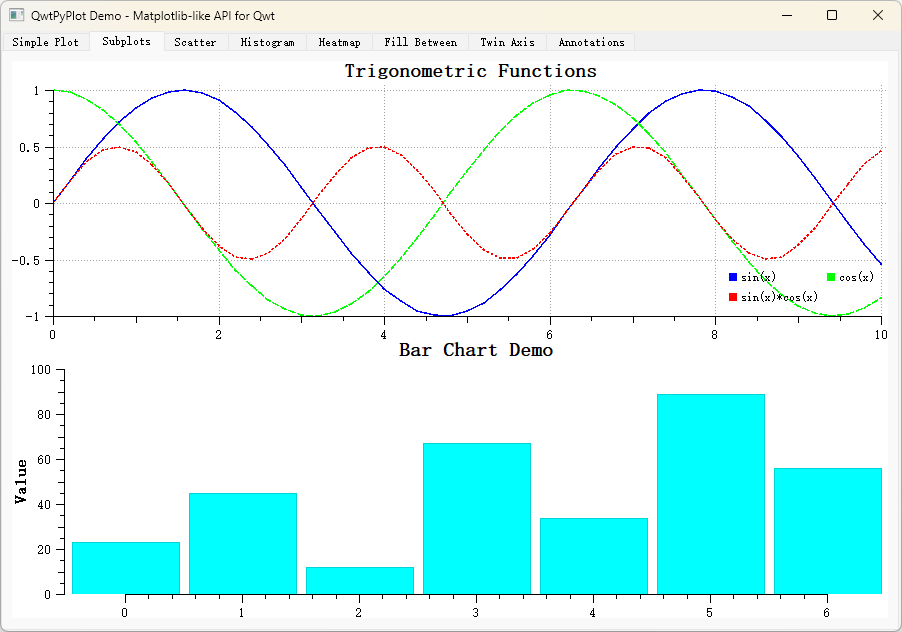
A complete example is located in examples/2D/pyplot/, with 8 tabs covering the main QwtPyPlot features.
Screenshot of the PyPlot example: