极坐标绘图 - QwtPolarPlot
QwtPolarPlot 是用于绘制极坐标图形的控件,与传统笛卡尔坐标系的 QwtPlot 不同,它使用角度和半径两个坐标轴,适合显示雷达图、方向分布、天文数据等圆形数据。
主要功能特性
- 使用角度(0-360°)和半径作为坐标轴
- 在极坐标系中绘制曲线
- 提供同心圆和角度射线网格
- 支持极坐标系下的缩放和平移
基本概念
极坐标结构
下面的示意图给出极坐标画布的布局:每个数据点由方位角与半径定位,同心圆对应半径刻度,从极点发出的射线对应角度刻度:
 1
 2
 3
 4
 5
 6
 7
 8
 9
10
11
12
13
14
15
16
17 | 90°
│
135° │ 45°
\ │ /
\ │ /
\ │ /
180°───●─+─●───0°
/ │ \
/ │ \
/ │ \
225° │ 315°
│
270°
● = 数据点
同心圆 = 半径刻度
射线 = 角度刻度
|
极坐标项类型
| 类名 |
说明 |
QwtPolarPlot |
极坐标绘图主控件 |
QwtPolarCurve |
极坐标曲线 |
QwtPolarGrid |
极坐标网格 |
QwtPolarMarker |
极坐标标记 |
使用方法
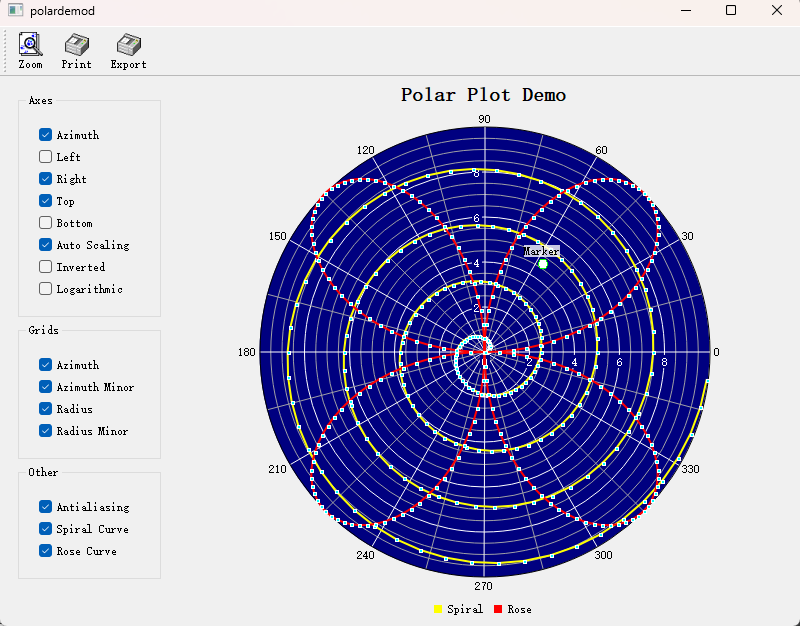
极坐标绘图的例子位于:examples/2D/polardemo,例子截图如下:
1. 创建极坐标绘图
一幅极坐标图由三部分组成:QwtPolarPlot 控件本身(用 setScale() 设定方位角与半径刻度)、作背景用的 QwtPolarGrid,以及若干 QwtPolarCurve。曲线消费包装在 QwtSeriesData<QwtPointPolar> 对象中的 QwtPointPolar 样本,并通过 setData() 传入;对普通的 QVector 样本,写一个极简的 QwtArraySeriesData 子类即可。下面的例子把它们组装成一张完整的图:
 1
 2
 3
 4
 5
 6
 7
 8
 9
10
11
12
13
14
15
16
17
18
19
20
21
22
23
24
25
26
27
28
29
30
31
32
33
34
35
36
37
38
39
40
41
42
43
44
45
46
47
48
49
50
51
52
53
54
55 | #include <QwtPolarPlot>
#include <QwtPolarGrid>
#include <QwtPolarCurve>
#include <qwt_series_data.h>
#include <cmath>
// QwtPolarCurve 消费 QwtSeriesData<QwtPointPolar>;
// 基于数组的极简子类只需补一个包围盒实现
class PolarSeriesData : public QwtArraySeriesData<QwtPointPolar>
{
public:
PolarSeriesData(const QVector<QwtPointPolar>& samples)
: QwtArraySeriesData<QwtPointPolar>(samples)
{
}
virtual QRectF boundingRect() const override
{
if (cachedBoundingRect.width() < 0.0)
cachedBoundingRect = qwtBoundingRect(*this);
return cachedBoundingRect;
}
};
// 创建极坐标绘图
QwtPolarPlot* polarPlot = new QwtPolarPlot();
polarPlot->setTitle("极坐标图示例");
// 设置角度范围(默认0-360度)
polarPlot->setScale(QwtPolar::Azimuth, 0.0, 360.0);
// 设置半径范围
polarPlot->setScale(QwtPolar::Radius, 0.0, 100.0);
// 创建极坐标网格
QwtPolarGrid* grid = new QwtPolarGrid();
grid->setPen(QPen(Qt::gray, 0.5));
grid->attach(polarPlot);
// 创建极坐标曲线
QwtPolarCurve* curve = new QwtPolarCurve("曲线数据");
// 准备数据(角度,半径)
QVector<QwtPointPolar> samples;
for (int angle = 0; angle < 360; angle += 10) {
const double radius = 50 + 30 * std::sin(angle * 3.0 * M_PI / 180.0);
samples << QwtPointPolar(angle, radius);
}
curve->setData(new PolarSeriesData(samples));
curve->setPen(QPen(Qt::blue, 2));
curve->attach(polarPlot);
polarPlot->replot();
|
2. 极坐标网格配置
QwtPolarGrid 负责两族网格线:showGrid() 按刻度 id(QwtPolar::Azimuth / QwtPolar::Radius)开关方位角射线与半径同心圆;showAxis() 则分别控制 QwtPolar::AxisAzimuth、AxisLeft、AxisRight、AxisTop、AxisBottom 各轴刻度标签的显示:
 1
 2
 3
 4
 5
 6
 7
 8
 9
10
11
12
13
14
15
16
17 | QwtPolarGrid* grid = new QwtPolarGrid();
// 显示角度网格线(射线)
grid->showGrid(QwtPolar::Azimuth, true);
// 显示半径网格线(同心圆)
grid->showGrid(QwtPolar::Radius, true);
// 设置网格样式
grid->setPen(QPen(Qt::lightGray, 0.5));
// 显示刻度标签
grid->showAxis(QwtPolar::AxisAzimuth, true); // 角度标签
grid->showAxis(QwtPolar::AxisLeft, true); // 左侧半径标签
grid->showAxis(QwtPolar::AxisRight, true); // 右侧半径标签
grid->showAxis(QwtPolar::AxisTop, true); // 顶部半径标签
grid->showAxis(QwtPolar::AxisBottom, true); // 底部半径标签
|
3. 极坐标曲线样式
QwtPolarCurve::setStyle() 在 Lines(点间直线连接,可经曲线拟合器平滑)与 NoCurve(只画符号)之间选择,大于 UserCurve(100)的值保留给用户自定义样式;画笔与 QwtSymbol 的设置方式与笛卡尔曲线完全一致:
 1
 2
 3
 4
 5
 6
 7
 8
 9
10
11
12
13
14
15
16 | #include <QwtSymbol>
QwtPolarCurve* curve = new QwtPolarCurve();
// 设置曲线样式
curve->setStyle(QwtPolarCurve::Lines); // 连线样式
// 可选样式:NoCurve(只画符号)、Lines、UserCurve(>100,
// 保留给用户自定义样式);散点效果用 NoCurve + 符号实现
// 设置线条样式
curve->setPen(QPen(Qt::red, 2));
// 设置符号
QwtSymbol* symbol = new QwtSymbol(QwtSymbol::Ellipse,
QBrush(Qt::red), QPen(Qt::darkRed), QSize(5, 5));
curve->setSymbol(symbol);
|
4. 角度范围设置
方位角轴使用常规的 setScale() / setScaleMaxMajor() 调用:把范围限制成一个扇形(如 0–180°)、限定主刻度数量,或交换上下限来反转角度方向:
| // 设置角度范围(例如仅显示0-180度)
polarPlot->setScale(QwtPolar::Azimuth, 0.0, 180.0);
// 设置角度步进
polarPlot->setScaleMaxMajor(QwtPolar::Azimuth, 8); // 8个主刻度(每45度)
// 反转角度方向
polarPlot->setScale(QwtPolar::Azimuth, 360.0, 0.0); // 从360到0递减
|
5. 半径范围设置
半径轴的调整方式相同,setScaleMaxMinor() 还可控制两个主刻度之间的次刻度数;对跨多个数量级的数据,可用 setScaleEngine() 为半径刻度换上对数引擎(QwtLogScaleEngine,与笛卡尔轴使用同一个 core 引擎):
| // 设置半径范围
polarPlot->setScale(QwtPolar::Radius, 0.0, 200.0);
// 设置半径刻度
polarPlot->setScaleMaxMajor(QwtPolar::Radius, 5); // 5个主刻度
polarPlot->setScaleMaxMinor(QwtPolar::Radius, 4); // 每区间4个次刻度
// 对数半径刻度(此时半径区间必须为正值)
#include <QwtScaleEngine>
polarPlot->setScaleEngine(QwtPolar::Radius, new QwtLogScaleEngine());
polarPlot->setScale(QwtPolar::Radius, 1.0, 200.0);
|
6. 极坐标标记
QwtPolarMarker 用于标注以 QwtPointPolar 给出的单个位置:setSymbol() 在该处绘制图标,setLabel() 配合 setLabelAlignment() 附加一个按指定方式对齐的 QwtText 文字说明:
1
2
3
4
5
6
7
8
9
10
11
12
13
14
15
16
17
18
19
20 | #include <QwtPolarMarker>
#include <QwtSymbol>
QwtPolarMarker* marker = new QwtPolarMarker();
// 设置标记位置
marker->setPosition(QwtPointPolar(90.0, 80.0)); // 角度90°,半径80
// 设置标记符号
QwtSymbol* symbol = new QwtSymbol(QwtSymbol::Cross,
Qt::NoBrush, QPen(Qt::red, 2), QSize(10, 10));
marker->setSymbol(symbol);
// 设置标签
QwtText label("关键点");
label.setColor(Qt::red);
marker->setLabel(label);
marker->setLabelAlignment(Qt::AlignCenter);
marker->attach(polarPlot);
|
极坐标轴标识
| 标识 |
枚举值 |
说明 |
| 角度轴 |
QwtPolar::Azimuth |
角度坐标(0-360°) |
| 半径轴 |
QwtPolar::Radius |
半径坐标 |
数据点结构
所有极坐标 item 都使用 QwtPointPolar 样本:它只是把方位角(度数)与半径配对,通过 azimuth() / radius() 读取;接受 QPointF 的构造函数会自动完成笛卡尔坐标转换,toPoint() 则转换回去:
| // 极坐标点
QwtPointPolar point(90.0, 80.0); // 角度90°,半径80
double a = point.azimuth(); // 角度
double r = point.radius(); // 半径
// 可从笛卡尔坐标转换
QwtPointPolar polar(QPointF(1.0, 1.0)); // 自动计算角度和半径
QPointF cartesian = polar.toPoint(); // 也可转换回去
|
核心方法总结
QwtPolarPlot
| 方法 |
说明 |
setScale() |
设置坐标轴范围 |
setScaleMaxMajor() |
设置主刻度数量 |
setScaleMaxMinor() |
设置次刻度数量 |
setScaleEngine() |
设置刻度引擎 |
replot() |
刷新绘图 |
QwtPolarCurve
| 方法 |
说明 |
setData() |
设置数据(接管 QwtSeriesData<QwtPointPolar> 对象的所有权) |
setStyle() |
设置曲线样式 |
setPen() |
设置线条样式 |
setSymbol() |
设置数据点符号 |
提示 — 极坐标应用场景
- 雷达显示
- 天文数据(星图)
- 方向分布统计
- 天线辐射图
示例 — 相关示例
- 极坐标演示:
examples/2D/polardemo
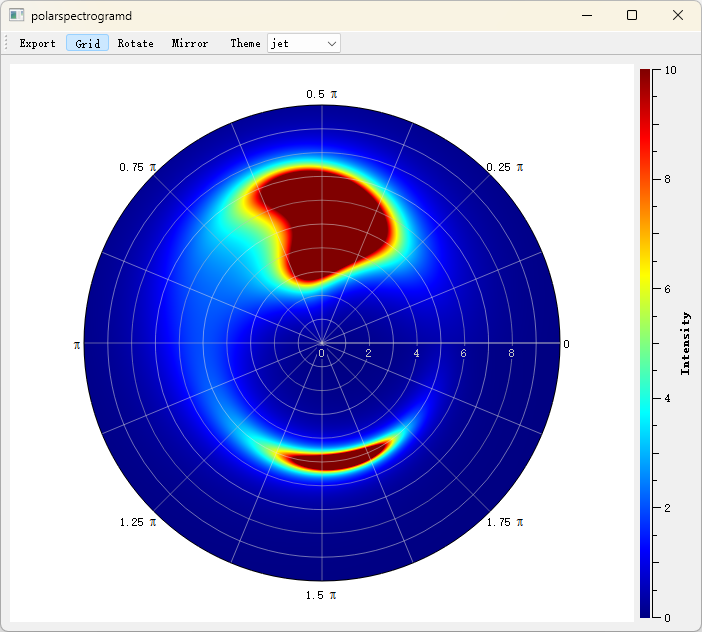
- 极坐标光谱图:
examples/2D/polarspectrogram
极坐标光谱图的例子截图如下: