Inward-Facing Ticks Usage Guide
QwtPlot::TickDirection is a tick direction control feature provided by Qwt, allowing axis tick marks to be displayed inside the plot area instead of the default outside display. This is very useful in scenarios requiring compact layouts or special visual effects.
Main Features
Features
- ✅ Tick direction control: Supports both outward (default) and inward tick display modes
- ✅ Independent axis control: Each axis (XBottom, XTop, YLeft, YRight) can be set independently
- ✅ Style synchronization: Inward ticks share the same style settings as outward ticks (length, color, line width)
- ✅ Dynamic switching: Tick direction can be switched at any time without resetting tick styles
Basic Concepts
Tick Direction Description
In traditional plots, axis tick marks extend outward from the axis line (outward display). The inward tick feature makes tick marks extend inward from the canvas edge, achieving different visual effects.
1 2 3 4 5 6 7 8 9 10 11 12 | |
TickDirection Enum
| Enum Value | Description |
|---|---|
QwtPlot::TickOutside |
Outward ticks (default behavior) |
QwtPlot::TickInside |
Inward ticks, extending inward from canvas edge |
Usage
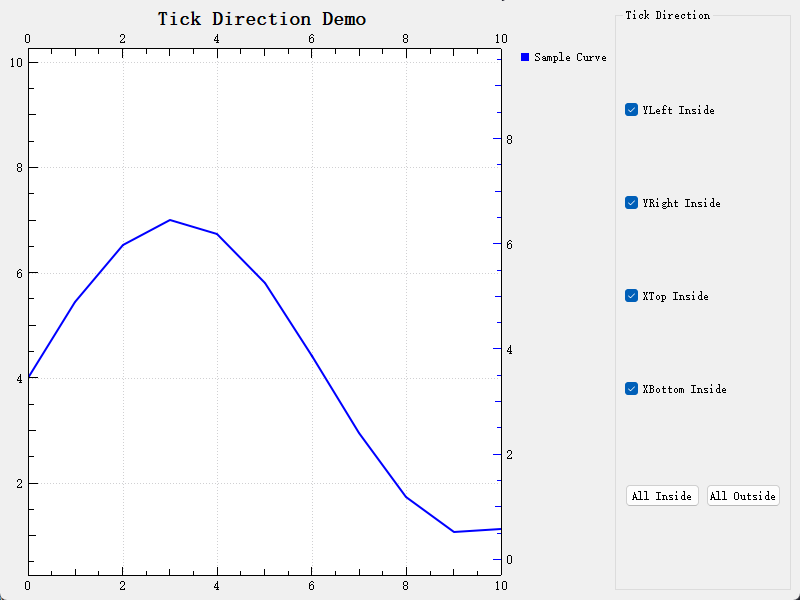
An example of inward tick display is located at: examples/2D/ticks_inside. Screenshot:
1. Basic Usage
Setting the tick direction for a single axis:
1 2 3 4 5 6 7 8 9 10 11 12 13 14 15 | |
2. Querying Current Settings
Getting the current tick direction of an axis:
1 2 3 4 5 6 7 8 | |
3. Restoring Default Settings
Restoring tick direction to the default outward display:
1 2 3 4 5 6 | |
4. Batch Setting All Axes
Setting tick direction for multiple axes simultaneously:
1 2 3 4 5 6 7 | |
Core Methods
| Method | Parameters | Description |
|---|---|---|
setAxisTickDirection(axisId, direction) |
QwtAxisId, TickDirection | Set tick direction for specified axis |
axisTickDirection(axisId) |
QwtAxisId | Get tick direction for specified axis |
Notes
Style Inheritance
Inward tick marks automatically inherit the style settings of outward ticks, including:
- Tick length (set via QwtScaleDraw::setTickLength())
- Line width (set via QwtScaleDraw::setPenWidthF())
- Color (set via QwtScaleWidget::setScaleColor())
Refresh Timing
Calling setAxisTickDirection() automatically triggers autoRefresh(). When autoReplot is enabled, it will refresh automatically. To refresh immediately, call replot().
Use with Parasite Axes
The inward tick feature can be used with parasite plots (Parasite Plot). Each parasite plot can independently set its tick direction.
Differences from QwtPlotScaleItem
| Feature | TickDirection | QwtPlotScaleItem |
|---|---|---|
| Purpose | Control main axis tick direction | Add additional axes inside canvas |
| Tick Style | Inherits main axis style | Can set style independently |
| Display Position | Replaces/changes main axis ticks | Overlays as independent layer |
| Use Cases | Compact layout or special effects needed | Reference scales needed inside canvas |
Example Code
Complete example located at: examples/2D/ticks_inside/
This example demonstrates:
- Independent control of four axes
- Real-time tick direction switching
- Batch setting functionality
References
- Axis Widget - Detailed QwtScaleWidget documentation
- Creating Multiple Axes - Parasite axis feature
- API documentation:
QwtPlot::setAxisTickDirection()