QwtLegend is the display widget for plot legends, used to show titles and icons of each plot item. Through the legend, users can identify the meaning of different curves or data series.
Main Features
Features
- ✅ Automatic legend item generation: Automatically generates legend entries based on plot items
- ✅ Interactive legend: Supports clicking legend items to hide/show corresponding plot items
- ✅ Flexible layout: Supports multiple legend layout modes
- ✅ Style customization: Customizable icon and text styles for legend items
Basic Concepts
Legend Position
QwtPlot supports four legend positions:
| Position |
Enum Value |
Description |
| Left |
LeftLegend |
Left of YLeft axis |
| Right |
RightLegend |
Right of YRight axis |
| Bottom |
BottomLegend |
Bottom of plot |
| Top |
TopLegend |
Top of plot |
Legend Item Composition
| ┌───────────────────────┐
│ [Icon] Curve Title │ ← Legend item
│ ──── Data Curve A │
│ ▬▬▬ Data Curve B │
│ ○○○ Scatter Data │
└───────────────────────┘
|
Usage
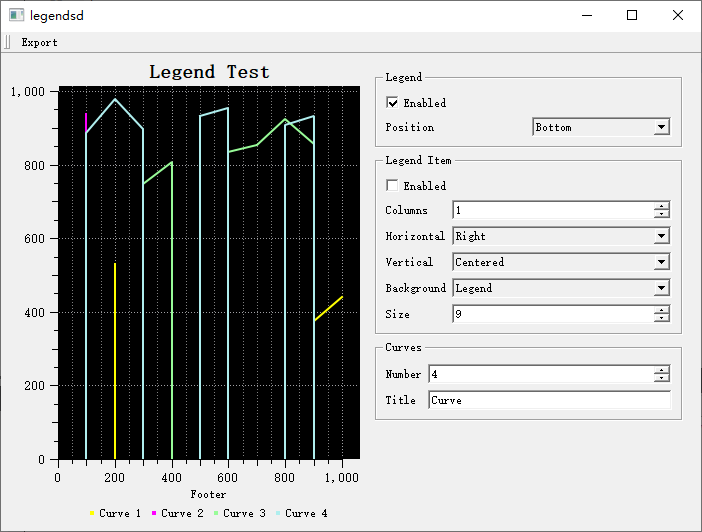
The legend demo is located at: examples/2D/legends. Screenshot:
1. Inserting a Legend
1
2
3
4
5
6
7
8
9
10
11
12
13 | #include <QwtPlot>
#include <QwtLegend>
QwtPlot* plot = new QwtPlot();
// Create legend and insert
QwtLegend* legend = new QwtLegend();
plot->insertLegend(legend, QwtPlot::RightLegend); // Right-side legend
// Other position options:
// QwtPlot::LeftLegend - Left
// QwtPlot::BottomLegend - Bottom
// QwtPlot::TopLegend - Top
|
2. Legend Interaction
By default, clicking a legend item toggles the display state of the corresponding plot item:
| // Enable/disable legend click interaction
legend->setItemMode(QwtLegend::ClickableItem); // Clickable (default)
// or legend->setItemMode(QwtLegend::ReadOnlyItem); // Read-only mode
// Effect of clicking a legend item:
// - Toggles the display state of the corresponding plot item (show/hide)
// - Legend item icon synchronizes with show/hide state
|
3. Setting Legend Position and Ratio
| // Set legend position and ratio
plot->insertLegend(legend, QwtPlot::RightLegend, 0.2); // Right side, 20% width
// Adjust via layout
QwtPlotLayout* layout = plot->plotLayout();
layout->setLegendPosition(QwtPlot::BottomLegend);
layout->setLegendRatio(0.15); // Legend occupies 15%
|
4. Legend Style Configuration
| // Set legend font
legend->setFont(QFont("Arial", 9));
// Set legend background
legend->setStyleSheet("background-color: white; border: 1px solid gray;");
// Set legend item style
for (int i = 0; i < legend->itemCount(); i++) {
QWidget* item = legend->item(i);
item->setFont(QFont("Arial", 10));
}
|
5. Plot Item Legend Properties
Control the display style of plot items in the legend:
| #include <QwtPlotCurve>
QwtPlotCurve* curve = new QwtPlotCurve("Curve A");
// Set legend properties
curve->setLegendAttribute(QwtPlotCurve::LegendShowLine, true); // Show line icon
curve->setLegendAttribute(QwtPlotCurve::LegendShowSymbol, true); // Show symbol icon
curve->setLegendAttribute(QwtPlotCurve::LegendShowBrush, true); // Show fill icon
// Set legend icon size
curve->setLegendIconSize(QSize(20, 15));
|
6. Custom Legend Icons
| // Fully custom legend icon
curve->setLegendIconSize(QSize(30, 20));
// Legend icon is generated by QwtPlotItem::legendIcon() method
// Can override this method in derived classes to implement custom icons
|
The legend can be placed outside the plot:
| // Create external legend
QwtLegend* externalLegend = new QwtLegend(parentWidget);
// Connect plot and legend
plot->connectExternalLegend(externalLegend);
// Legend updates automatically without occupying plot space
|
8. Embedded Legend Item
Use QwtPlotLegendItem to display legend inside the canvas:
 1
 2
 3
 4
 5
 6
 7
 8
 9
10
11
12
13
14
15
16
17
18 | #include <QwtPlotLegendItem>
// Create embedded legend (drawn on canvas)
QwtPlotLegendItem* legendItem = new QwtPlotLegendItem();
legendItem->attach(plot);
// Set position (canvas-relative coordinates)
legendItem->setPosition(QwtPlotLegendItem::TopRight); // Top-right corner
// Other positions: TopLeft, BottomLeft, BottomRight, Right, Left
// Set background
legendItem->setBackgroundBrush(QBrush(Qt::white));
// Set border
legendItem->setBorderPen(QPen(Qt::gray, 1));
// Set maximum columns
legendItem->setMaxColumns(1);
|
Core Method Summary
QwtPlot Legend Methods
| Method |
Description |
insertLegend() |
Insert legend |
connectExternalLegend() |
Connect external legend |
QwtLegend Methods
| Method |
Description |
setItemMode() |
Set interaction mode |
itemCount() |
Get number of legend items |
item() |
Get legend item widget |
QwtPlotItem Legend Methods
| Method |
Description |
setLegendAttribute() |
Set legend property |
setLegendIconSize() |
Set icon size |
setTitle() |
Set title (legend text) |
Legend Usage Recommendations
- Few curves (<5): Right-side legend
- Many curves (5-10): Bottom legend
- Very many curves (>10): Consider using embedded legend or grouped display
Related Examples
- Legend demo:
examples/2D/legends