Skip to content

Data Series - QwtSeriesData

QwtSeriesData is the abstract interface for plot item data, providing data access methods for plots. By creating custom QwtSeriesData derived classes, flexible data management can be achieved, supporting data retrieval from various sources such as memory, files, and databases.

Main Features

Features

  • Data abstraction interface: Defines a unified data access interface
  • Multiple built-in implementations: Provides common implementations such as memory storage and external array references
  • Dynamic data support: Supports real-time updates and large data scenarios
  • Bounding calculation: Automatically calculates data bounding rectangle

Basic Concepts

Data Interface Structure

classDiagram
    class QwtSeriesData~T~ {
        +size() int
        +sample(i) T
        +boundingRect() QRectF
        +setRectOfInterest(rect)
    }

    class QwtPointSeriesData {
        +setSamples()
        +samples()
    }

    class QwtArraySeriesData~T~ {
        +setSamples()
        +samples()
    }

    class QwtSyntheticSeriesData {
        +value(x) double
    }

    QwtSeriesData <|-- QwtPointSeriesData
    QwtSeriesData <|-- QwtArraySeriesData
    QwtSeriesData <|-- QwtSyntheticSeriesData

Built-in Data Classes

Class Name Description
QwtPointSeriesData Stores QPointF data points
QwtArraySeriesData<T> Stores arbitrary type data arrays
QwtSyntheticSeriesData Generates function data (not stored)

Usage

1. Using Built-in Data Classes

 1
 2
 3
 4
 5
 6
 7
 8
 9
10
11
12
13
14
15
#include <QwtPlotCurve>
#include <QwtPointSeriesData>

QwtPlotCurve* curve = new QwtPlotCurve();

// Method 1: Use QwtPlotCurve convenience methods directly
QVector<double> xData, yData;
curve->setSamples(xData, yData);

// Method 2: Use QwtPointSeriesData
QwtPointSeriesData* seriesData = new QwtPointSeriesData();
QVector<QPointF> points;
points << QPointF(0, 0) << QPointF(1, 1) << QPointF(2, 4);
seriesData->setSamples(points);
curve->setData(seriesData);

2. Referencing External Data

 1
 2
 3
 4
 5
 6
 7
 8
 9
10
#include <QwtPlotCurve>

QwtPlotCurve* curve = new QwtPlotCurve();

// Use setRawSamples to reference external arrays (no copy)
double x[1000], y[1000];
curve->setRawSamples(x, y, 1000);

// Note: Arrays must remain valid for the lifetime of the curve
// No need to re-set when data changes, just call replot

setRawSamples Notes

  • External arrays must remain valid until the curve is destroyed
  • Do not modify array size, only modify contents
  • Call replot to refresh display after data updates

3. Custom Data Class

Implementing a custom data source:

 1
 2
 3
 4
 5
 6
 7
 8
 9
10
11
12
13
14
15
16
17
18
19
20
21
22
23
24
25
26
27
28
29
30
31
32
33
34
35
36
37
38
39
40
41
42
43
44
45
46
47
48
#include <QwtSeriesData>

// Custom database data source
class DatabaseSeriesData : public QwtSeriesData<QPointF>
{
public:
    DatabaseSeriesData(const QString& tableName)
        : m_tableName(tableName)
    {
        // Initialize database connection
        m_count = queryCount();
    }

    // Return number of data points
    virtual size_t size() const override
    {
        return m_count;
    }

    // Return data point at specified index
    virtual QPointF sample(size_t i) const override
    {
        // Query the i-th record from database
        return queryPoint(i);
    }

    // Calculate data bounds
    virtual QRectF boundingRect() const override
    {
        if (m_boundingRect.isNull()) {
            // Calculate bounding rectangle
            m_boundingRect = calculateBounds();
        }
        return m_boundingRect;
    }

private:
    QString m_tableName;
    size_t m_count;
    QRectF m_boundingRect;

    size_t queryCount() const;
    QPointF queryPoint(size_t i) const;
    QRectF calculateBounds() const;
};

// Use custom data class
curve->setData(new DatabaseSeriesData("measurements"));

4. Function-Generated Data

Using QwtSyntheticSeriesData to generate function curves:

 1
 2
 3
 4
 5
 6
 7
 8
 9
10
11
12
13
14
15
16
17
18
19
20
21
22
23
24
25
26
27
28
#include <QwtSyntheticSeriesData>

// Function data generator
class FunctionSeriesData : public QwtSyntheticSeriesData
{
public:
    FunctionSeriesData(double(*func)(double), double xMin, double xMax)
        : QwtSyntheticSeriesData(xMin, xMax)
        , m_function(func)
    {
    }

    // Return y value at specified x position
    virtual double value(double x) const override
    {
        return m_function(x);
    }

private:
    double(*m_function)(double);
};

// Use function to generate data
double myFunction(double x) {
    return std::sin(x) * std::cos(2 * x);
}

curve->setData(new FunctionSeriesData(myFunction, 0, 10));

5. Real-time Data Updates

 1
 2
 3
 4
 5
 6
 7
 8
 9
10
11
12
13
14
15
16
17
18
19
20
21
22
23
24
25
26
27
28
29
30
31
32
33
34
35
36
37
38
39
40
41
// Real-time data scenario
class RealtimeSeriesData : public QwtSeriesData<QPointF>
{
public:
    RealtimeSeriesData(int maxPoints = 1000)
        : m_maxPoints(maxPoints)
    {
    }

    void appendPoint(const QPointF& point)
    {
        m_points.append(point);
        if (m_points.size() > m_maxPoints) {
            m_points.removeFirst();
        }
        m_boundingRect = QRectF();  // Reset bounds, trigger recalculation
    }

    virtual size_t size() const override { return m_points.size(); }
    virtual QPointF sample(size_t i) const override { return m_points[i]; }
    virtual QRectF boundingRect() const override
    {
        if (m_boundingRect.isNull()) {
            m_boundingRect = calculateBounds();
        }
        return m_boundingRect;
    }

private:
    QVector<QPointF> m_points;
    int m_maxPoints;
    QRectF m_boundingRect;
};

// Usage
RealtimeSeriesData* data = new RealtimeSeriesData(1000);
curve->setData(data);

// Add data in real-time
data->appendPoint(QPointF(time, value));
plot->replot();

Core Method Summary

QwtSeriesData Interface

Method Description
size() Return number of data points
sample(i) Return the i-th data point
boundingRect() Return data bounding rectangle
setRectOfInterest() Set region of interest (optimize rendering)

QwtPlotCurve Data Methods

Method Description
setData() Set data object
setSamples() Set data arrays
setRawSamples() Reference external arrays
data() Get data object

Data Management Recommendations

  • Static data: Use setSamples() to copy data
  • Large data: Use setRawSamples() to avoid copying
  • Dynamic data: Implement custom QwtSeriesData
  • Function data: Use QwtSyntheticSeriesData

Related Examples

  • Real-time data: examples/2D/realtime
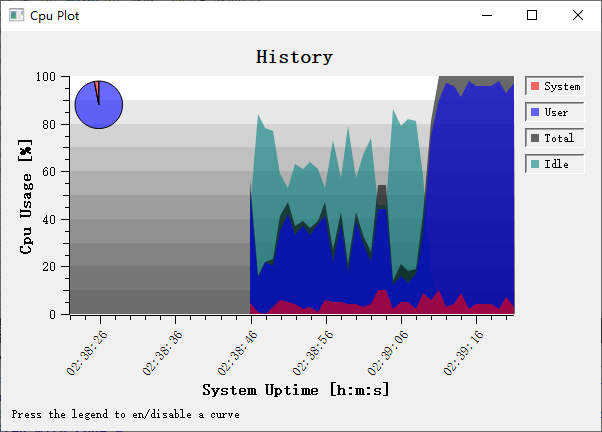
  • CPU monitor: examples/2D/cpuplot

Screenshots of real-time data and CPU monitor:
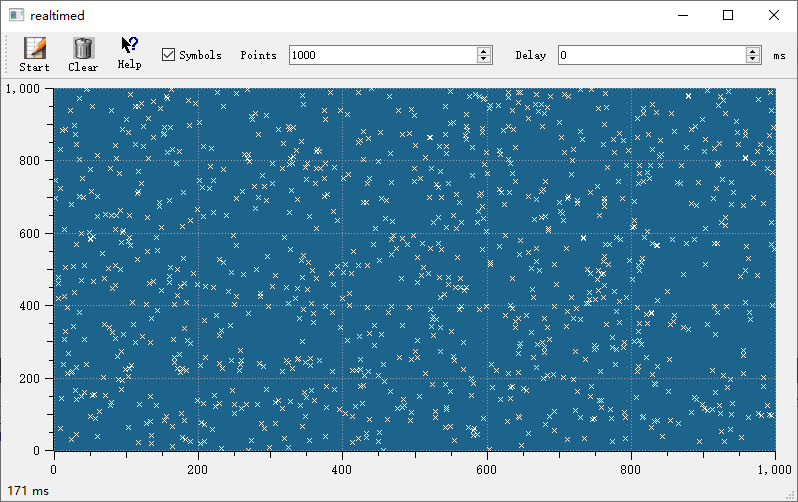
Real-Time Plot

CPU Monitor