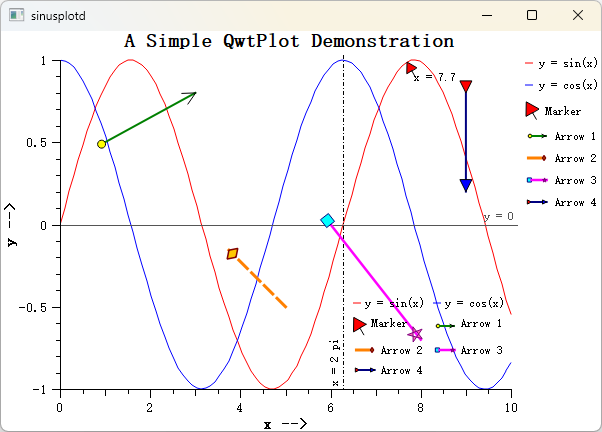
箭头标记 - QwtPlotArrowMarker
QwtPlotArrowMarker 是用于在绘图上绘制箭头标注的绘图项。它支持自定义起止点、箭头/箭尾样式、线条样式等,常用于标注数据区域、指示方向或添加注释说明。
主要功能特性
- ✅ 两种定位模式:显式起止点坐标,或起点+像素长度+角度
- ✅ 七种端点样式:无端点、箭头、圆形、方形、菱形、三角形、自定义路径
- ✅ 独立配置 head/tail:箭头的两端可分别设置样式、尺寸、画笔和画刷
- ✅ 自定义路径:通过
QPainterPath 创建任意形状的端点
- ✅ 像素级控制:
StartLengthAngle 模式下箭头尺寸不随缩放变化
基本概念
定位模式
| 模式 |
枚举值 |
说明 |
| 显式坐标 |
ExplicitPoints |
指定起止点的坐标值,箭头随缩放变化 |
| 起点+长度+角度 |
StartLengthAngle |
指定起点、像素长度和角度,尺寸固定 |
端点样式类型
| 样式 |
枚举值 |
说明 |
| 无 |
NoEndpoint |
不绘制端点 |
| 箭头 |
ArrowHead |
V 字形箭头 |
| 圆形 |
Circle |
圆形端点 |
| 方形 |
Square |
方形端点 |
| 菱形 |
Diamond |
菱形端点 |
| 三角形 |
Triangle |
填充三角形端点 |
| 自定义 |
CustomPath |
使用 QPainterPath 自定义形状 |
箭头结构
| tail (箭尾) head (箭头)
↓ ↓
●━━━━━━━━━━━━━━━━━━━━━━━━━━━━━━━━▶
│ │
start point end point
|
使用方法
1. 基本箭头(显式坐标模式)
使用起止点坐标创建箭头,最常用的方式:
1
2
3
4
5
6
7
8
9
10
11
12
13
14
15
16
17
18
19
20
21 | #include <QwtPlotArrowMarker>
QwtPlotArrowMarker* arrow = new QwtPlotArrowMarker("箭头标注");
// 设置起止点(坐标值)
arrow->setPoints(QPointF(1.0, 0.5), QPointF(3.0, 0.8));
// 设置线条样式
arrow->setLinePen(Qt::darkGreen, 2.0);
// 设置箭头(head)样式
arrow->setHeadStyle(QwtPlotArrowMarker::ArrowHead);
arrow->setHeadSize(12.0);
arrow->setHeadBrush(Qt::green);
// 设置箭尾(tail)样式
arrow->setTailStyle(QwtPlotArrowMarker::Circle);
arrow->setTailSize(8.0);
arrow->setTailBrush(Qt::yellow);
arrow->attach(plot);
|
2. 固定长度箭头(起点+长度+角度模式)
此模式下箭头长度以像素为单位,不随坐标轴缩放变化:
1
2
3
4
5
6
7
8
9
10
11
12
13
14
15
16
17
18
19
20 | QwtPlotArrowMarker* arrow = new QwtPlotArrowMarker("固定箭头");
// 设置起点
arrow->setStartPoint(QPointF(5.0, -0.5));
// 切换到长度+角度模式
arrow->setPositionMode(QwtPlotArrowMarker::StartLengthAngle);
arrow->setLength(80.0); // 80 像素
arrow->setAngle(135.0); // 135 度
// 虚线样式
arrow->setLinePen(QColor(255, 128, 0), 3.0, Qt::DashLine);
// 菱形箭头
arrow->setHeadStyle(QwtPlotArrowMarker::Diamond);
arrow->setHeadSize(QSizeF(10.0, 15.0));
arrow->setHeadBrush(QColor(255, 200, 0));
arrow->setHeadPen(QPen(Qt::darkRed, 1.5));
arrow->attach(plot);
|
3. 自定义端点路径
通过 QPainterPath 创建任意形状的端点,例如五角星:
 1
 2
 3
 4
 5
 6
 7
 8
 9
10
11
12
13
14
15
16
17
18
19
20
21
22
23
24
25
26 | QwtPlotArrowMarker* arrow = new QwtPlotArrowMarker("自定义箭头");
arrow->setPoints(QPointF(6.0, 0.0), QPointF(8.0, -0.7));
arrow->setLinePen(Qt::magenta, 2.5);
// 创建五角星路径
QPainterPath starPath;
starPath.moveTo(0, -5);
for (int i = 1; i < 5; ++i) {
double angle = i * 4 * M_PI / 5;
starPath.lineTo(5 * sin(angle), -5 * cos(angle));
}
starPath.closeSubpath();
// 设置自定义 head
arrow->setHeadStyle(QwtPlotArrowMarker::CustomPath);
arrow->setHeadCustomPath(starPath);
arrow->setHeadSize(15.0);
arrow->setHeadBrush(QColor(255, 105, 180));
arrow->setHeadPen(QPen(Qt::darkMagenta, 1.0));
// 方形 tail
arrow->setTailStyle(QwtPlotArrowMarker::Square);
arrow->setTailSize(10.0);
arrow->setTailBrush(Qt::cyan);
arrow->attach(plot);
|
4. 三角形双端箭头
两端都使用三角形端点,适合标注方向:
 1
 2
 3
 4
 5
 6
 7
 8
 9
10
11
12
13
14
15 | QwtPlotArrowMarker* arrow = new QwtPlotArrowMarker("双端箭头");
arrow->setPoints(QPointF(9.0, 0.8), QPointF(9.0, 0.2));
arrow->setLinePen(Qt::darkBlue, 2.0);
// Head 端:蓝色三角形
arrow->setHeadStyle(QwtPlotArrowMarker::Triangle);
arrow->setHeadSize(12.0);
arrow->setHeadBrush(Qt::blue);
// Tail 端:红色三角形
arrow->setTailStyle(QwtPlotArrowMarker::Triangle);
arrow->setTailSize(12.0);
arrow->setTailBrush(Qt::red);
arrow->attach(plot);
|
图例配置
箭头标记可以显示在图例中。启用图例后,图标会绘制一条水平样本线以及 head/tail 端点:
| arrow->setItemAttribute(QwtPlotItem::Legend, true);
|
默认图例图标尺寸为 24×12 像素,可通过 setLegendIconSize() 调整:
| arrow->setLegendIconSize(QSize(32, 16));
|
核心方法总结
| 方法 |
说明 |
setPoints(start, end) |
设置起止点坐标 |
setStartPoint(point) |
设置起点 |
setEndPoint(point) |
设置终点 |
setPositionMode(mode) |
设置定位模式 |
setLength(length) |
设置像素长度(StartLengthAngle 模式) |
setAngle(angle) |
设置角度(StartLengthAngle 模式) |
setLinePen(pen) |
设置线条画笔 |
setHeadStyle(style) |
设置 head 端点样式 |
setHeadSize(size) |
设置 head 尺寸(像素) |
setHeadBrush(brush) |
设置 head 填充画刷 |
setHeadPen(pen) |
设置 head 轮廓画笔 |
setHeadCustomPath(path) |
设置 head 自定义路径 |
setTailStyle(style) |
设置 tail 端点样式 |
setTailSize(size) |
设置 tail 尺寸(像素) |
setTailBrush(brush) |
设置 tail 填充画刷 |
setTailPen(pen) |
设置 tail 轮廓画笔 |
setTailCustomPath(path) |
设置 tail 自定义路径 |
提示
- 使用
setRenderHint(QwtPlotItem::RenderAntialiased, true) 启用抗锯齿,使箭头线条更平滑。
StartLengthAngle 模式下,长度以像素为单位,缩放坐标轴时箭头长度不变。ExplicitPoints 模式下,起止点使用坐标值,缩放时箭头会跟随变化。
相关示例
- 箭头标注示例:
examples/2D/sinusplot
箭头标注的例子截图如下: