User Configuration of Ribbon
- ✅ Office-style customization: SARibbonCustomizeDialog provides a full customization dialog like Office
- ✅ Action auto-registration: autoRegisteActions traverses and registers all QActions, classified by Category
- ✅ XML persistence: Custom config saved as XML, auto-loaded on startup to restore user interface
- ✅ Widget embedding mode: SARibbonCustomizeWidget can be embedded into your own settings page
- ✅ Complete workflow: Create → Register → Load → Edit → Apply → Save, one-stop closed loop
Customization Features of SARibbon
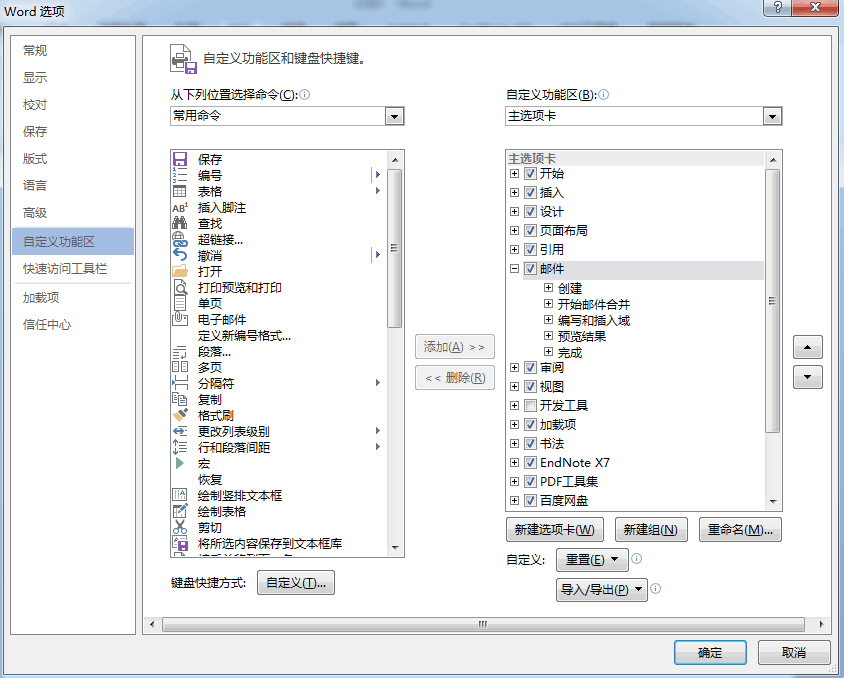
The customization of the ribbon is a distinctive feature of SARibbon. Referencing the custom interfaces of Office and WPS, users can define a great deal of content for their own ribbons, and can even create a completely different interface from the original one.
The following is the custom interface of Office:
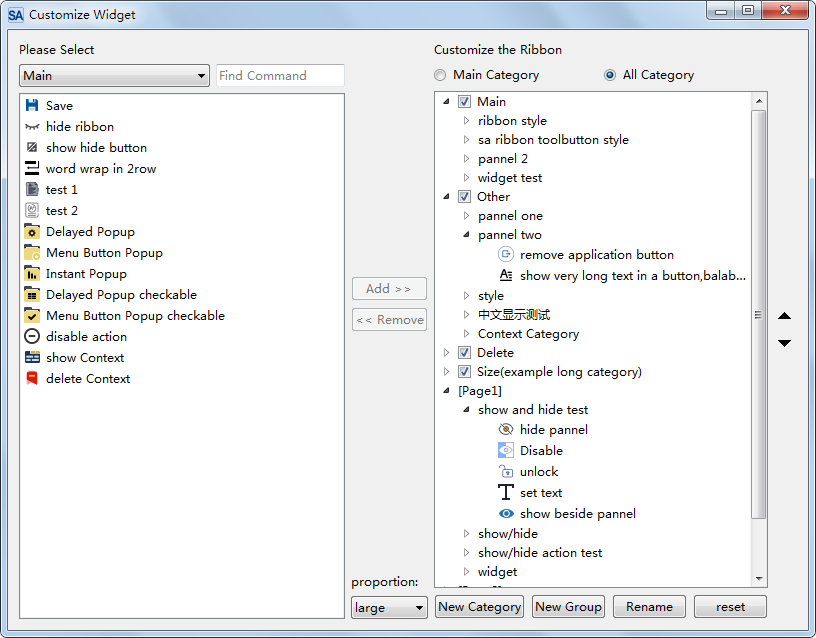
SARibbon refers to the interfaces of Office and WPS and encapsulates user-friendly SARibbonCustomize** classes:
Core Class Description
| Class | Purpose | Used directly by user? |
|---|---|---|
SARibbonActionsManager |
Manages all QActions, supports classification by Category | Yes |
SARibbonCustomizeDialog |
Customization dialog (wraps Widget) | Yes |
SARibbonCustomizeWidget |
Customization widget, embeddable in other dialogs | Optional |
SARibbonCustomizeData |
Stores a single customization operation data | Internal |
SARibbonActionsManagerModel |
Data model for the Widget | Internal |
In actual use, users will only deal with SARibbonActionsManager and SARibbonCustomizeDialog/SARibbonCustomizeWidget; the other classes are not normally used.
SARibbonActionsManager manages QActions that you want to customize, and allows categorizing them for display in SARibbonCustomizeDialog/SARibbonCustomizeWidget:
Adding Customization Features to the Interface
Here is a demonstration of how to add customization features.
First, define SARibbonActionsManager as a member variable of MainWindow.
1 2 | |
During the initialization of MainWindow, a large number of QActions need to be created, with the parent object of QAction specified as MainWindow. In addition, ribbon layouts will be generated, such as adding categories, adding panels, etc. After the above operations are completed, add the following steps to automatically let SARibbonActionsManager manage all QActions.
1 2 3 4 | |
The key function autoRegisteActions of SARibbonActionsManager can traverse all child objects under SARibbonMainWindow, find and register actions, and traverse all SARibbonCategory to classify the actions under SARibbonCategory by the title name of SARibbonCategory. This function will also register the actions under SARibbonMainWindow that are not in any category with the NotInRibbonCategoryTag label, and the default name will be "not in ribbon".
Perform the following operations where SARibbonCustomizeDialog needs to be called:
1 2 3 4 5 6 7 8 9 | |
The customized content needs to be loaded before MainWindow is generated, so the following statement should be added at the end of the constructor:
1 2 | |
sa_apply_customize_from_xml_file is a function provided in SARibbonCustomizeWidget.h, which directly applies the customized content in the configuration file to MainWindow.
In this way, the software will load according to the configuration file every time it starts.
Complete Workflow
flowchart TD
    A[Program Startup] --> B[Create QActions and Ribbon Layout]
    B --> C[Create SARibbonActionsManager]
    C --> D[autoRegisteActions auto-registers all Actions]
    D --> E[sa_apply_customize_from_xml_file loads existing config]
    E --> F[Program runs normally]
    F --> G{User clicks customize button}
    G --> H[Create SARibbonCustomizeDialog]
    H --> I[setupActionsManager sets Action Manager]
    I --> J[fromXml loads existing configuration steps]
    J --> K{User finishes editing}
    K -->|Confirm| L[dlg.applys applies changes]
    L --> M[dlg.toXml saves to XML]
    M --> F
    K -->|Cancel| F
Complete Example Code
Below is a complete example of integrating the customization feature into a MainWindow (reference example/MainWindowExample):
1 2 3 4 5 6 7 8 9 10 11 12 13 14 15 16 17 18 19 20 21 22 23 24 25 26 27 28 29 30 31 32 33 34 35 36 37 38 | |
Note
autoRegisteActions must be called after all Categories, Panels, and Actions have been created, otherwise it will not be able to register all Actions.
Tip
If you want to embed the customization dialog into your own settings page, you can use SARibbonCustomizeWidget instead of SARibbonCustomizeDialog. The APIs are essentially the same.
Customizing the Quick Access Bar
In the customization dialog there are three radio buttons above the result tree: Main Category, All Category, and Quick Access Bar. Selecting "Quick Access Bar" shows the quick access bar as the tree root with its actions, operated exactly like the Ribbon customization:
- Add: select an action in the left action list, select the quick access bar (or one of its actions) in the result tree, then click "Add >>";
- Remove: select an action in the quick access bar and click "<< Remove";
- Reorder: use the "move up / move down" buttons with an action selected.
Quick access bar customization data shares the same save/load entry points as the Ribbon customization (toXml/fromXml), with no extra configuration; XML files saved by older versions simply contain no quick access data and load unaffected.
Prerequisite
Actions to be added to the quick access bar must first be registered with SARibbonActionsManager (via autoRegisteActions or manual registeAction), and marked customizable with SARibbonCustomizeData::setCanCustomize(action) before they appear in the operable list. Run the customization dialog of example/MainWindowExample to try the full flow.