Building SARibbon Library
- ✅ CMake build: supports Visual Studio and Qt Creator, with 5 configurable options
- ✅ QMake build: compatible with older versions via Qt Creator (v2.6.2 and below)
- ✅ Local install isolation: auto-creates version-specific install directories per compiler/Qt version
- ✅ Optional QWindowKit: enables native window features (Snap Layout, etc.)
The SARibbon library provides two build methods: CMake and QMake, with CMake being recommended.
Note
Qt6 no longer maintains QMake and is gradually shifting to CMake. Future versions of SARibbon will remove QMake support.
Building the SARibbon Library with CMake
CMake Build Options
| Option Name | Default Value | Description | Notes |
|---|---|---|---|
SARIBBON_BUILD_STATIC_LIBS |
OFF |
Controls SARibbon build mode: ON for static, OFF for dynamic |
Static mode forces BUILD_SHARED_LIBS=OFF, dynamic mode forces BUILD_SHARED_LIBS=ON |
SARIBBON_BUILD_EXAMPLES |
ON |
Controls whether to build example programs under example/ (e.g. MainWindowExample) |
Disable to speed up compilation, builds only the library itself |
SARIBBON_USE_FRAMELESS_LIB |
OFF |
Whether to use QWindowKit as borderless window solution |
Requires Qt 5.14+, Qt 6.2+; forces C++17 standard, depends on QWindowKit library |
SARIBBON_ENABLE_SNAPLAYOUT |
OFF |
Whether to enable Windows 11 Snap Layout effect | Only effective when SARIBBON_USE_FRAMELESS_LIB=ON, compatibility issues possible with different Qt versions |
SARIBBON_INSTALL_IN_CURRENT_DIR |
ON on Windows, OFF on other systems |
Controls install path: ON installs to version-distinguished folder under project root, OFF uses system default |
Local install folder naming: bin_qt<Qt version>_<compiler>_x<architecture> (e.g. bin_qt5.14.2_msvc_x64) |
BUILD_TESTS |
OFF |
Controls whether to build unit tests (Qt Test framework tests under tests/) |
Requires BUILD_TESTS=ON and test dependencies available |
Note
Qt version compatibility:
SARIBBON_USE_FRAMELESS_LIB has strict Qt version requirements (Qt 5.14+, Qt 6.2+). Lower Qt versions will automatically disable this option and switch to C++14 standard.
Other features require a minimum of Qt 5.12.
Note
C++ standard requirements:
- Qt6 builds always use C++17
- When SARIBBON_USE_FRAMELESS_LIB is enabled, C++17 is forced (same for Qt5)
- In all other cases (Qt5 without frameless), C++14 is used (MSVC adds corresponding compiler flags automatically)
Note
Third-party dependencies:
If SARIBBON_USE_FRAMELESS_LIB is enabled, ensure QWindowKit is properly compiled and discoverable by CMake (use -DQWindowKit_DIR to specify its path).
Building under Visual Studio
-
If you want to enable
QWindowKit, change the optionSARIBBON_USE_FRAMELESS_LIBto ON inCMakeLists.txt. -
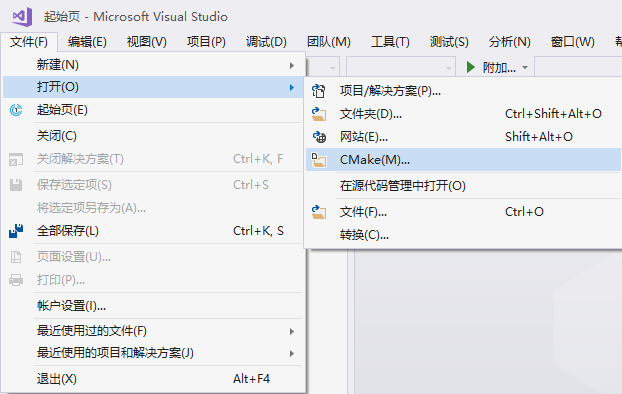
Open the CMake project and select
CMakeLists.txt.
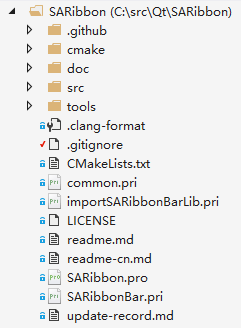
- The following build tree will be formed.
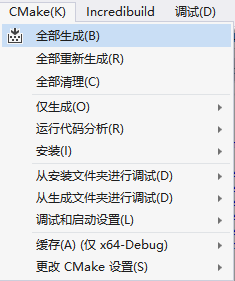
- Directly select "Build All" in the CMake menu (some versions do not have a CMake menu; you can right-click on
CMakeLists.txt).
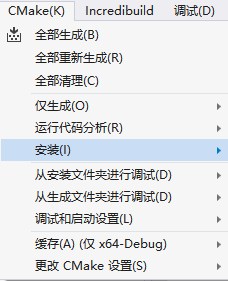
- After all builds are completed, select "Install" -> "SARibbon" in the CMake menu (some versions do not have a CMake menu; you can right-click on
CMakeLists.txt).
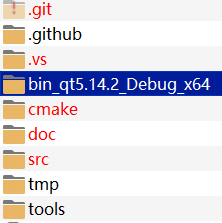
At this point, you will see a new folder in the root directory of the source code. The folder is named in the format bin_qt{version}_[MSVC/GNU]_x[64/86] (you can use the default installation location by setting the SARIBBON_INSTALL_IN_CURRENT_DIR variable to OFF: SARIBBON_INSTALL_IN_CURRENT_DIR=OFF).
Building with Qt Creator
Click File -> Open File or Project, select CMakeLists.txt, and after loading, the following build tree will be formed.
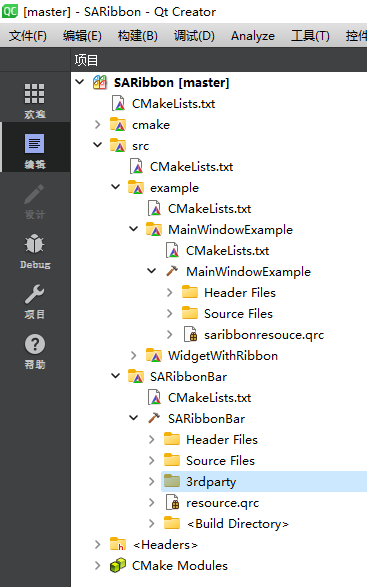
Qt Creator allows modifying the value of SARIBBON_USE_FRAMELESS_LIB in the interface, or you can modify it manually. In Qt Creator, click the left sidebar to switch to Project mode (Ctrl+5), and set SARIBBON_USE_FRAMELESS_LIB to ON in Current Configuration to enable QWindowKit, provided that QWindowKit has been compiled first.
Click the run button.
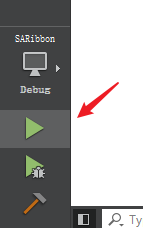
After the run ends, an example window will pop up. Click the Project tab in the left sidebar, go to the Build steps, and select install.
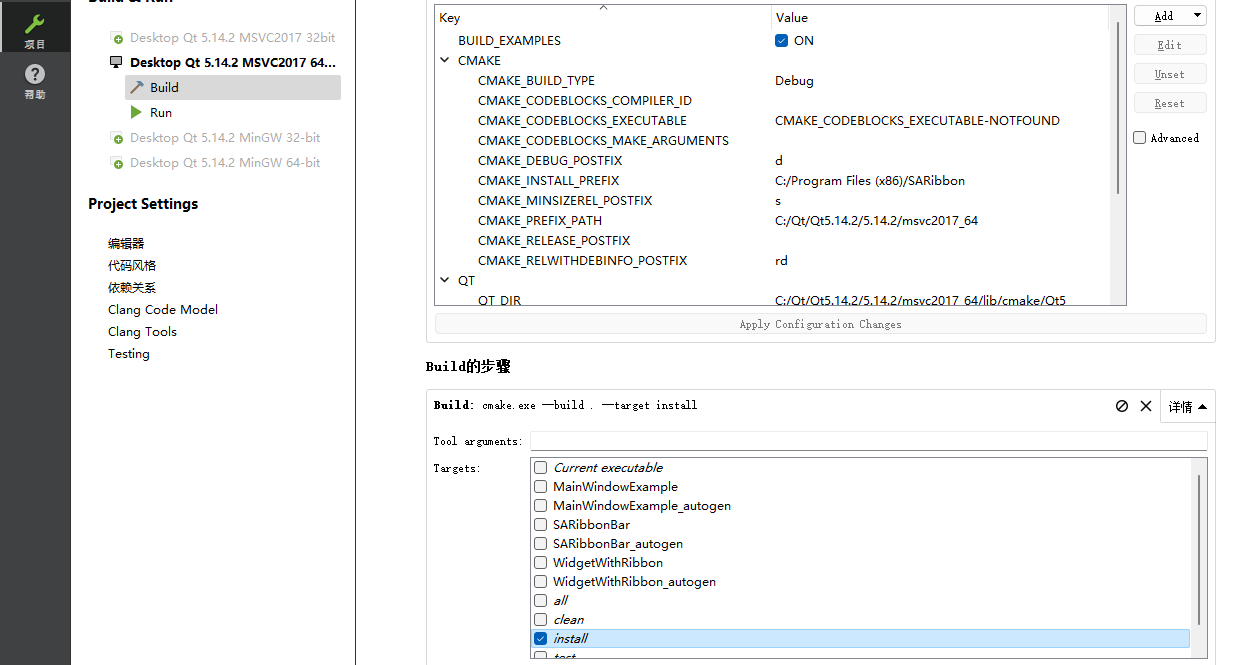
Click the run button again, and at this time you will see a new folder in the root directory of the source code. The folder is named in the format bin_qt{version}_[MSVC/GNU]_x[64/86] (provided that you have not changed CMAKE_INSTALL_PREFIX).
All content for using SARibbon is in this folder.
Building SARibbonBar with QMake
To build SARibbon with qmake, simply open the SARibbon.pro file using Qt Creator.
Note
If an error occurs while opening the SARibbon.pro file with Qt Creator, your account may not have sufficient write permissions. Different versions of Qt Creator behave differently on different operating systems, so it is recommended to use cmake.