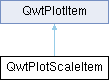
A class which draws a scale inside the plot canvas/在绘图画布内绘制刻度的类 More...
#include <qwt_plot_scaleitem.h>
Classes | |
| class | PrivateData |
Public Member Functions | |
| QwtPlotScaleItem (QwtScaleDraw::Alignment=QwtScaleDraw::BottomScale, const double pos=0.0) | |
| Constructor for scale item at the position pos. | |
| virtual | ~QwtPlotScaleItem () |
| Destructor. | |
| virtual int | rtti () const QWT_OVERRIDE |
| void | setScaleDiv (const QwtScaleDiv &) |
| Assign a scale division. | |
| const QwtScaleDiv & | scaleDiv () const |
| void | setScaleDivFromAxis (bool on) |
| Enable/Disable the synchronization of the scale division with the corresponding axis. | |
| bool | isScaleDivFromAxis () const |
| void | setPalette (const QPalette &) |
| Set the palette. | |
| QPalette | palette () const |
| void | setFont (const QFont &) |
| Change the tick label font. | |
| QFont | font () const |
| void | setScaleDraw (QwtScaleDraw *) |
| Set a scale draw. | |
| const QwtScaleDraw * | scaleDraw () const |
| QwtScaleDraw * | scaleDraw () |
| void | setPosition (double pos) |
| Change the position of the scale. | |
| double | position () const |
| void | setBorderDistance (int) |
| Align the scale to the canvas. | |
| int | borderDistance () const |
| void | setAlignment (QwtScaleDraw::Alignment) |
| Change the alignment of the scale. | |
| virtual void | draw (QPainter *, const QwtScaleMap &xMap, const QwtScaleMap &yMap, const QRectF &canvasRect) const QWT_OVERRIDE |
| Draw the scale. | |
| virtual void | updateScaleDiv (const QwtScaleDiv &, const QwtScaleDiv &) QWT_OVERRIDE |
| Update the item to changes of the axes scale division. | |
 Public Member Functions inherited from QwtPlotItem Public Member Functions inherited from QwtPlotItem | |
| QwtPlotItem () | |
| Constructor. | |
| QwtPlotItem (const QString &title) | |
| Constructor. | |
| QwtPlotItem (const QwtText &title) | |
| Constructor. | |
| virtual | ~QwtPlotItem () |
| Destroy the QwtPlotItem. | |
| void | attach (QwtPlot *plot) |
| Attach the item to a plot. | |
| void | detach () |
| This method detaches a QwtPlotItem from any QwtPlot it has been associated with. | |
| QwtPlot * | plot () const |
| Return attached plot. | |
| void | setTitle (const QString &title) |
| Set a new title. | |
| void | setTitle (const QwtText &title) |
| Set a new title. | |
| const QwtText & | title () const |
| void | setItemAttribute (ItemAttribute, bool on=true) |
| Toggle an item attribute. | |
| bool | testItemAttribute (ItemAttribute) const |
| Test an item attribute. | |
| void | setItemInterest (ItemInterest, bool on=true) |
| Toggle an item interest. | |
| bool | testItemInterest (ItemInterest) const |
| Test an item interest. | |
| void | setRenderHint (RenderHint, bool on=true) |
| Toggle an render hint. | |
| bool | testRenderHint (RenderHint) const |
| Test a render hint. | |
| void | setRenderThreadCount (uint numThreads) |
| On multi core systems rendering of certain plot item ( f.e QwtPlotRasterItem ) can be done in parallel in several threads. | |
| uint | renderThreadCount () const |
| void | setLegendIconSize (const QSize &) |
| Set the size of the legend icon. | |
| QSize | legendIconSize () const |
| double | z () const |
| Plot items are painted in increasing z-order. | |
| void | setZ (double z) |
| Set the z value. | |
| void | show () |
| Show the item. | |
| void | hide () |
| Hide the item. | |
| virtual void | setVisible (bool) |
| Show/Hide the item. | |
| bool | isVisible () const |
| void | setAxes (QwtAxisId xAxis, QwtAxisId yAxis) |
| Set X and Y axis. | |
| void | setXAxis (QwtAxisId) |
| Set the X axis. | |
| QwtAxisId | xAxis () const |
| Return xAxis. | |
| void | setYAxis (QwtAxisId) |
| Set the Y axis. | |
| QwtAxisId | yAxis () const |
| Return yAxis. | |
| virtual void | itemChanged () |
| Update the legend and call QwtPlot::autoRefresh() for the parent plot. | |
| virtual void | legendChanged () |
| Update the legend of the parent plot. | |
| virtual QRectF | boundingRect () const |
| virtual void | getCanvasMarginHint (const QwtScaleMap &xMap, const QwtScaleMap &yMap, const QRectF &canvasRect, double &left, double &top, double &right, double &bottom) const |
| Calculate a hint for the canvas margin. | |
| virtual void | updateLegend (const QwtPlotItem *, const QList< QwtLegendData > &) |
| Update the item to changes of the legend info. | |
| QRectF | scaleRect (const QwtScaleMap &, const QwtScaleMap &) const |
| Calculate the bounding scale rectangle of 2 maps. | |
| QRectF | paintRect (const QwtScaleMap &, const QwtScaleMap &) const |
| Calculate the bounding paint rectangle of 2 maps. | |
| virtual QList< QwtLegendData > | legendData () const |
| Return all information, that is needed to represent the item on the legend. | |
| virtual QwtGraphic | legendIcon (int index, const QSizeF &) const |
Additional Inherited Members | |
| Public Types inherited from QwtPlotItem | |
| enum | RttiValues { Rtti_PlotItem = 0 , Rtti_PlotGrid , Rtti_PlotScale , Rtti_PlotLegend , Rtti_PlotMarker , Rtti_PlotCurve , Rtti_PlotSpectroCurve , Rtti_PlotIntervalCurve , Rtti_PlotHistogram , Rtti_PlotSpectrogram , Rtti_PlotGraphic , Rtti_PlotTradingCurve , Rtti_PlotBarChart , Rtti_PlotMultiBarChart , Rtti_PlotShape , Rtti_PlotTextLabel , Rtti_PlotZone , Rtti_PlotVectorField , Rtti_PlotUserItem = 1000 } |
| Runtime type information. More... | |
| enum | ItemAttribute { Legend = 0x01 , AutoScale = 0x02 , Margins = 0x04 } |
| Plot Item Attributes. More... | |
| enum | ItemInterest { ScaleInterest = 0x01 , LegendInterest = 0x02 } |
| Plot Item Interests/绘图项关注的事件类型 More... | |
| enum | RenderHint { RenderAntialiased = 0x1 } |
| Render hints. More... | |
| Protected Member Functions inherited from QwtPlotItem | |
| QwtGraphic | defaultIcon (const QBrush &, const QSizeF &) const |
| Return a default icon from a brush. | |
Detailed Description
A class which draws a scale inside the plot canvas/在绘图画布内绘制刻度的类
QwtPlotScaleItem can be used to draw an axis inside the plot canvas. It might by synchronized to one of the axis of the plot, but can also display its own ticks and labels.
QwtPlotScaleItem 可用于在绘图画布内绘制一条坐标轴。它可以与绘图的某一轴同步,也可以显示自己的刻度和标签。
It is allowed to synchronize the scale item with a disabled axis. In plots with vertical and horizontal scale items, it might be necessary to remove ticks at the intersections, by overloading updateScaleDiv().
允许将刻度项与禁用的轴同步。在同时存在垂直和水平刻度项的绘图中,可能需要通过重载 updateScaleDiv() 方法来移除交叉点处的刻度。
The scale might be at a specific position (f.e 0.0) or it might be aligned to a canvas border.
刻度可以位于特定位置(例如 0.0),也可以与画布边缘对齐。
- Example
- The following example shows how to replace the left axis, by a scale item at the x position 0.0. 以下示例展示了如何用 x 位置为 0.0 处的刻度项替换左轴。 void attach(QwtPlot *plot)Attach the item to a plot.Definition qwt_plot_item.cpp:115A class which draws a scale inside the plot canvas/在绘图画布内绘制刻度的类Definition qwt_plot_scaleitem.h:64void setFont(const QFont &)Change the tick label font.Definition qwt_plot_scaleitem.cpp:200void setAxisVisible(QwtAxisId, bool on=true)Hide or show a specified axis/显示或隐藏指定轴Definition qwt_plot_axis.cpp:488const QwtScaleWidget * axisWidget(QwtAxisId) constReturn the scale widget of the specified axis/返回指定轴的刻度控件Definition qwt_plot_axis.cpp:179
Constructor & Destructor Documentation
◆ QwtPlotScaleItem()
|
explicit |
Constructor for scale item at the position pos.
- Parameters
-
alignment In case of QwtScaleDraw::BottomScale or QwtScaleDraw::TopScale the scale item is corresponding to the xAxis(), otherwise it corresponds to the yAxis(). pos x or y position, depending on the corresponding axis.
- See also
- setPosition(), setAlignment()
Member Function Documentation
◆ borderDistance()
| int QwtPlotScaleItem::borderDistance | ( | ) | const |
- Returns
- Distance from a canvas border
- See also
- setBorderDistance(), setPosition()
◆ draw()
|
virtual |
Draw the scale.
Implements QwtPlotItem.
◆ font()
| QFont QwtPlotScaleItem::font | ( | ) | const |
- Returns
- tick label font
- See also
- setFont()
◆ isScaleDivFromAxis()
| bool QwtPlotScaleItem::isScaleDivFromAxis | ( | ) | const |
- Returns
- True, if the synchronization of the scale division with the corresponding axis is enabled.
- See also
- setScaleDiv(), setScaleDivFromAxis()
◆ palette()
| QPalette QwtPlotScaleItem::palette | ( | ) | const |
- Returns
- palette
- See also
- setPalette()
◆ position()
| double QwtPlotScaleItem::position | ( | ) | const |
- Returns
- Position of the scale
- See also
- setPosition(), setAlignment()
◆ rtti()
|
virtual |
- Returns
- QwtPlotItem::Rtti_PlotScale
Reimplemented from QwtPlotItem.
◆ scaleDiv()
| const QwtScaleDiv & QwtPlotScaleItem::scaleDiv | ( | ) | const |
- Returns
- Scale division
◆ scaleDraw() [1/2]
| QwtScaleDraw * QwtPlotScaleItem::scaleDraw | ( | ) |
- Returns
- Scale draw
- See also
- setScaleDraw()
◆ scaleDraw() [2/2]
| const QwtScaleDraw * QwtPlotScaleItem::scaleDraw | ( | ) | const |
- Returns
- Scale draw
- See also
- setScaleDraw()
◆ setAlignment()
| void QwtPlotScaleItem::setAlignment | ( | QwtScaleDraw::Alignment | alignment | ) |
Change the alignment of the scale.
The alignment sets the orientation of the scale and the position of the ticks:
- QwtScaleDraw::BottomScale: horizontal, ticks below
- QwtScaleDraw::TopScale: horizontal, ticks above
- QwtScaleDraw::LeftScale: vertical, ticks left
- QwtScaleDraw::RightScale: vertical, ticks right
For horizontal scales the position corresponds to QwtPlotItem::yAxis(), otherwise to QwtPlotItem::xAxis().
◆ setBorderDistance()
| void QwtPlotScaleItem::setBorderDistance | ( | int | distance | ) |
Align the scale to the canvas.
If distance is >= 0 the scale will be aligned to a border of the contents rectangle of the canvas. If alignment() is QwtScaleDraw::LeftScale, the scale will be aligned to the right border, if it is QwtScaleDraw::TopScale it will be aligned to the bottom (and vice versa),
If distance is < 0 the scale will be at the position().
- Parameters
-
distance Number of pixels between the canvas border and the backbone of the scale.
- See also
- setPosition(), borderDistance()
◆ setFont()
| void QwtPlotScaleItem::setFont | ( | const QFont & | font | ) |
Change the tick label font.
- See also
- font()
◆ setPalette()
| void QwtPlotScaleItem::setPalette | ( | const QPalette & | palette | ) |
Set the palette.
- See also
- QwtAbstractScaleDraw::draw(), palette()
◆ setPosition()
| void QwtPlotScaleItem::setPosition | ( | double | pos | ) |
Change the position of the scale.
The position is interpreted as y value for horizontal axes and as x value for vertical axes.
The border distance is set to -1.
- Parameters
-
pos New position
- See also
- position(), setAlignment()
◆ setScaleDiv()
| void QwtPlotScaleItem::setScaleDiv | ( | const QwtScaleDiv & | scaleDiv | ) |
Assign a scale division.
When assigning a scaleDiv the scale division won't be synchronized with the corresponding axis anymore.
- Parameters
-
scaleDiv Scale division
◆ setScaleDivFromAxis()
| void QwtPlotScaleItem::setScaleDivFromAxis | ( | bool | on | ) |
Enable/Disable the synchronization of the scale division with the corresponding axis.
- Parameters
-
on true/false
- See also
- isScaleDivFromAxis()
◆ setScaleDraw()
| void QwtPlotScaleItem::setScaleDraw | ( | QwtScaleDraw * | scaleDraw | ) |
Set a scale draw.
- Parameters
-
scaleDraw object responsible for drawing scales.
The main use case for replacing the default QwtScaleDraw is to overload QwtAbstractScaleDraw::label, to replace or swallow tick labels.
- See also
- scaleDraw()
◆ updateScaleDiv()
|
virtual |
Update the item to changes of the axes scale division.
In case of isScaleDivFromAxis(), the scale draw is synchronized to the correspond axis.
- Parameters
-
xScaleDiv Scale division of the x-axis yScaleDiv Scale division of the y-axis
- See also
- QwtPlot::updateAxes()
Reimplemented from QwtPlotItem.
The documentation for this class was generated from the following files:
- /home/runner/work/QWT/QWT/src/qwt_plot_scaleitem.h
- /home/runner/work/QWT/QWT/src/qwt_plot_scaleitem.cpp