载入中...
搜索中...
未找到
DA::DACommandDataFrame_iat类 参考
添加变量命令 更多...
#include <DACommandsDataFrame.h>
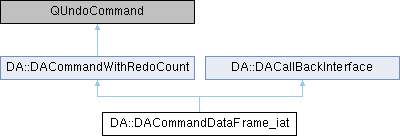
类 DA::DACommandDataFrame_iat 继承关系图:
Public 成员函数 | |
| DACommandDataFrame_iat (const DAPyDataFrame &df, int row, int col, const QVariant &olddata, const QVariant &newdata, QUndoCommand *par=nullptr) | |
| virtual void | undo () override |
| virtual bool | exec () override |
| 执行函数,此函数返回false,说明执行失败,不应该被放入command stack中,在DACommandWithRedoCount中,exec函数应该替代redo函数 | |
 Public 成员函数 继承自 DA::DACommandWithRedoCount Public 成员函数 继承自 DA::DACommandWithRedoCount | |
| DACommandWithRedoCount (QUndoCommand *par=nullptr) | |
| virtual void | redo () override |
| Public 成员函数 继承自 DA::DACallBackInterface | |
| void | setCallBack (CallBack fn) |
| CallBack | getCallBack () const |
| void | callback () |
| bool | hasCallback () const |
额外继承的成员函数 | |
| Public 类型 继承自 DA::DACallBackInterface | |
| using | CallBack = std::function< void() > |
| Protected 属性 继承自 DA::DACommandWithRedoCount | |
| bool | mIsFirstRedo { true } |
详细描述
添加变量命令
redo会调用iat设置值,但是,如果值没有设置成功,将会把m_isSuccess设置为false,这时调用undo不做任何处理
因此在对一些场合,需要判断是否设置成功的地方,可以按照如下方式进行操作
bool DAPyDataFrameTableModule::setData(const QModelIndex& index, const QVariant& value, int role)
{
if (Qt::EditRole != role) {
return false;
}
if (!index.isValid() || d_ptr->_dataframe.isNone()) {
return false;
}
std::pair< std::size_t, std::size_t > shape = d_ptr->_dataframe.shape();
if (index.row() >= (int)shape.first || index.column() >= (int)shape.second) {
return false;
}
QVariant olddata = d_ptr->_dataframe.iat(index.row(), index.column());
DACommandDataFrame_iat* cmd_iat = new DACommandDataFrame_iat(d_ptr->_dataframe, index.row(), index.column(),
olddata, value); d_ptr->_undoStack->push(cmd_iat); if (!cmd_iat->isSetSuccess()) {
//没设置成功,undo回退一步
d_ptr->_undoStack->undo();
return false;
}
//这里说明设置成功了
return true;
}
成员函数说明
◆ exec()
|
overridevirtual |
执行函数,此函数返回false,说明执行失败,不应该被放入command stack中,在DACommandWithRedoCount中,exec函数应该替代redo函数
- 返回
该类的文档由以下文件生成:
- /home/runner/work/data-workbench/data-workbench/src/DAGui/Commands/DACommandsDataFrame.h
- /home/runner/work/data-workbench/data-workbench/src/DAGui/Commands/DACommandsDataFrame.cpp