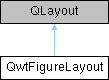
Custom layout manager for QwtFigureWidget that handles both normalized coordinates and grid layouts. More...
#include <qwt_figure_layout.h>
Classes | |
| class | PrivateData |
Public Member Functions | |
| QwtFigureLayout (QWidget *parent) | |
| virtual void | addItem (QLayoutItem *item) override |
| virtual QLayoutItem * | itemAt (int index) const override |
| virtual QLayoutItem * | takeAt (int index) override |
| virtual int | count () const override |
| virtual QSize | sizeHint () const override |
| virtual QSize | minimumSize () const override |
| virtual void | setGeometry (const QRect &rect) override |
| void | addAxes (QWidget *widget, const QRectF &rect) |
| Add a widget with normalized coordinates. | |
| void | addAxes (QWidget *widget, qreal left, qreal top, qreal width, qreal height) |
| Add a widget with normalized coordinates using separate parameters. | |
| void | addGridAxes (QWidget *widget, int rowCnt, int colCnt, int row, int col, int rowSpan=1, int colSpan=1, qreal wspace=0.0, qreal hspace=0.0) |
| Add a widget by grid layout. | |
| void | setAxesNormPos (QWidget *widget, const QRectF &rect) |
| Change the normalized position of an already added widget. | |
| QRectF | widgetNormRect (QWidget *widget) const |
| Get the normalized rectangle for a widget. | |
| QRect | calcActualRect (const QRect &parentRect, const QRectF &normRect) |
| Calculate actual rectangle from normalized coordinates. | |
Static Public Member Functions | |
| static QRectF | calcNormRect (const QRect &parentRect, const QRect &rect) |
| Calculate normalized coordinates of rect relative to parentRect. | |
Protected Member Functions | |
| QRectF | calcGridRect (int rowCnt, int colCnt, int row, int col, int rowSpan=1, int colSpan=1, qreal wspace=0.0, qreal hspace=0.0) const |
| Calculate the normalized rectangle for a grid cell. | |
Detailed Description
Custom layout manager for QwtFigureWidget that handles both normalized coordinates and grid layouts.
Member Function Documentation
◆ addAxes() [1/2]
| void QwtFigureLayout::addAxes | ( | QWidget * | widget, |
| const QRectF & | rect | ||
| ) |
Add a widget with normalized coordinates.
This method adds a widget to the layout using normalized coordinates in the range [0,1]. The coordinates are specified as [left, top, width, height], where:
- left: distance from the left edge of the figure
- top: distance from the top edge of the figure
- width: width of the widget
- height: height of the widget
- Parameters
-
widget Widget to add rect Normalized coordinates [left, top, width, height] in range [0,1]
- Note
- All coordinates must be in the [0,1] range. left+width should not exceed 1, and top+height should not exceed 1.
◆ addAxes() [2/2]
| void QwtFigureLayout::addAxes | ( | QWidget * | widget, |
| qreal | left, | ||
| qreal | top, | ||
| qreal | width, | ||
| qreal | height | ||
| ) |
Add a widget with normalized coordinates using separate parameters.
This is a convenience overload that adds a widget to the layout using normalized coordinates in the range [0,1] with separate left, top, width, and height parameters. The coordinates use Qt's standard top-left coordinate system.
- Parameters
-
widget Widget to add left Normalized distance from the left edge [0,1] top Normalized distance from the top edge [0,1] width Normalized width of the widget [0,1] height Normalized height of the widget [0,1]
- Note
- All parameters must be in the range [0,1]. The sum of left + width should not exceed 1, and the sum of top + height should not exceed 1.
◆ addGridAxes()
| void QwtFigureLayout::addGridAxes | ( | QWidget * | widget, |
| int | rowCnt, | ||
| int | colCnt, | ||
| int | row, | ||
| int | col, | ||
| int | rowSpan = 1, |
||
| int | colSpan = 1, |
||
| qreal | wspace = 0.0, |
||
| qreal | hspace = 0.0 |
||
| ) |
Add a widget by grid layout.
◆ calcActualRect()
| QRect QwtFigureLayout::calcActualRect | ( | const QRect & | parentRect, |
| const QRectF & | normRect | ||
| ) |
Calculate actual rectangle from normalized coordinates.
◆ calcGridRect()
|
protected |
Calculate the normalized rectangle for a grid cell.
This method calculates the normalized coordinates for a specific grid cell based on the current layout parameters and grid configuration.
- Parameters
-
rowCnt Total number of rows in the grid colCnt Total number of columns in the grid row Grid row position (0-based) col Grid column position (0-based) rowSpan Number of rows to span (default: 1) colSpan Number of columns to span (default: 1)
- Returns
- Normalized coordinates [left, top, width, height] in range [0,1]
◆ calcNormRect()
|
static |
Calculate normalized coordinates of rect relative to parentRect.
◆ setAxesNormPos()
| void QwtFigureLayout::setAxesNormPos | ( | QWidget * | widget, |
| const QRectF & | rect | ||
| ) |
Change the normalized position of an already added widget.
◆ widgetNormRect()
| QRectF QwtFigureLayout::widgetNormRect | ( | QWidget * | widget | ) | const |
Get the normalized rectangle for a widget.
The documentation for this class was generated from the following files:
- /home/runner/work/QWT/QWT/src/plot/qwt_figure_layout.h
- /home/runner/work/QWT/QWT/src/plot/qwt_figure_layout.cpp