An abstract base class for drawing scales. More...
#include <qwt_abstract_scale_draw.h>
Classes | |
| class | PrivateData |
Public Types | |
| enum | ScaleComponent { Backbone = 0x01 , Ticks = 0x02 , Labels = 0x04 } |
| Components of a scale. More... | |
Public Member Functions | |
| QwtAbstractScaleDraw () | |
| Constructor for QwtAbstractScaleDraw. | |
| void | setScaleDiv (const QwtScaleDiv &) |
| Set the scale division. | |
| const QwtScaleDiv & | scaleDiv () const |
| Return the scale division. | |
| void | setTransformation (QwtTransform *) |
| Set the scale transformation. | |
| const QwtScaleMap & | scaleMap () const |
| Return the scale map (const version) | |
| QwtScaleMap & | scaleMap () |
| Return the scale map (non-const version) | |
| void | enableComponent (ScaleComponent, bool enable=true) |
| Enable or disable a scale component. | |
| bool | hasComponent (ScaleComponent) const |
| Check if a component is enabled. | |
| void | setTickLength (QwtScaleDiv::TickType, double length) |
| Set the length of the ticks. | |
| double | tickLength (QwtScaleDiv::TickType) const |
| Get the length of the ticks. | |
| double | maxTickLength () const |
| Get the length of the longest tick. | |
| void | setSpacing (double) |
| Set the spacing between tick and labels. | |
| double | spacing () const |
| Get the spacing. | |
| void | setPenWidthF (qreal width) |
| Specify the width of the scale pen. | |
| qreal | penWidthF () const |
| Get the scale pen width. | |
| void | setSelected (bool on) |
| Set whether the scale draw is selected. | |
| bool | isSelected () const |
| Check if the scale draw is selected. | |
| void | setSelectedPenWidthOffset (qreal offset=1) |
| Set the pen width offset for the axis when it is in selected state. | |
| qreal | selectedPenWidthOffset () const |
| Get the current pen width offset for the axis when it is in selected state. | |
| virtual void | draw (QPainter *, const QPalette &) const |
| Draw the scale. | |
| virtual QwtText | label (double) const |
| Convert a value into its representing label. | |
| virtual double | extent (const QFont &font) const =0 |
| void | setMinimumExtent (double) |
| Set a minimum for the extent. | |
| double | minimumExtent () const |
| Get the minimum extent. | |
| void | invalidateCache () |
| Invalidate the cache used by tickLabel() | |
Protected Member Functions | |
| virtual void | drawTick (QPainter *painter, double value, double len) const =0 |
| virtual void | drawBackbone (QPainter *painter) const =0 |
| virtual void | drawLabel (QPainter *painter, double value) const =0 |
| const QwtText & | tickLabel (const QFont &, double value) const |
| Convert a value into its representing label and cache it. | |
| qreal | effectivePenWidthF () const |
| Pen width including the offset of the selected state. | |
Detailed Description
An abstract base class for drawing scales.
QwtAbstractScaleDraw can be used to draw linear or logarithmic scales. After a scale division has been specified as a QwtScaleDiv object using setScaleDiv(), the scale can be drawn with the draw() member.
Member Enumeration Documentation
◆ ScaleComponent
Components of a scale.
- See also
- enableComponent(), hasComponent
| Enumerator | |
|---|---|
| Backbone | Backbone = the line where the ticks are located. |
| Ticks | Ticks. |
| Labels | Labels. |
Constructor & Destructor Documentation
◆ QwtAbstractScaleDraw()
| QwtAbstractScaleDraw::QwtAbstractScaleDraw | ( | ) |
Constructor for QwtAbstractScaleDraw.
The range of the scale is initialized to [0, 100], the spacing (distance between ticks and labels) is set to 4, the tick lengths are set to 4, 6 and 8 pixels.
Destructor for QwtAbstractScaleDraw
Member Function Documentation
◆ draw()
|
virtual |
Draw the scale.
- Parameters
-
painter The painter palette Palette, text color is used for the labels, foreground color for ticks and backbone
◆ drawBackbone()
|
protectedpure virtual |
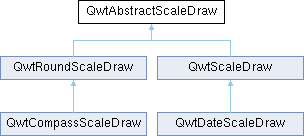
Implemented in QwtRoundScaleDraw, and QwtScaleDraw.
◆ drawLabel()
|
protectedpure virtual |
Implemented in QwtRoundScaleDraw, and QwtScaleDraw.
◆ drawTick()
|
protectedpure virtual |
Implemented in QwtRoundScaleDraw, and QwtScaleDraw.
◆ effectivePenWidthF()
|
protected |
Pen width including the offset of the selected state.
- Returns
- Pen width used for the backbone and the ticks
When the scale is selected, the pen grows by selectedPenWidthOffset(); a zero width ( hairline ) becomes 1 + offset, as the hairline has no width to grow from.
- See also
- setSelected(), setSelectedPenWidthOffset()
◆ enableComponent()
| void QwtAbstractScaleDraw::enableComponent | ( | ScaleComponent | component, |
| bool | enable = true |
||
| ) |
Enable or disable a scale component.
- Parameters
-
component Scale component (Backbone, Ticks, or Labels) enable True to enable, false to disable
- See also
- hasComponent()
◆ extent()
|
pure virtual |
Implemented in QwtRoundScaleDraw, and QwtScaleDraw.
◆ hasComponent()
| bool QwtAbstractScaleDraw::hasComponent | ( | ScaleComponent | component | ) | const |
Check if a component is enabled.
- Parameters
-
component Component type
- Returns
- True if component is enabled
- See also
- enableComponent()
◆ invalidateCache()
| void QwtAbstractScaleDraw::invalidateCache | ( | ) |
Invalidate the cache used by tickLabel()
The cache is invalidated when a new QwtScaleDiv is set. If the labels need to be changed while the same QwtScaleDiv is set, invalidateCache() needs to be called manually.
◆ isSelected()
| bool QwtAbstractScaleDraw::isSelected | ( | ) | const |
Check if the scale draw is selected.
- Returns
- True if selected, false otherwise
◆ label()
|
virtual |
Convert a value into its representing label.
The value is converted to a plain text using QLocale().toString(value). This method is often overloaded by applications to have individual labels.
- Parameters
-
value Value
- Returns
- Label string
Reimplemented in QwtCompassScaleDraw, QwtTextScaleDraw, and QwtDateScaleDraw.
◆ maxTickLength()
| double QwtAbstractScaleDraw::maxTickLength | ( | ) | const |
Get the length of the longest tick.
- Returns
- Length of the longest tick
Useful for layout calculations
- See also
- tickLength(), setTickLength()
◆ minimumExtent()
| double QwtAbstractScaleDraw::minimumExtent | ( | ) | const |
◆ penWidthF()
| qreal QwtAbstractScaleDraw::penWidthF | ( | ) | const |
Get the scale pen width.
- Returns
- Scale pen width
- See also
- setPenWidth()
◆ scaleDiv()
| const QwtScaleDiv & QwtAbstractScaleDraw::scaleDiv | ( | ) | const |
Return the scale division.
- Returns
- Current scale division object
◆ scaleMap() [1/2]
| QwtScaleMap & QwtAbstractScaleDraw::scaleMap | ( | ) |
Return the scale map (non-const version)
- Returns
- Map for translating between scale and pixel values
◆ scaleMap() [2/2]
| const QwtScaleMap & QwtAbstractScaleDraw::scaleMap | ( | ) | const |
Return the scale map (const version)
- Returns
- Map for translating between scale and pixel values
◆ selectedPenWidthOffset()
| qreal QwtAbstractScaleDraw::selectedPenWidthOffset | ( | ) | const |
Get the current pen width offset for the axis when it is in selected state.
- Returns
- The current width offset value
- See also
- setSelectedPenWidthOffset()
◆ setMinimumExtent()
| void QwtAbstractScaleDraw::setMinimumExtent | ( | double | minExtent | ) |
Set a minimum for the extent.
The extent is calculated from the components of the scale draw. In situations where the labels are changing and the layout depends on the extent (e.g., scrolling a scale), setting an upper limit as minimum extent will avoid jumps of the layout.
- Parameters
-
minExtent Minimum extent
- See also
- extent(), minimumExtent()
◆ setPenWidthF()
| void QwtAbstractScaleDraw::setPenWidthF | ( | qreal | width | ) |
Specify the width of the scale pen.
- Parameters
-
width Pen width
- See also
- penWidth()
◆ setScaleDiv()
| void QwtAbstractScaleDraw::setScaleDiv | ( | const QwtScaleDiv & | scaleDiv | ) |
Set the scale division.
- Parameters
-
scaleDiv New scale division object
This also updates the scale map and clears the label cache.
◆ setSelected()
| void QwtAbstractScaleDraw::setSelected | ( | bool | on | ) |
Set whether the scale draw is selected.
- Parameters
-
on True to select, false to deselect
◆ setSelectedPenWidthOffset()
| void QwtAbstractScaleDraw::setSelectedPenWidthOffset | ( | qreal | offset = 1 | ) |
Set the pen width offset for the axis when it is in selected state.
When an axis (e.g., X-axis or Y-axis) is selected by the user, the pen width used for drawing will be increased by this offset value, achieving a visual highlighting effect.
- Parameters
-
offset The additional width value to be added when selected (unit: pixels). This value should be non-negative. If it is 0, the line width in selected state will be the same as in normal state.
- See also
- selectedPenWidthOffset()
◆ setSpacing()
| void QwtAbstractScaleDraw::setSpacing | ( | double | spacing | ) |
Set the spacing between tick and labels.
The spacing is the distance between ticks and labels. The default spacing is 4 pixels.
- Parameters
-
spacing Spacing
- See also
- spacing()
◆ setTickLength()
| void QwtAbstractScaleDraw::setTickLength | ( | QwtScaleDiv::TickType | tickType, |
| double | length | ||
| ) |
Set the length of the ticks.
- Parameters
-
tickType Tick type length New length
- Warning
- The length is limited to [0..1000]
◆ setTransformation()
| void QwtAbstractScaleDraw::setTransformation | ( | QwtTransform * | transformation | ) |
Set the scale transformation.
- Parameters
-
transformation New scale transformation object
◆ spacing()
| double QwtAbstractScaleDraw::spacing | ( | ) | const |
Get the spacing.
The spacing is the distance between ticks and labels. The default spacing is 4 pixels.
- Returns
- Spacing
- See also
- setSpacing()
◆ tickLabel()
|
protected |
Convert a value into its representing label and cache it.
The conversion between value and label is called very often in the layout and painting code. Unfortunately the calculation of the label sizes might be slow (really slow for rich text in Qt4), so it's necessary to cache the labels.
- Parameters
-
font Font value Value
- Returns
- Tick label
◆ tickLength()
| double QwtAbstractScaleDraw::tickLength | ( | QwtScaleDiv::TickType | tickType | ) | const |
The documentation for this class was generated from the following files:
- /home/runner/work/QWT/QWT/src/plot/qwt_abstract_scale_draw.h
- /home/runner/work/QWT/QWT/src/plot/qwt_abstract_scale_draw.cpp