A paint device for scalable graphics 更多...
#include <qwt_graphic.h>
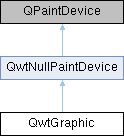
类 | |
| class | PathInfo |
| class | PrivateData |
Public 类型 | |
| enum | RenderHint { RenderPensUnscaled = 0x1 } |
| Hint how to render a graphic 更多... | |
| enum | CommandType { VectorData = 1 << 0 , RasterData = 1 << 1 , Transformation = 1 << 2 } |
| Indicator if the graphic contains a specific type of painter command 更多... | |
 Public 类型 继承自 QwtNullPaintDevice Public 类型 继承自 QwtNullPaintDevice | |
| enum | Mode { NormalMode , PolygonPathMode , PathMode } |
| Render mode for the paint device 更多... | |
Public 成员函数 | |
| QwtGraphic () | |
| Constructor | |
| QwtGraphic (const QwtGraphic &) | |
| QwtGraphic & | operator= (const QwtGraphic &) |
| Assignment operator | |
| void | reset () |
| Clear all stored commands | |
| bool | isNull () const |
| Check if the graphic is null | |
| bool | isEmpty () const |
| Check if the graphic is empty | |
| CommandTypes | commandTypes () const |
| Get the types of painter commands being used | |
| void | render (QPainter *) const |
| Replay all recorded painter commands | |
| void | render (QPainter *, const QSizeF &, Qt::AspectRatioMode=Qt::IgnoreAspectRatio) const |
| Replay all recorded painter commands scaled to fit into given size | |
| void | render (QPainter *, const QPointF &, Qt::Alignment=Qt::AlignTop|Qt::AlignLeft) const |
| Replay all recorded painter commands aligned to a position | |
| void | render (QPainter *, const QRectF &, Qt::AspectRatioMode=Qt::IgnoreAspectRatio) const |
| Replay all recorded painter commands scaled to fit into given rectangle | |
| QPixmap | toPixmap (qreal devicePixelRatio=0.0) const |
| Convert the graphic to a QPixmap in default size | |
| QPixmap | toPixmap (const QSize &, Qt::AspectRatioMode=Qt::IgnoreAspectRatio, qreal devicePixelRatio=0.0) const |
| Convert the graphic to a QPixmap with specified size | |
| QImage | toImage (qreal devicePixelRatio=0.0) const |
| Convert the graphic to a QImage in default size | |
| QImage | toImage (const QSize &, Qt::AspectRatioMode=Qt::IgnoreAspectRatio, qreal devicePixelRatio=0.0) const |
| Convert the graphic to a QImage with specified size | |
| QRectF | scaledBoundingRect (qreal sx, qreal sy) const |
| Calculate the target rectangle for scaling the graphic | |
| QRectF | boundingRect () const |
| Get the bounding rectangle | |
| QRectF | controlPointRect () const |
| Get the control point rectangle | |
| const QVector< QwtPainterCommand > & | commands () const |
| Get the list of recorded paint commands | |
| void | setCommands (const QVector< QwtPainterCommand > &) |
| Append paint commands | |
| void | setDefaultSize (const QSizeF &) |
| Set a default size | |
| QSizeF | defaultSize () const |
| Get the default size | |
| qreal | heightForWidth (qreal width) const |
| Find the height for a given width | |
| qreal | widthForHeight (qreal height) const |
| Find the width for a given height | |
| void | setRenderHint (RenderHint, bool on=true) |
| Toggle a render hint | |
| bool | testRenderHint (RenderHint) const |
| Test a render hint | |
| RenderHints | renderHints () const |
| Get the render hints | |
| Public 成员函数 继承自 QwtNullPaintDevice | |
| QwtNullPaintDevice () | |
| Constructor | |
| ~QwtNullPaintDevice () override | |
| Destructor | |
| void | setMode (Mode) |
| Set the render mode | |
| Mode | mode () const |
| Get the render mode | |
| virtual QPaintEngine * | paintEngine () const override |
| Return the paint engine | |
| virtual int | metric (PaintDeviceMetric) const override |
| Return metric information for the paint device | |
| virtual void | drawRects (const QRect *, int) |
| Draw rectangles (integer version) | |
| virtual void | drawRects (const QRectF *, int) |
| Draw rectangles (floating point version) | |
| virtual void | drawLines (const QLine *, int) |
| Draw lines (integer version) | |
| virtual void | drawLines (const QLineF *, int) |
| Draw lines (floating point version) | |
| virtual void | drawEllipse (const QRectF &) |
| Draw ellipse (floating point version) | |
| virtual void | drawEllipse (const QRect &) |
| Draw ellipse (integer version) | |
| virtual void | drawPoints (const QPointF *, int) |
| Draw points (floating point version) | |
| virtual void | drawPoints (const QPoint *, int) |
| Draw points (integer version) | |
| virtual void | drawPolygon (const QPointF *, int, QPaintEngine::PolygonDrawMode) |
| Draw polygon (floating point version) | |
| virtual void | drawPolygon (const QPoint *, int, QPaintEngine::PolygonDrawMode) |
| Draw polygon (integer version) | |
| virtual void | drawTextItem (const QPointF &, const QTextItem &) |
| Draw a text item | |
| virtual void | drawTiledPixmap (const QRectF &, const QPixmap &, const QPointF &) |
| Draw a tiled pixmap | |
Protected 成员函数 | |
| virtual QSize | sizeMetrics () const override |
| virtual void | drawPath (const QPainterPath &) override |
| Store a path command in the command list | |
| virtual void | drawPixmap (const QRectF &, const QPixmap &, const QRectF &) override |
| Store a pixmap command in the command list | |
| virtual void | drawImage (const QRectF &, const QImage &, const QRectF &, Qt::ImageConversionFlags) override |
| Store a image command in the command list | |
| virtual void | updateState (const QPaintEngineState &) override |
| Store a state command in the command list | |
详细描述
A paint device for scalable graphics
QwtGraphic is the representation of a graphic that is tailored for scalability. Like QPicture it will be initialized by QPainter operations and can be replayed later to any target paint device.
While the usual image representations QImage and QPixmap are not scalable Qt offers two paint devices, that might be candidates for representing a vector graphic:
- QPicture: Unfortunately QPicture had been forgotten, when Qt4 introduced floating point based render engines. Its API is still on integers, what make it unusable for proper scaling.
- QSvgRenderer/QSvgGenerator: Unfortunately QSvgRenderer hides too much information about its nodes in internal APIs, that are necessary for proper layout calculations. Also it is derived from QObject and can't be copied like QImage/QPixmap.
QwtGraphic maps all scalable drawing primitives to a QPainterPath and stores them together with the painter state changes ( pen, brush, transformation ... ) in a list of QwtPaintCommands. For being a complete QPaintDevice it also stores pixmaps or images, what is somehow against the idea of the class, because these objects can't be scaled without a loss in quality.
The main issue about scaling a QwtGraphic object are the pens used for drawing the outlines of the painter paths. While non cosmetic pens ( QPen::isCosmetic() ) are scaled with the same ratio as the path, cosmetic pens have a fixed width. A graphic might have paths with different pens - cosmetic and non-cosmetic.
QwtGraphic caches 2 different rectangles:
- control point rectangle: The control point rectangle is the bounding rectangle of all control point rectangles of the painter paths, or the target rectangle of the pixmaps/images.
- bounding rectangle: The bounding rectangle extends the control point rectangle by what is needed for rendering the outline with an unscaled pen.
Because the offset for drawing the outline depends on the shape of the painter path ( the peak of a triangle is different than the flat side ) scaling with a fixed aspect ratio always needs to be calculated from the control point rectangle.
成员枚举类型说明
◆ CommandType
◆ RenderHint
Hint how to render a graphic
| 枚举值 | |
|---|---|
| RenderPensUnscaled | When rendering a QwtGraphic a specific scaling between the controlPointRect() and the coordinates of the target rectangle is set up internally in render(). When RenderPensUnscaled is set this specific scaling is applied for the control points only, but not for the pens. All other painter transformations ( set up by application code ) are supposed to work like usual. |
构造及析构函数说明
◆ QwtGraphic()
| QwtGraphic::QwtGraphic | ( | ) |
Constructor
Initializes a null graphic.
Copy constructor
- 参数
-
[in] other Source graphic to copy from
Destructor
Deletes private data.
成员函数说明
◆ boundingRect()
| QRectF QwtGraphic::boundingRect | ( | ) | const |
Get the bounding rectangle
The bounding rectangle is the controlPointRect() extended by the areas needed for rendering the outlines with unscaled pens.
- 返回
- Bounding rectangle of the graphic
◆ commands()
| const QVector< QwtPainterCommand > & QwtGraphic::commands | ( | ) | const |
Get the list of recorded paint commands
- 返回
- List of recorded paint commands
◆ commandTypes()
| QwtGraphic::CommandTypes QwtGraphic::commandTypes | ( | ) | const |
Get the types of painter commands being used
- 返回
- Types of painter commands
◆ controlPointRect()
| QRectF QwtGraphic::controlPointRect | ( | ) | const |
Get the control point rectangle
The control point rectangle is the bounding rectangle of all control points of the paths and the target rectangles of the images/pixmaps.
- 返回
- Control point rectangle
◆ defaultSize()
| QSizeF QwtGraphic::defaultSize | ( | ) | const |
Get the default size
When a non empty size has been assigned by setDefaultSize() this size will be returned. Otherwise the default size is the size of the bounding rectangle.
The default size is used in all methods rendering the graphic, where no size is explicitly specified.
- 返回
- Default size
◆ drawImage()
|
overrideprotectedvirtual |
Store a image command in the command list
- 参数
-
rect target rectangle image Image to be painted subRect Reactangle of the pixmap to be painted flags Image conversion flags
- 参见
- QPaintEngine::drawImage()
重载 QwtNullPaintDevice .
◆ drawPath()
|
overrideprotectedvirtual |
Store a path command in the command list
- 参数
-
path Painter path
- 参见
- QPaintEngine::drawPath()
重载 QwtNullPaintDevice .
◆ drawPixmap()
|
overrideprotectedvirtual |
Store a pixmap command in the command list
- 参数
-
rect target rectangle pixmap Pixmap to be painted subRect Reactangle of the pixmap to be painted
- 参见
- QPaintEngine::drawPixmap()
重载 QwtNullPaintDevice .
◆ heightForWidth()
| qreal QwtGraphic::heightForWidth | ( | qreal | width | ) | const |
Find the height for a given width
The height is calculated using the aspect ratio of defaultSize().
- 参数
-
[in] width Width to calculate height for
- 返回
- Calculated height
◆ isEmpty()
| bool QwtGraphic::isEmpty | ( | ) | const |
Check if the graphic is empty
- 返回
- True when the bounding rectangle is empty
◆ isNull()
| bool QwtGraphic::isNull | ( | ) | const |
Check if the graphic is null
- 返回
- True when no painter commands have been stored
◆ operator=()
| QwtGraphic & QwtGraphic::operator= | ( | const QwtGraphic & | other | ) |
Assignment operator
- 参数
-
[in] other Source graphic to assign from
- 返回
- Reference to this object
◆ render() [1/4]
| void QwtGraphic::render | ( | QPainter * | painter | ) | const |
Replay all recorded painter commands
- 参数
-
[in] painter Qt painter
◆ render() [2/4]
| void QwtGraphic::render | ( | QPainter * | painter, |
| const QPointF & | pos, | ||
| Qt::Alignment | alignment = Qt::AlignTop | Qt::AlignLeft |
||
| ) | const |
Replay all recorded painter commands aligned to a position
The graphic is scaled to the defaultSize() and aligned to a position.
- 参数
-
[in] painter Qt painter [in] pos Reference point, where to render [in] alignment Flags how to align the target rectangle to pos
◆ render() [3/4]
| void QwtGraphic::render | ( | QPainter * | painter, |
| const QRectF & | rect, | ||
| Qt::AspectRatioMode | aspectRatioMode = Qt::IgnoreAspectRatio |
||
| ) | const |
Replay all recorded painter commands scaled to fit into given rectangle
- 参数
-
[in] painter Qt painter [in] rect Rectangle for the scaled graphic [in] aspectRatioMode Mode how to scale - See Qt::AspectRatioMode
◆ render() [4/4]
| void QwtGraphic::render | ( | QPainter * | painter, |
| const QSizeF & | size, | ||
| Qt::AspectRatioMode | aspectRatioMode = Qt::IgnoreAspectRatio |
||
| ) | const |
Replay all recorded painter commands scaled to fit into given size
The graphic is scaled to fit into the rectangle of the given size starting at ( 0, 0 ).
- 参数
-
[in] painter Qt painter [in] size Size for the scaled graphic [in] aspectRatioMode Mode how to scale - See Qt::AspectRatioMode
◆ renderHints()
| QwtGraphic::RenderHints QwtGraphic::renderHints | ( | ) | const |
Get the render hints
- 返回
- Render hints
◆ reset()
| void QwtGraphic::reset | ( | ) |
Clear all stored commands
Resets the graphic to its initial null state.
◆ scaledBoundingRect()
| QRectF QwtGraphic::scaledBoundingRect | ( | qreal | sx, |
| qreal | sy | ||
| ) | const |
Calculate the target rectangle for scaling the graphic
- 参数
-
[in] sx Horizontal scaling factor [in] sy Vertical scaling factor
- 注解
- In case of paths that are painted with a cosmetic pen ( see QPen::isCosmetic() ) the target rectangle is different to multiplying the bounding rectangle.
- 返回
- Scaled bounding rectangle
◆ setCommands()
| void QwtGraphic::setCommands | ( | const QVector< QwtPainterCommand > & | commands | ) |
Append paint commands
- 参数
-
[in] commands Paint commands to append
◆ setDefaultSize()
| void QwtGraphic::setDefaultSize | ( | const QSizeF & | size | ) |
Set a default size
The default size is used in all methods rendering the graphic, where no size is explicitly specified. Assigning an empty size means, that the default size will be calculated from the bounding rectangle.
The default setting is an empty size.
- 参数
-
[in] size Default size
◆ setRenderHint()
| void QwtGraphic::setRenderHint | ( | RenderHint | hint, |
| bool | on = true |
||
| ) |
Toggle a render hint
- 参数
-
[in] hint Render hint to toggle [in] on true to enable, false to disable
◆ sizeMetrics()
|
overrideprotectedvirtual |
- 返回
- Ceiled defaultSize()
实现了 QwtNullPaintDevice.
◆ testRenderHint()
| bool QwtGraphic::testRenderHint | ( | RenderHint | hint | ) | const |
Test a render hint
- 参数
-
[in] hint Render hint to test
- 返回
- true if the hint is enabled, false otherwise
◆ toImage() [1/2]
| QImage QwtGraphic::toImage | ( | const QSize & | size, |
| Qt::AspectRatioMode | aspectRatioMode = Qt::IgnoreAspectRatio, |
||
| qreal | devicePixelRatio = 0.0 |
||
| ) | const |
Convert the graphic to a QImage with specified size
All pixels of the image get initialized by 0 ( transparent ) before the graphic is scaled and rendered on it.
The format of the image is QImage::Format_ARGB32_Premultiplied.
- 参数
-
[in] size Size of the image ( will be multiplied by the devicePixelRatio ) [in] aspectRatioMode Aspect ratio how to scale the graphic [in] devicePixelRatio Device pixel ratio for the image. If devicePixelRatio <= 0.0 the pixmap is initialized with the system default.
- 返回
- The graphic as image
◆ toImage() [2/2]
| QImage QwtGraphic::toImage | ( | qreal | devicePixelRatio = 0.0 | ) | const |
Convert the graphic to a QImage in default size
All pixels of the image get initialized by 0 ( transparent ) before the graphic is scaled and rendered on it.
The format of the image is QImage::Format_ARGB32_Premultiplied.
The size of the image is the default size ( ceiled to integers ) of the graphic multiplied by the devicePixelRatio.
- 参数
-
[in] devicePixelRatio Device pixel ratio for the image. If devicePixelRatio <= 0.0 the pixmap is initialized with the system default.
- 返回
- The graphic as image in default size
◆ toPixmap() [1/2]
| QPixmap QwtGraphic::toPixmap | ( | const QSize & | size, |
| Qt::AspectRatioMode | aspectRatioMode = Qt::IgnoreAspectRatio, |
||
| qreal | devicePixelRatio = 0.0 |
||
| ) | const |
Convert the graphic to a QPixmap with specified size
All pixels of the pixmap get initialized by Qt::transparent before the graphic is scaled and rendered on it.
- 参数
-
[in] size Size of the image [in] aspectRatioMode Aspect ratio how to scale the graphic [in] devicePixelRatio Device pixel ratio for the pixmap. If devicePixelRatio <= 0.0 the pixmap is initialized with the system default.
- 返回
- The graphic as pixmap
◆ toPixmap() [2/2]
| QPixmap QwtGraphic::toPixmap | ( | qreal | devicePixelRatio = 0.0 | ) | const |
Convert the graphic to a QPixmap in default size
All pixels of the pixmap get initialized by Qt::transparent before the graphic is scaled and rendered on it.
The size of the pixmap is the default size ( ceiled to integers ) of the graphic.
- 参数
-
[in] devicePixelRatio Device pixel ratio for the pixmap. If devicePixelRatio <= 0.0 the pixmap is initialized with the system default.
- 返回
- The graphic as pixmap in default size
◆ updateState()
|
overrideprotectedvirtual |
Store a state command in the command list
- 参数
-
state State to be stored
- 参见
- QPaintEngine::updateState()
重载 QwtNullPaintDevice .
◆ widthForHeight()
| qreal QwtGraphic::widthForHeight | ( | qreal | height | ) | const |
Find the width for a given height
The width is calculated using the aspect ratio of defaultSize().
- 参数
-
[in] height Height to calculate width for
- 返回
- Calculated width
该类的文档由以下文件生成:
- /home/runner/work/QWT/QWT/src/plot/qwt_graphic.h
- /home/runner/work/QWT/QWT/src/plot/qwt_graphic.cpp