An abstract base class for slider widgets with a scale. More...
#include <qwt_abstract_slider.h>
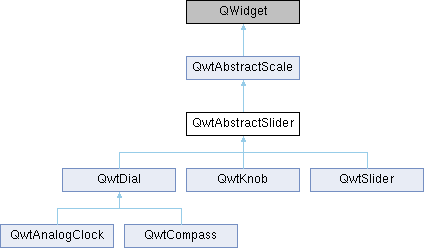
Classes | |
| class | PrivateData |
Public Slots | |
| void | setValue (double value) |
| Set the slider to the specified value. | |
Signals | |
| void | valueChanged (double value) |
| Notify a change of value. | |
| void | sliderPressed () |
| This signal is emitted when the user presses the movable part of the slider. | |
| void | sliderReleased () |
| This signal is emitted when the user releases the movable part of the slider. | |
| void | sliderMoved (double value) |
| This signal is emitted when the user moves the slider with the mouse. | |
Public Member Functions | |
| QwtAbstractSlider (QWidget *parent=NULL) | |
| Constructor. | |
| virtual | ~QwtAbstractSlider () |
| Destructor. | |
| void | setValid (bool) |
| Set the value to be valid/invalid. | |
| bool | isValid () const |
| double | value () const |
| Returns the current value. | |
| void | setWrapping (bool) |
| If wrapping is true stepping up from upperBound() value will take you to the minimum() value and vice versa. | |
| bool | wrapping () const |
| void | setTotalSteps (uint) |
| Set the number of steps. | |
| uint | totalSteps () const |
| void | setSingleSteps (uint) |
| Set the number of steps for a single increment. | |
| uint | singleSteps () const |
| void | setPageSteps (uint) |
| Set the number of steps for a page increment. | |
| uint | pageSteps () const |
| void | setStepAlignment (bool) |
| Enable step alignment. | |
| bool | stepAlignment () const |
| void | setTracking (bool) |
| Enables or disables tracking. | |
| bool | isTracking () const |
| void | setReadOnly (bool) |
| En/Disable read only mode. | |
| bool | isReadOnly () const |
| In read only mode the slider can't be controlled by mouse or keyboard. | |
| void | setInvertedControls (bool) |
| Invert wheel and key events. | |
| bool | invertedControls () const |
 Public Member Functions inherited from QwtAbstractScale Public Member Functions inherited from QwtAbstractScale | |
| QwtAbstractScale (QWidget *parent=NULL) | |
| Constructor. | |
| virtual | ~QwtAbstractScale () |
| Destructor. | |
| void | setScale (double lowerBound, double upperBound) |
| Specify a scale. | |
| void | setScale (const QwtInterval &) |
| Specify a scale. | |
| void | setScale (const QwtScaleDiv &) |
| Specify a scale. | |
| const QwtScaleDiv & | scaleDiv () const |
| void | setLowerBound (double value) |
| Set the lower bound of the scale. | |
| double | lowerBound () const |
| void | setUpperBound (double value) |
| Set the upper bound of the scale. | |
| double | upperBound () const |
| void | setScaleStepSize (double stepSize) |
| Set the step size used for calculating a scale division. | |
| double | scaleStepSize () const |
| void | setScaleMaxMajor (int ticks) |
| Set the maximum number of major tick intervals. | |
| int | scaleMaxMinor () const |
| void | setScaleMaxMinor (int ticks) |
| Set the maximum number of minor tick intervals. | |
| int | scaleMaxMajor () const |
| void | setScaleEngine (QwtScaleEngine *) |
| Set a scale engine. | |
| const QwtScaleEngine * | scaleEngine () const |
| QwtScaleEngine * | scaleEngine () |
| int | transform (double) const |
| Translate a scale value into a widget coordinate. | |
| double | invTransform (int) const |
| Translate a widget coordinate into a scale value. | |
| bool | isInverted () const |
| double | minimum () const |
| double | maximum () const |
| const QwtScaleMap & | scaleMap () const |
Protected Member Functions | |
| virtual void | mousePressEvent (QMouseEvent *) QWT_OVERRIDE |
| Mouse press event handler. | |
| virtual void | mouseReleaseEvent (QMouseEvent *) QWT_OVERRIDE |
| Mouse Release Event handler. | |
| virtual void | mouseMoveEvent (QMouseEvent *) QWT_OVERRIDE |
| Mouse Move Event handler. | |
| virtual void | keyPressEvent (QKeyEvent *) QWT_OVERRIDE |
| Handles key events. | |
| virtual void | wheelEvent (QWheelEvent *) QWT_OVERRIDE |
| Wheel Event handler. | |
| virtual bool | isScrollPosition (const QPoint &pos) const =0 |
| Determine what to do when the user presses a mouse button. | |
| virtual double | scrolledTo (const QPoint &pos) const =0 |
| Determine the value for a new position of the movable part of the slider. | |
| void | incrementValue (int stepCount) |
| Increment the slider. | |
| virtual void | scaleChange () QWT_OVERRIDE |
| Update the slider according to modifications of the scale. | |
| virtual void | sliderChange () |
| Calling update() | |
| double | incrementedValue (double value, int stepCount) const |
| Increment a value. | |
| Protected Member Functions inherited from QwtAbstractScale | |
| virtual void | changeEvent (QEvent *) QWT_OVERRIDE |
| Change Event handler. | |
| void | rescale (double lowerBound, double upperBound, double stepSize) |
| Recalculate the scale division and update the scale. | |
| void | setAbstractScaleDraw (QwtAbstractScaleDraw *) |
| Set a scale draw. | |
| const QwtAbstractScaleDraw * | abstractScaleDraw () const |
| QwtAbstractScaleDraw * | abstractScaleDraw () |
| void | updateScaleDraw () |
| Recalculate ticks and scale boundaries. | |
Properties | |
| double | value |
| uint | totalSteps |
| uint | singleSteps |
| uint | pageSteps |
| bool | stepAlignment |
| bool | readOnly |
| bool | tracking |
| bool | wrapping |
| bool | invertedControls |
| Properties inherited from QwtAbstractScale | |
| double | lowerBound |
| double | upperBound |
| int | scaleMaxMajor |
| int | scaleMaxMinor |
| double | scaleStepSize |
Detailed Description
An abstract base class for slider widgets with a scale.
A slider widget displays a value according to a scale. The class is designed as a common super class for widgets like QwtKnob, QwtDial and QwtSlider.
When the slider is nor readOnly() its value can be modified by keyboard, mouse and wheel inputs.
The range of the slider is divided into a number of steps from which the value increments according to user inputs depend. Only for linear scales the number of steps correspond with a fixed step size.
Constructor & Destructor Documentation
◆ QwtAbstractSlider()
|
explicit |
Constructor.
The scale is initialized to [0.0, 100.0], the number of steps is set to 100 with 1 and 10 and single an page step sizes. Step alignment is enabled.
The initial value is invalid.
- Parameters
-
parent Parent widget
Member Function Documentation
◆ incrementedValue()
|
protected |
Increment a value.
- Parameters
-
value Value stepCount Number of steps
- Returns
- Incremented value
◆ incrementValue()
|
protected |
Increment the slider.
The step size depends on the number of totalSteps()
- Parameters
-
stepCount Number of steps
- See also
- setTotalSteps(), incrementedValue()
◆ invertedControls()
| bool QwtAbstractSlider::invertedControls | ( | ) | const |
- Returns
- True, when the controls are inverted
- See also
- setInvertedControls()
◆ isReadOnly()
| bool QwtAbstractSlider::isReadOnly | ( | ) | const |
In read only mode the slider can't be controlled by mouse or keyboard.
- Returns
- true if read only
- See also
- setReadOnly()
◆ isScrollPosition()
|
protectedpure virtual |
Determine what to do when the user presses a mouse button.
- Parameters
-
pos Mouse position
- Return values
-
True,when pos is a valid scroll position
- See also
- scrolledTo()
◆ isTracking()
| bool QwtAbstractSlider::isTracking | ( | ) | const |
- Returns
- True, when tracking has been enabled
- See also
- setTracking()
◆ isValid()
| bool QwtAbstractSlider::isValid | ( | ) | const |
- Returns
- True, when the value is invalid
◆ keyPressEvent()
|
protectedvirtual |
Handles key events.
QwtAbstractSlider handles the following keys:
- Qt::Key_Left
Add/Subtract singleSteps() in direction to lowerBound(); - Qt::Key_Right
Add/Subtract singleSteps() in direction to upperBound(); - Qt::Key_Down
Subtract singleSteps(), when invertedControls() is false - Qt::Key_Up
Add singleSteps(), when invertedControls() is false - Qt::Key_PageDown
Subtract pageSteps(), when invertedControls() is false - Qt::Key_PageUp
Add pageSteps(), when invertedControls() is false - Qt::Key_Home
Set the value to the minimum() - Qt::Key_End
Set the value to the maximum()
- Parameters
-
event Key event
- See also
- isReadOnly()
Reimplemented in QwtCompass.
◆ mouseMoveEvent()
|
protectedvirtual |
Mouse Move Event handler.
- Parameters
-
event Mouse event
◆ mousePressEvent()
|
protectedvirtual |
◆ mouseReleaseEvent()
|
protectedvirtual |
◆ pageSteps()
| uint QwtAbstractSlider::pageSteps | ( | ) | const |
- Returns
- Number of steps
- See also
- setPageSteps(), totalSteps(), singleSteps()
◆ scaleChange()
|
protectedvirtual |
Update the slider according to modifications of the scale.
Reimplemented from QwtAbstractScale.
◆ scrolledTo()
|
protectedpure virtual |
Determine the value for a new position of the movable part of the slider.
- Parameters
-
pos Mouse position
- Returns
- Value for the mouse position
- See also
- isScrollPosition()
◆ setInvertedControls()
| void QwtAbstractSlider::setInvertedControls | ( | bool | on | ) |
Invert wheel and key events.
Usually scrolling the mouse wheel "up" and using keys like page up will increase the slider's value towards its maximum. When invertedControls() is enabled the value is scrolled towards its minimum.
Inverting the controls might be f.e. useful for a vertical slider with an inverted scale ( decreasing from top to bottom ).
- Parameters
-
on Invert controls, when true
- See also
- invertedControls(), keyEvent(), wheelEvent()
◆ setPageSteps()
| void QwtAbstractSlider::setPageSteps | ( | uint | stepCount | ) |
Set the number of steps for a page increment.
The range of the slider is divided into a number of steps from which the value increments according to user inputs depend.
- Parameters
-
stepCount Number of steps
- See also
- pageSteps(), setTotalSteps(), setSingleSteps()
◆ setReadOnly()
| void QwtAbstractSlider::setReadOnly | ( | bool | on | ) |
En/Disable read only mode.
In read only mode the slider can't be controlled by mouse or keyboard.
- Parameters
-
on Enables in case of true
- See also
- isReadOnly()
- Warning
- The focus policy is set to Qt::StrongFocus or Qt::NoFocus
◆ setSingleSteps()
| void QwtAbstractSlider::setSingleSteps | ( | uint | stepCount | ) |
Set the number of steps for a single increment.
The range of the slider is divided into a number of steps from which the value increments according to user inputs depend.
- Parameters
-
stepCount Number of steps
- See also
- singleSteps(), setTotalSteps(), setPageSteps()
◆ setStepAlignment()
| void QwtAbstractSlider::setStepAlignment | ( | bool | on | ) |
Enable step alignment.
When step alignment is enabled values resulting from slider movements are aligned to the step size.
- Parameters
-
on Enable step alignment when true
- See also
- stepAlignment()
◆ setTotalSteps()
| void QwtAbstractSlider::setTotalSteps | ( | uint | stepCount | ) |
Set the number of steps.
The range of the slider is divided into a number of steps from which the value increments according to user inputs depend.
The default setting is 100.
- Parameters
-
stepCount Number of steps
- See also
- totalSteps(), setSingleSteps(), setPageSteps()
◆ setTracking()
| void QwtAbstractSlider::setTracking | ( | bool | on | ) |
Enables or disables tracking.
If tracking is enabled, the slider emits the valueChanged() signal while the movable part of the slider is being dragged. If tracking is disabled, the slider emits the valueChanged() signal only when the user releases the slider.
Tracking is enabled by default.
- Parameters
-
on true(enable) orfalse(disable) tracking.
- See also
- isTracking(), sliderMoved()
◆ setValid()
| void QwtAbstractSlider::setValid | ( | bool | on | ) |
Set the value to be valid/invalid.
- Parameters
-
on When true, the value is invalidated
- See also
- setValue()
◆ setValue
|
slot |
Set the slider to the specified value.
- Parameters
-
value New value
- See also
- setValid(), sliderChange(), valueChanged()
◆ setWrapping()
| void QwtAbstractSlider::setWrapping | ( | bool | on | ) |
If wrapping is true stepping up from upperBound() value will take you to the minimum() value and vice versa.
- Parameters
-
on En/Disable wrapping
- See also
- wrapping()
◆ singleSteps()
| uint QwtAbstractSlider::singleSteps | ( | ) | const |
- Returns
- Number of steps
- See also
- setSingleSteps(), totalSteps(), pageSteps()
◆ sliderChange()
|
protectedvirtual |
Calling update()
Reimplemented in QwtDial.
◆ sliderMoved
|
signal |
This signal is emitted when the user moves the slider with the mouse.
- Parameters
-
value New value
- See also
- valueChanged()
◆ stepAlignment()
| bool QwtAbstractSlider::stepAlignment | ( | ) | const |
- Returns
- True, when step alignment is enabled
- See also
- setStepAlignment()
◆ totalSteps()
| uint QwtAbstractSlider::totalSteps | ( | ) | const |
- Returns
- Number of steps
- See also
- setTotalSteps(), singleSteps(), pageSteps()
◆ valueChanged
|
signal |
Notify a change of value.
When tracking is enabled (default setting), this signal will be emitted every time the value changes.
- Parameters
-
value New value
- See also
- setTracking(), sliderMoved()
◆ wheelEvent()
|
protectedvirtual |
Wheel Event handler.
In/decreases the value by s number of steps. The direction depends on the invertedControls() property.
When the control or shift modifier is pressed the wheel delta ( divided by 120 ) is mapped to an increment according to pageSteps(). Otherwise it is mapped to singleSteps().
- Parameters
-
event Wheel event
Reimplemented in QwtDial.
◆ wrapping()
| bool QwtAbstractSlider::wrapping | ( | ) | const |
- Returns
- True, when wrapping is set
- See also
- setWrapping()
The documentation for this class was generated from the following files:
- /home/runner/work/QWT/QWT/src/qwt_abstract_slider.h
- /home/runner/work/QWT/QWT/src/qwt_abstract_slider.cpp